AIRPLANE
OPERATIONS
MANUAL
EQUIPMENT
AND FURNISHINGS
OCTOBER 02, 2001
2-02-20
Page
3
Code
01
CONTROLS AND INDICATORS
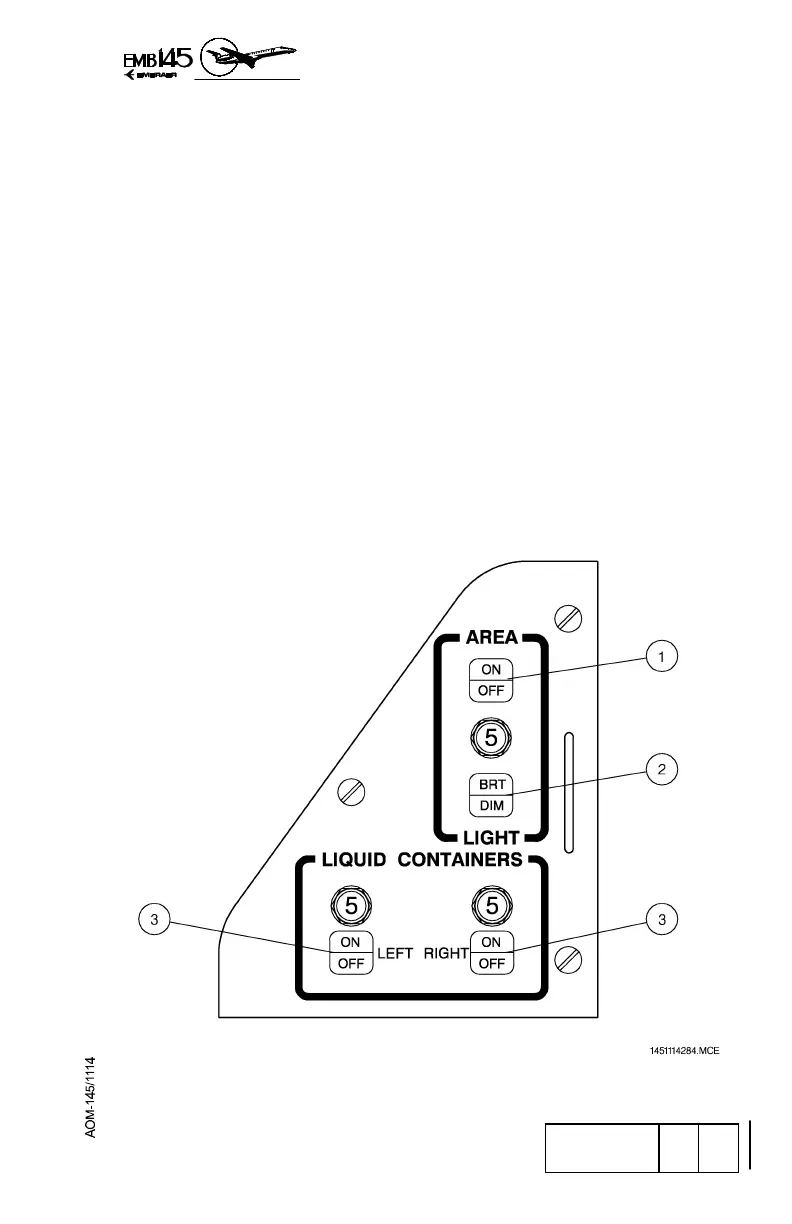
GALLEY CONTROL PANEL
1 - AREA LIGHTING BUTTON
− When alternately pressed, turns on or off the galley area
lighting.
2 - AREA LIGHTING BRIGHT/DIM BUTTON
− When alternately pressed, selects the bright or dim mode for
galley area lighting.
3 - LEFT AND RIGHT LIQUID CONTAINER BUTTON
− When alternately pressed turns on or off heating for the
associated liquid container.
− When the heating is turned on, the respective left or right
indication is lit.
GALLEY CONTROL PANEL



 To Next Page