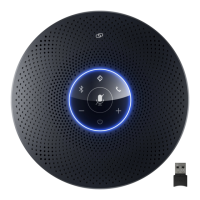
The EMEET OfficeCore M0 is a USB speakerphone designed for clear audio communication in various settings. This quick start guide provides an overview of its functions, usage, and maintenance.
Function Description
The EMEET OfficeCore M0 serves as an external speaker and microphone for your computer, enhancing audio quality for calls, conferences, and multimedia playback. It connects to your computer via a USB cable and features an audio output jack for headphones.
Key Functions:
- Speakerphone: Provides high-quality audio output and microphone input for calls and meetings.
- USB Connectivity: Connects to a laptop or PC via a standard USB-A to USB-C cable.
- Headphone Output: Allows private listening through 3.5mm headphones.
- Call Control: Dedicated buttons for answering and ending calls.
- Volume Control: Buttons for increasing and decreasing speaker volume.
- Microphone Mute: A button to mute/unmute the microphone.
- Speaker Mute: A button to mute/unmute the speaker.
Important Technical Specifications
While specific technical specifications like frequency response, driver size, or microphone sensitivity are not detailed in the provided manual, the device is designed for USB connectivity and features a 3.5mm audio jack.
Connectivity:
- Input: USB-C port on the device, connecting to a USB-A port on a computer.
- Output: 3.5mm audio jack for headphones.
Controls:
- Volume Up (+): Increases speaker volume.
- Volume Down (-): Decreases speaker volume.
- Microphone Mute Button: Toggles microphone mute on/off.
- Speaker Mute Button: Toggles speaker mute on/off.
- Answer Call Button (Green Phone Icon): Initiates or answers a call.
- End Call Button (Red Phone Icon): Ends a call.
Usage Features
The EMEET OfficeCore M0 is designed for straightforward plug-and-play operation, making it easy to integrate into your existing setup.
Getting Started:
- Connect to Computer: Use the provided USB cable to connect the speakerphone to a USB port on your laptop or PC. The manual illustrates connecting the USB-C end to the speakerphone and the USB-A end to the laptop.
- Power On: The device should power on automatically once connected to a powered USB port. If using a USB HUB adapter, ensure the adapter is powered.
- Audio Output (Optional): To listen privately, plug 3.5mm headphones into the audio output jack on the speakerphone.
Controls and Indicators:
- Speaker Mute: Press the button with the crossed-out speaker icon to mute the speaker. An indicator light (not explicitly described but implied by the icon) may show the mute status.
- Microphone Mute: Press the button with the crossed-out microphone icon to mute the microphone. The manual shows a red ring around the speakerphone's top surface when the microphone is muted, indicating a visual cue for the mute status.
- Volume Adjustment: Use the '+' and '-' buttons to adjust the speaker volume.
- Call Handling: Use the green phone icon button to answer calls and the red phone icon button to end calls.
- LED Indicator: The device features an LED light ring that provides visual feedback. The manual illustrates the LED indicating the direction of sound pickup or active status, with a blue light emanating from the device towards the user.
Maintenance Features
Proper care and adherence to the warning guidelines will ensure the longevity and optimal performance of your EMEET OfficeCore M0.
Warnings:
- USB HUB Adapter: When connecting the product with a USB HUB adapter, ensure the USB HUB adapter is powered.
- Disassembly/Repair: Non-professional technicians should never attempt to dismantle or repair the product. For any questions or service needs, contact your local dealers.
- Environmental Protection: Avoid exposing the product to rain, moisture, or other liquids.
- Damage/Overheating: Discontinue use if the product overheats, has been dropped or damaged, or dropped in a liquid.
Warranty:
- Limited Warranty: The product comes with a limited one (1) year warranty, requiring proof of purchase.
- Exclusions: The warranty does not cover limited-life consumable components subject to normal wear and tear, such as batteries and other accessories.
Contact Information:
For all customer service and technical support, you can contact EMEET:
- Email: support@emeet.ai
- Website: www.emeet.ai

 Need help?

 To Next Page
 General