
 Need help?
Do you have a question about the emerald alarms EP-SA-CONT-RF and is the answer not in the manual?
Press test button; all interconnected alarms beep for 7 seconds.
Press LOCATE button to silence all alarms except the activated one.
Press SILENCE button; all alarms silenced for 8 minutes.
In case of fire, Alarm Indicator flashes twice per second.
Yellow LED flashes once every 9 seconds when battery is low.
Wall mount controller 1.4m above floor for best wireless transmission.
Press and hold silence button for 5 seconds to activate the device.
Details two methods (A and B) for wirelessly connecting smoke alarms.
Press TEST and LOCATE buttons for 70 seconds to clear connections.
Steps for removing and replacing the CR2450 battery.
Warning about risks of swallowing coin/button cell batteries.
Controller sends test signal to interlinked alarms.
Controller silences all alarms except the one sensing fire.
Controller silences all interlinked alarms for 8 minutes.
Check battery installation if test button has no reaction.
Check interconnection and alarm status if red LED flashes but no alarm.
Change controller battery if yellow LED flashes every 8 seconds.
The Emerald Smoke Alarm Controller is a sophisticated device designed to simplify the management of interconnected smoke alarms, offering a convenient and effortless method for testing, silencing, and locating triggered alarms without the need to physically access the ceiling-mounted units. It operates wirelessly, connecting via radio frequency (RF) to compatible Ranger and Vulcan series smoke alarms that are also equipped with an RF module. This controller enhances safety and user convenience by centralizing control over multiple smoke detectors within a home or building.
The primary function of the Emerald Smoke Alarm Controller is to provide a central point of control for a network of interconnected smoke alarms. It facilitates several key operations:
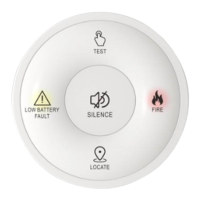
Testing Mode: When the "TEST" button is pressed once, the controller enters testing mode, indicated by a single flash of the red LED. In this mode, it sends a signal for 7 seconds to all interlinked smoke alarms. Upon receiving this signal, all interconnected alarms will beep for approximately 7 seconds, confirming their operational status. To exit testing mode, the "SILENCE" button can be pressed once, which will cause the red LED to flash once. If not manually exited, the controller will remain in testing mode.
Locate Mode: In the event of a fire, when all interconnected smoke alarms are alarming, the "LOCATE" button can be pressed. This action, indicated by a single flash of the red LED on the controller, will, after a 5-second delay, silence all smoke alarms except for the one that initially detected the fire. This feature is invaluable for quickly pinpointing the source of an alarm in a multi-alarm setup, allowing for faster response and investigation. If the locate function does not perform as expected, the user is advised to repeat the step.
Silence Mode: If a smoke alarm is triggered by a non-emergency event (e.g., cooking smoke), the "SILENCE" button can be pressed. This action, indicated by a single flash of the red LED on the controller, will silence all interlinked smoke alarms for an 8-minute period after a 3-second delay. This temporary silencing allows the user to address the cause of the false alarm without having to manually reset each individual detector. If the silencing does not occur, the user should repeat the step.
Alarm Indicator Mode: In the event of an actual fire, when the smoke alarm controller itself is alarming, its red LED will flash twice per second, providing a clear visual indication of an active alarm state.
Low Battery Indicator Mode: The controller provides a clear warning when its own battery is running low. When the battery level drops below 15%, the yellow LED on the controller will flash once every 9 seconds, signaling to the user that the battery needs to be replaced.
Wireless Interconnection Function: The controller supports two methods for establishing wireless interconnection with other smoke alarms:
Clear Wireless Connection Function: To clear all existing wireless connections between the smoke alarm controller and its paired smoke alarms, the user can press and hold both the "TEST" and "LOCATE" buttons simultaneously for 70 seconds. The red LED will flash once to confirm the operation, after which the buttons can be released. This is useful for reconfiguring the network or troubleshooting connection issues.
The Emerald Smoke Alarm Controller is designed for ease of use and integration into a smart home safety system:
Activation: Before initial use, the device needs to be activated. This is done by pressing and holding the "SILENCE" button for 5 seconds until both the red and yellow LEDs flash simultaneously. Releasing the button completes the activation, making the device ready for pairing with smoke alarms. This activation process is a one-time step.
Installation: For optimal wireless transmission to connected smoke alarms, it is recommended to wall-mount the smoke alarm controller at a height of 1.4 meters above floor level. This placement helps ensure reliable communication throughout the network.
User Interface: The controller features clearly labeled buttons for "TEST," "SILENCE," and "LOCATE," along with distinct LED indicators (Yellow for low battery/fault, Red for fire/alarm) for intuitive operation and status feedback.
Regular maintenance ensures the continued reliability and effectiveness of the Emerald Smoke Alarm Controller:
Battery Replacement: The controller is powered by a CR2450 battery. When the low battery indicator (yellow LED flashing once every 9 seconds) signals a low battery, replacement is straightforward:
Battery Safety Warning: The manual includes a critical warning regarding the coin/button battery. It emphasizes that these batteries pose a risk to children and can cause injury if swallowed. Users are advised to keep new and used batteries away from children. If the controller is damaged or the battery compartment does not close securely, the controller should be replaced and disposed of. If a battery is suspected to have been swallowed, immediate medical attention is required. The warning also highlights the chemical burn hazard and the potential for severe internal burns and even death if a coin/button cell battery is swallowed.
Troubleshooting Guide: The manual provides a comprehensive troubleshooting section to help users address common issues:
By offering these comprehensive features, the Emerald Smoke Alarm Controller provides a robust and user-friendly solution for managing smoke alarm systems, enhancing both safety and convenience in residential and commercial environments.
 General
| Operating Voltage | 12VDC |
|---|---|
| Wireless Frequency | 433 MHz |
| Operating Temperature | -10°C to 50°C |
| Weight | 300g |
| Remote Controls | Up to 8 |

 To Next Page