EMERALD PLANET HEAD OFFICE - SYDNEY Unit 2 / 29 Mitchell Road, Brookvale NSW 2100 Australia P 02 9466 6000
INSTALLATION POSITIONING ADVICE
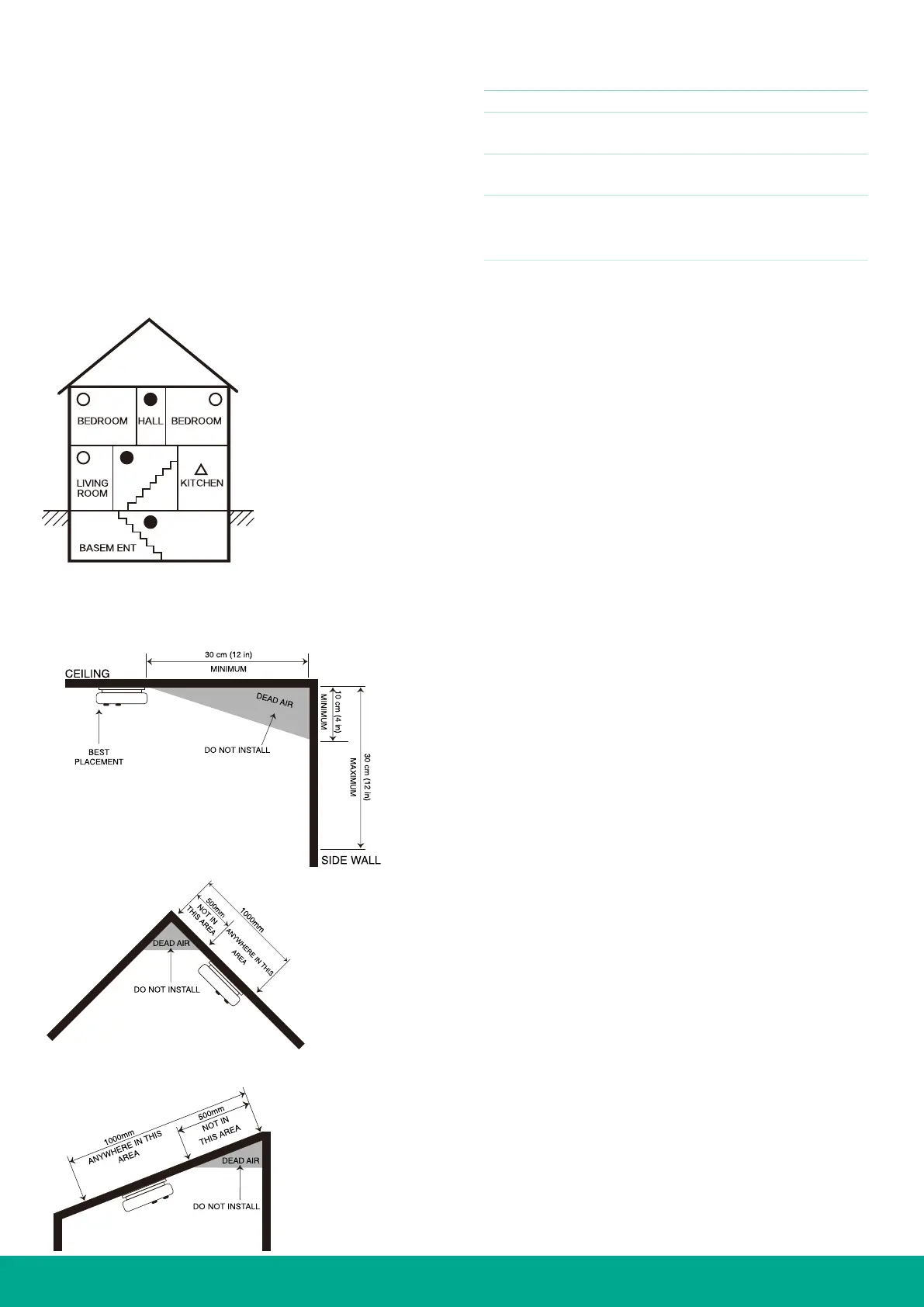
When mounting an alarm on the ceiling, locate it a minimum
of 30 cm from the side wall (see Diagram 5).
• Put smoke alarms at both ends of a bedroom hallway or
large room if larger than 10m long.
• Install smoke alarms on slopped, peaked or cathedral
ceilings between 500 and 1500mm from the highest point
of the ceiling. Smoke
alarms in rooms with ceiling slopes
greater than 1m in 8 m horizontally should be located on
the high side of the room (See Diagram 6).
DIAGRAM 6
PEAK CEILING PLACEMENT
DIAGRAM 4
MULTIPLE FLOOR PLAN
DIAGRAM 5
CEILING PLACEMENT
Smoke alarm should be located
between 500mm and 1500mm
from the highest point.
SLOPED CEILING PLACEMENT
WIRELESS PAIRING
WIRELESS FREQUENCY: 433MHz
OPERATION CURRENT: RF Receiver: <6mA
RF emitter: <30mA
MAXIMUM NUMBER OF 30PCS
INTERCONNECT PRODUCTS
WIRELESS DISTANCE > 20 meters
Note: Make sure the batteries are
installed correctly before
operating the product.
1. 1: Set the first smoke alarm to “Pair Mode”
Note: Before operation, the unit must be in normal
working mode. It is advisable to pair all alarms prior to
installation.
a. Press the test/hush button 3 times within 2 seconds, a red
NET LED will light for a few seconds within the alarm (if
not previously networked) or a green NET LED will light
for a few seconds within the alarm (If already networked),
then a blue NET LED is lit for
30 seconds, the smoke
alarm is now ready to pair with the next alarm.
2. Set next smoke alarm to “Learning Mode”
a. While the first smoke alarm is in “Pair Mode” with a blue
NET LED light showing (pair within 30 seconds) Press
the test/hush button on the second smoke alarm 3 times
within 2 seconds, both green NET LED will light for 3
seconds indicating the radio link is successfully paired
Note: Products can be paired repeatedly, but all
products must be paired with the same primary smoke
alarm. Please remember this product.
3. To cancel pairing
If you want to cancel network pairing:
a. Ensure the power is be disconnected by turning the
mounting plate anti-clockwise until it unlocks.
b. Press the test/hush button and hold down (do not release),
and at the same time reconnect power by twisting the
mounting plate clockwise until it locks into
place.
c. The red LED will light for 3 seconds, then release the test
button when the red LED light switches off.
d. When the button is released, the red LED will light for 3
seconds. In these 3 seconds, press the button to clear all
paired alarms, the red LED will flash for a while. When the
red LED stops flashing, the network is successfully cleared.
4. Radio link test
To ensure that all the products have been successfully paired;
a. Select one device, press and hold the button for about 2
seconds until the smoke alarm enters “Test alarm mode”
and then release the button, the device will automatically
send “Radio link test” information.
b. After short delay, all other paired alarms will enter “Radio
link test” status (red LED flash twice every second for 5
minutes, beep twice every second for 10 seconds). If
an alarm does not start flashing red, then network pairing
has failed or the distance between the connected alarms is
too great (the connected devices cannot reach each other).
Note: In “Radio link test” status device, press the
button and the device immediately en
ter the normal
standby mode.
Note: Before installing, place the product in each
installed room and select the device in the farthest room
for this test, to ensure that other products successfully
enter the “Radio link test” status.


 To Next Page
 Loading...
