EasyManua.ls Logo

Emerson CKD9902 - User Manual

Emerson CKD9902
27 pages
Print Icon
To Next Page IconTo Next Page
Loading...
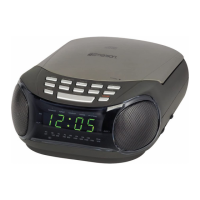
OWNER'S MANUAL
CKD9902
Stereo Radio, CD-R/RW Player
with Dual Alarm Clock
Visit our web site at www.emersonradio.com
CKD9902_041707.p65 17/4/2007, 11:0627

Questions and Answers

  • N
    Natalie CisnerosJul 26, 2025
    What to do if my Emerson CKD9902 CD Player will not play?
    • A
      Alejandro HarrisonJul 26, 2025
      If your Emerson CD Player isn't playing, ensure the FUNCTION switch is set to CD. Also, verify the CD is correctly inserted with the label side facing up.
  • J
    Jason ReevesJul 31, 2025
    Why is there no sound from my Emerson CKD9902 CD Player on AM or FM?
    • M
      Michael LopezJul 31, 2025
      If you're not getting any sound on AM or FM from your Emerson CD Player, first check that the FUNCTION switch is set to AM or FM ST as desired. Also, make sure the volume isn't set to the minimum; increase it to a suitable level.
  • J
    Javier JonesAug 6, 2025
    How to fix noise or distorted sound on Emerson CKD9902 CD Player AM/FM?
    • B
      Brian HicksAug 6, 2025
      To address noise or distorted sound on AM or FM broadcasts with your Emerson CD Player, start by retuning to the AM or FM broadcast station. If you're using FM, ensure the FM wire antenna is fully extended. For AM, reposition the unit until you achieve the best possible reception.
  • K
    Kelsey ElliottAug 13, 2025
    What to do if Emerson CKD9902 skips while playing?
    • T
      Timothy GarciaAug 13, 2025
      If your Emerson CD Player skips while playing a CD, the disc might be dirty or scratched. Try wiping the disc with a cloth or using a different disc to see if that resolves the issue.
  • C
    Christina BaileyAug 18, 2025
    Why doesn't the FM STEREO indicator light up on my Emerson CD Player?
    • D
      davidshieldsAug 18, 2025
      The FM STEREO indicator on your Emerson CD Player might not light up because you're tuned to a mono station. Try selecting another FM stereo station.

Summary

Important Safety Instructions

Before We Begin

Important Notes

Class 1 Laser Product

Information regarding the product's classification as a Class 1 Laser Product.

FCC Information

Details on FCC compliance and potential interference issues for the device.

Preparation for Use

Unpacking and Setup Guide

Instructions for unpacking the unit, removing packaging, and initial setup.

Furniture Protection Advice

Recommendations for protecting furniture from the unit's rubber feet.

Power Source Information

Battery Backup System Details

Location of Controls and Indicators

Top Panel Controls

Identification and numbering of controls and indicators on the top panel of the unit.

Front Panel Controls

Identification and numbering of controls and indicators on the front panel of the unit.

Operating Instructions

Setting the Time of Day

Step-by-step guide to set the clock on the device.

Setting Wake Up Times

Procedure for configuring the alarm times for waking up.

Radio Operation and Antenna

Instructions for listening to the radio and optimizing antenna reception.

Compact Disc Playback Features

Guide to various CD playback modes: normal, specific track, search, repeat, random, programmed.

Auxiliary Input Jack Usage

How to connect external audio devices via the AUX IN jack.

Alarm Functions

Details on setting and using the buzzer, radio, and CD alarms.

Snooze and Repeat Alarm Function

Explanation of the snooze function and how it repeats the alarm.

Sleep To Music Timer

How to use the sleep timer to automatically turn off audio playback.

Care and Maintenance

Compact Disc Care Guidelines

Instructions for cleaning and handling compact discs to ensure playback quality.

Cabinet Care Instructions

How to clean the unit's cabinet without damaging the finish.

Troubleshooting Guide

Limited Warranty Information

Emerson CKD9902 Specifications

General IconGeneral
BrandEmerson
ModelCKD9902
CategoryCD Player
LanguageEnglish

Related product manuals