
 Need help?
Do you have a question about the Emerson ER100401 and is the answer not in the manual?
Adjust the clock to the current time zone for accurate time display.
Manually set the current time and date on the clock radio for accurate timekeeping.
Configure alarm settings, including wake-up times and sound options.
Identify and understand the buttons and indicators on the front panel.
Locate and understand the function of controls on the rear panel.
Set the current time and date for accurate timekeeping and alarm functions.
Learn how to turn alarms on and off, and set wake-up modes.
Tune into FM radio stations, adjust volume, and use sleep timer functions.
Set the sleep timer to automatically turn off the radio after a specified duration.
Utilize the wireless charging pad to power compatible smartphones.
Connect and play audio wirelessly from Bluetooth-enabled devices.
Connect external audio devices using the AUX input for playback.
Adjust the display brightness automatically or manually to suit your preference.
Procedure for replacing the internal lithium battery for backup power.
Details on the product's warranty coverage and duration.
Instructions for cleaning and maintaining the clock radio for longevity.
Safety guidelines and precautions for handling and disposing of lithium batteries.
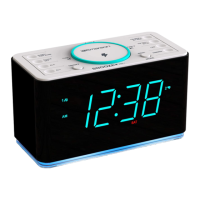
The 15W Ultra Fast Wireless Charging SmartSet® Clock Radio with Bluetooth, USB Charge Out, Dual Alarm, LED Décor, Auto Dimmer and 1.4" Cyan LED Display is a versatile device designed to enhance your daily routine. It combines multiple functionalities into a single, compact unit, making it suitable for various settings, from your bedroom to your office.
The core function of this device is to serve as a clock radio, offering a clear 1.4" Cyan LED display for time and other information. It features a SmartSet® automatic time setting system, which ensures that the time is always accurate and automatically adjusts for Daylight Saving Time (DST). This eliminates the need for manual adjustments, making it incredibly convenient.
Beyond basic timekeeping, the device incorporates a dual alarm system, allowing you to set two independent alarms. You can choose to wake up to your favorite FM radio station, a buzzer, or Bluetooth audio, providing flexibility in your morning routine. The alarms also include a Snooze function, giving you a few extra minutes of sleep before starting your day.
A significant feature of this device is its 15W Ultra Fast Wireless Charging capability. This allows you to wirelessly charge compatible smartphones by simply placing them on the designated charging pad. For devices that don't support wireless charging, a USB charge out port is available, enabling you to charge them via a cable. This dual charging capability ensures that all your portable devices can be powered up conveniently.
The device also includes Bluetooth connectivity, allowing you to stream audio wirelessly from your smartphone, tablet, or other Bluetooth-enabled devices. This transforms the clock radio into a personal speaker, perfect for listening to music, podcasts, or audiobooks. For non-Bluetooth devices, an AUX In jack is provided, offering a wired connection option.
An integrated FM radio tuner allows you to listen to your favorite local radio stations. The digital tuning system makes it easy to find and save stations, and the telescopic antenna helps improve reception.
Adding to its aesthetic appeal, the device features an LED Décor light. This light can be set to various colors and brightness levels, allowing you to customize the ambiance of your room. The Auto Dimmer function automatically adjusts the display brightness based on ambient light conditions, ensuring that the display is always easy to read without being too bright or distracting, especially in a dark room.
Setting up the device is straightforward thanks to the SmartSet® automatic time setting. Upon plugging in the device for the first time, the clock will automatically set itself to the correct Eastern Time Zone. You can easily change the time zone to your local zone using the Time Zone button. The device also automatically adjusts for Daylight Saving Time (DST), eliminating the need for manual changes.
Setting alarms is intuitive. You can set two separate alarms, each with its own wake-up source (FM radio, buzzer, or Bluetooth audio). The alarm volume can be adjusted independently of the radio volume. The Snooze function provides a temporary pause for the alarm, allowing for a few extra minutes of sleep. The alarm duration can also be customized.
For wireless charging, simply place your Qi-compatible smartphone on the charging pad. The device will automatically detect and begin charging. For wired charging, connect your device to the USB charge out port using a compatible USB cable.
Bluetooth pairing is simple. Activate Bluetooth on your device and select the clock radio from the list of available devices. Once paired, you can stream audio wirelessly. The AUX In jack provides an alternative for wired audio connections.
The FM radio features digital tuning, allowing you to easily scan for and save your favorite stations. The telescopic antenna can be extended for better reception.
The LED Décor light can be customized to your preference. You can choose from various colors and adjust the brightness to create the desired ambiance. The Auto Dimmer feature ensures that the display brightness is always optimal, adjusting automatically to ambient light.
The device also includes a Sleep Timer function, allowing you to fall asleep to music or radio for a set duration. The display can be dimmed or turned off completely for undisturbed sleep.
To maintain the device's performance and appearance, it's important to follow a few simple guidelines.
By following these maintenance tips, you can ensure that your 15W Ultra Fast Wireless Charging SmartSet® Clock Radio remains in excellent working condition for a long time.
 General
| Display | LED |
|---|---|
| Alarm | Yes |
| Snooze | Yes |
| Power Source | AC Power |
| Battery Backup | Yes |
| Frame Material | Plastic |
| Frame Color | Black |
| Type | Digital |
| Movement | Digital |

 To Next Page