EasyManua.ls Logo

Emerson EWC1303 - User Manual

Emerson EWC1303
32 pages
Print Icon
To Next Page IconTo Next Page
Loading...
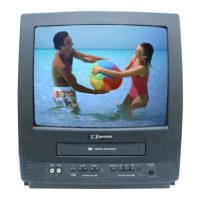
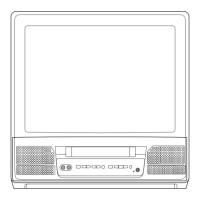
COLOR TV/VCR
EWC1303 (13 inch)
EWC1903 (19 inch)
OWNER’S
MANUAL
As an ENERGY STAR
Partner, our company has
determined that this product meets
the E
NERGY STAR guidelines for
energy efficiency. E
NERGY STAR is
a U.S. registered mark.
®
®
®
If you need additional assistance for set-up or operating after
reading owner’s manual, please call TOLL FREE : 1-800-256-2487.
Or visit our WEB SITE at
http://www.funai-corp.com
Please read before using this equipment
INSTRUCCIONES EN ESPAÑOL INCLUIDAS.
This Owner’s Manual is made of
recycled paper.
“EMERSON AND THE G-CLEF LOGO ARE REGISTERED TRADEMARKS
OF EMERSON RADIO CORP., PARSIPPANY, NEW JERSEY, U.S.A.
19” MODEL ILLUSTRATED
T5403/7403UD.QX33 02.12.24 11:58 AM Page 1

Questions and Answers

  • J
    John SandovalSep 8, 2025
    Why does my Emerson TV/VCR show misspelled captions?
    • B
      Brandon WarrenSep 9, 2025
      If your Emerson TV/VCR Combo shows misspelled captions, it's likely because you are watching a live broadcast where spelling errors made by the closed captioning production company may pass through uncorrected. Prerecorded programs typically do not have misspelled words due to editing.
  • C
    Curtis YoderSep 12, 2025
    Why Emerson TV/VCR will not show the text in its entirety?
    • V
      Vanessa JonesSep 12, 2025
      Captions that are delayed a few seconds behind the actual dialogue are common for live broadcast. Most captioning production companies can display a dialogue to a maximum of 220 words per minute. If a dialogue exceeds that rate, selective editing is used to ensure that the captions remain up-to-date with the current TV screen dialogue.
  • N
    Noah KiddSep 12, 2025
    What causes scrambled captions with white boxes on Emerson TV screen?
    • S
      Sophia MooreSep 12, 2025
      Interference caused by building, power lines, thunderstorms, etc. may cause scrambled or incomplete captions to appear on your Emerson TV screen.
  • T
    Terry HarrellSep 14, 2025
    Why my program guide listed a TV show as being closed captioned but none of the captions were displayed on Emerson TV/VCR?
    • C
      Catherine ShawSep 14, 2025
      Broadcasters may at times use a time compression process to speed up the actual program so that additional advertising time can be given. Since the decoder cannot read the compressed information, captions will be lost.
  • W
    Wendy WilliamsSep 16, 2025
    Why Emerson TV/VCR prerecorded video tape does not show any captions?
    • W
      William VargasSep 16, 2025
      If your Emerson TV/VCR prerecorded video tape does not show any captions, the video tape was either an illegal copy or the tape duplicating company accidentally left out the captioning signals during the copying process.

Summary

PRECAUTIONS

LOCATION

Guidance on selecting an optimal place for TV/VCR installation to ensure safe and satisfactory performance.

AVOID THE HAZARDS OF ELECTRICAL SHOCK AND FIRE

Essential safety warnings and guidelines to prevent electrical shock and fire hazards when using the appliance.

OPERATING CONTROLS AND FUNCTIONS

PREPARATION FOR USE

ANTENNA;CABLE CONNECTIONS

Instructions for connecting various types of antennas and cable systems to the TV/VCR.

SET UP FOR USE

CHANNEL SET UP FOR THE FIRST TIME

Step-by-step guide for initial channel scanning and memory programming.

CLOCK SET UP (AUTO; MANUAL)

MANUAL CLOCK SETTING

Procedure for manually setting the TV/VCR's internal clock for accurate timer functions.

TV OPERATION

WATCHING A TV PROGRAM

Instructions on how to tune in and watch television channels.

PICTURE CONTROL

Adjusting picture settings like brightness, contrast, color, tint, and sharpness.

CLOSED CAPTION SYSTEM

V-CHIP SET UP

PLAYBACK

NORMAL PLAYBACK

Basic steps to play back a video cassette in standard mode.

SEARCH

PICTURE SEARCH

Feature to find specific scenes on a tape by viewing in fast forward or reverse.

RECORDING

NORMAL RECORDING

OTR (One Touch Recording)

TIMER RECORDING

TIMER PROGRAM EXTENSION

AUTO RETURN

WAKE UP TIMER

SLEEP TIMER

COPYING A VIDEO TAPE

SPECIAL FEATURES

MAINTENANCE

TROUBLESHOOTING GUIDE

Emerson EWC1303 Specifications

General IconGeneral
BrandEmerson
ModelEWC1303
CategoryTV VCR Combo
LanguageEnglish

Related product manuals