• Remote control
• User Manual
2.0 Explanation of the media player
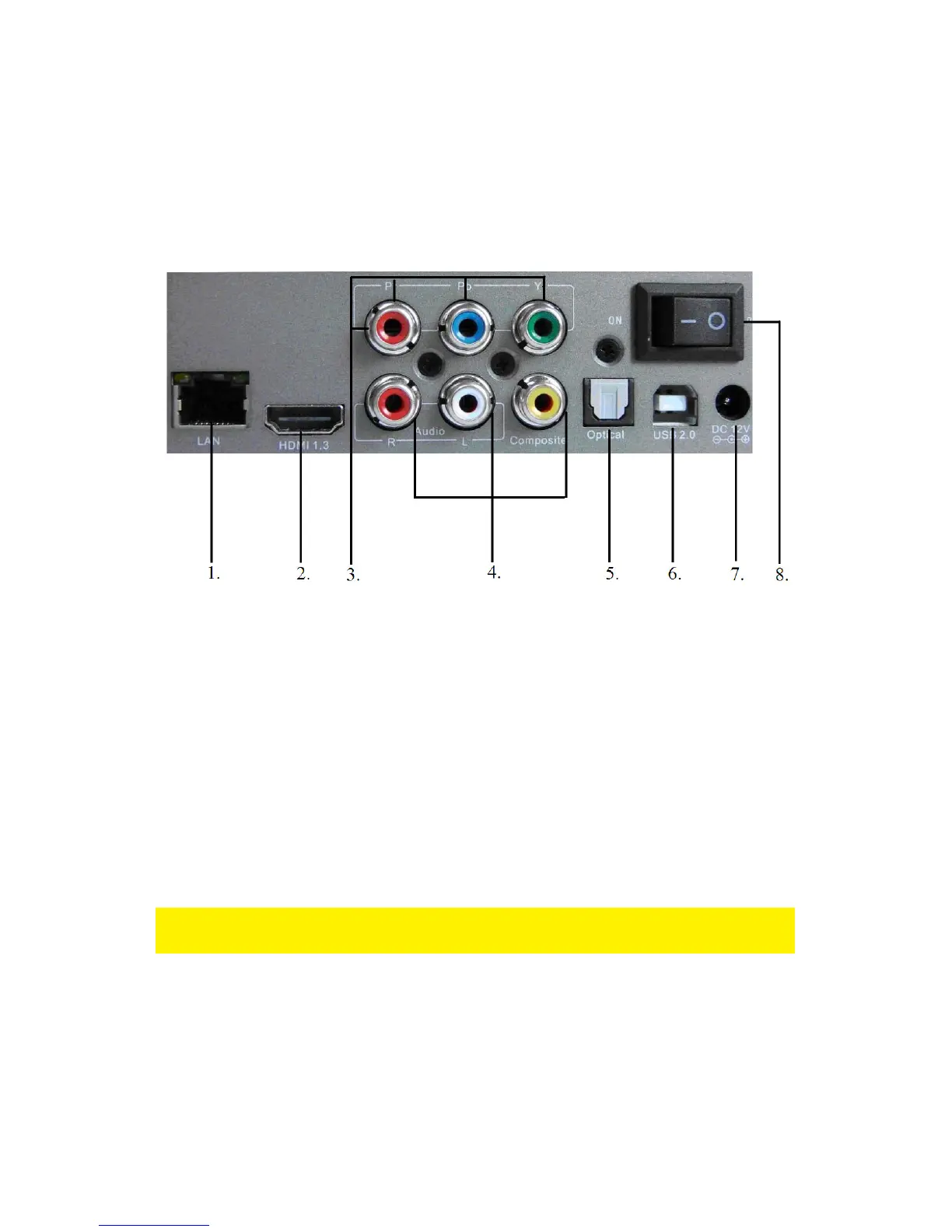
The media player has the following connections on the back of the casing:
1. Network connection. Connect your network cable to this connection.
2. HDMI 1.3 connection. Use this connection to connect the hdMEDIA RT to the
HDMI connection on your television.
3. Component connection. Use these connections to connect the hdMEDIA RT to
the component connections on your television.
4. Composite connections. Use these connections to connect the hdMEDIA RT to
the composite connections your television
5. Optical (Toslink) connection. Use this connection to connect your receiver to the
hdMEDIA RT.
6. USB host. USB connection used to connect the hdMEDIA RT to your computer.
7. Power connection. Used to connect the power supply.
8. On/off switch. Use this switch to turn on or turn off the hdMEDIA RT.
At the front of the case you will find two USB ports for harddisks and memory sticks,
and one (e)SATA port for external disks.



 To Next Page