1.Do not plug or unplug the power cable while you have wet hands.
2.When the unit is not used for a long period of time, disconnect the power cord from the wall outlet.
3.When disconnecting the power cord from the wall outlet, do not pull on the cord.
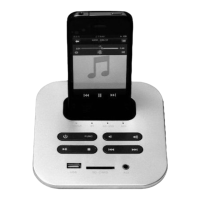
CHANGING iPod/iPhone GENERATION SOCKET
We provide 4 sockets for different generation of iPod and iPhone. Please select the suitable socket for
your iPod/iPhone generation, this will keep the iPod/iPhone stable and safe.
Do not use excessive force to plug or unplug the iPod/iPhone socket with excessive force.
Before you connect with the iPod/iPhone dock device , make sure that the sofa audio unit is powered off.
LISTEN TO YOUR iPod/iPhone
To listen to your iPod/iPhone, press the "FUNC" button to get the iPhone mode. The iPhone LED
light will be on, indicating that the iPod/iPhone mode have been selected.
When the iPod/iPhone is docked in standby mode, it will automatically begin charging if
needed.
NOTE:
PLAY MUSIC BY BLUETOOTH
8
To use your sound furniture by bluetooth, press the "FUNC" button to transfer to BT mode
(Bluetooth) . Select and PAIR the sound source to this device. The BT LED light will be on,
indicating that the BT has been selected.
When the BT is selected, only ONE device can work and all other bluetooth devices
should be turned off. The pairing password is 0000.
NOTE:


 To Next Page