3
GB | Projection and Alarm Clock
Options and functions
• DCF 77 radio signal controlled clock
• Easy to read LCD display
• Display of hours, minutes, seconds, month, date, day of the week, week number and alarm time
• Automatic toggling of wintertime and daylight saving time
• Both alarm clocks ALARM1/ALARM2 set by the MODE button
• Two alarm times with a snooze function
• Toggling the 12/24 hours system
• Dual time
• Days of the week in ve languages
• Orange backlighting with the LIGHT/SNOOZE button
• Power supply - battery 2× 1.5 V AAA and a power supply unit (included)
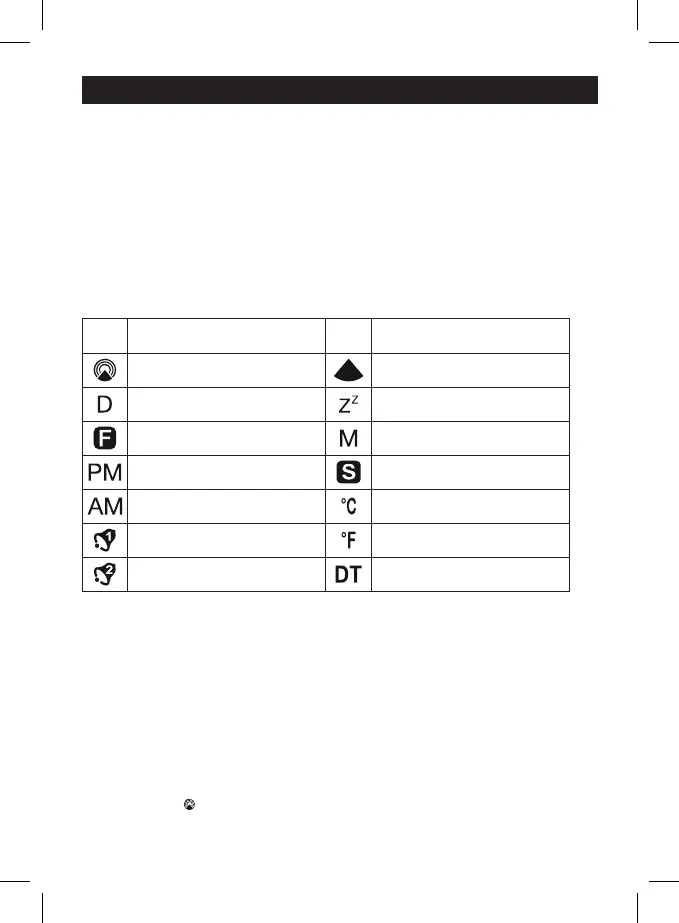
Display icons
Icon Meaning Icon Meaning
DCF radio signal reception Weak DCF radio signal
Date Snooze
Foreign time Month
Afternoon Summer time
Morning Degrees Celsius
Alarm 1 Degrees Fahrenheit
Alarm 2 Dual time
Connecting the power supply unit for continuous projection
The projection clock is delivered with a power supply unit (power box). If you want to use a dierent power
box, it must comply with the following parameters: 230 V AC, 50 Hz – 5 V DC, 200 mA.
Do not use PSU of dierent voltage and current as it might damage the clock.
Battery installation
Remove the battery cover at the bottom of the alarm clock and insert 2× 1.5 V AAA alkaline batteries.
Mind the proper polarity, do not use rechargeable batteries.
Fit the battery cover back.
Commissioning
After the battery installation, the display will show the time and date in the format 1 D 1M MO, 0:00 oo,
the current internal temperature and the antenna symbol is blinking – the clock will automatically start
searching for the radio signal DCF. If the DCF signal reception works, an antenna with waves will be
displayed as an icon . If the signal cannot be found within 5 minutes, use the WAVE button to carry out
the search manually. The manually set time will be readjusted, if a radio DCF signal is found. The clock is
adjusted by the DCF radio signal every full hour.


 To Next Page