5
GB | Wireless Weather Station
Read this manual carefully before using the product.
Specications
radio-controlled clock
time format: 12/24 h
indoor temperature: 0°C to +50°C, 0.1°C resolution
outdoor temperature: -20°C to +60°C, 0.1°C resolution
temperature measurement accuracy: ±1°C for 0°C to +50°C range, ±1.5°C for other ranges
indoor and outdoor humidity: 20 % to 99 % RH, 1 % resolution
humidity measurement accuracy: ±5 % RH in 40 % to 80 % range, ±8 % RH in other ranges
barometric pressure measurement range: 850 hPa to 1,100 hPa
unit of pressure: hPa/mb/inHg
radio signal range: up to 60 m in an open area
transmission frequency: 433 MHz, 10 mW e.r.p. max.
number of sensors: max. 3
power supply:
main station: 3× 1.5 V AA batteries (not included)
sensor: 2× 1.5 V AAA batteries (not included)
size:
main station: 30 × 166 × 131 mm
sensor: 29 × 60 × 96 mm
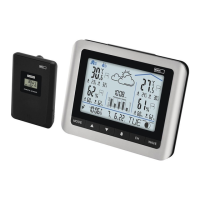
Weather Station – On-Screen Indicators (See Fig. 1)
1 – data from outdoor sensor
2 – outdoor sensor channel number, station
batteries low
3 – weather forecast
4 – pressure value
5 – indoor temperature, sensor batteries low
6 – indoor temperature trend
7 – min. indoor temperature
8 – max. indoor temperature
9 – indoor humidity
10 – indoor humidity trend
11 – min. indoor humidity
12 – max. indoor humidity
13 – moon phase
14 – day of the week
15 – year
16 – month
17 – day
18 – alarm activation
19 – time
20 – DCF signal reception
21 – max. outdoor humidity
22 – min. outdoor humidity
23 – outdoor humidity
24 – max. outdoor temperature
25 – min. outdoor temperature
26 – outdoor temperature
Button Description (See Fig. 2)
1 – SNOOZE/LIGHT
2 – MODE
3 – up arrow
4 – down arrow
5 – alarm
6 – CH
7 – WAVE
8 – stand
9 – battery compartment
Sensor Description (See Fig. 3)
1 – sensor channel number (CH 1, 2, 3)
2 – temperature
3 – humidity
4 – TEST button
5 – sensor channel number switch (CH 1,
2, 3)
6 – unit of temperature switch (°C/°F)
7 – battery compartment
Getting Started
1. First, insert batteries into the weather station (3× 1.5 V AA) and then into the wireless sensor
(2× 1.5 V AAA). When inserting the batteries, make sure the polarity is correct to avoid damaging


 To Next Page