8
6. Short-press the
button and set the minimum indoor temperature.
7. Short-press the button and activate (ON)/deactivate (OFF) the indoor minimum temperature
alert.
8. Short-press the button and set the minimum indoor temperature.
9. Short-press the button and activate (ON)/deactivate (OFF) the indoor maximum temperature
alert.
When the set temperature limit is exceeded, an audio alarm will sound for 1 minute and the value
will begin ashing.
Pressing any button on the screen cancels the alert sound, but the symbol of an active alert will con-
tinue ashing. Once temperature drops below the set limit, the symbol on the screen will stop ashing.
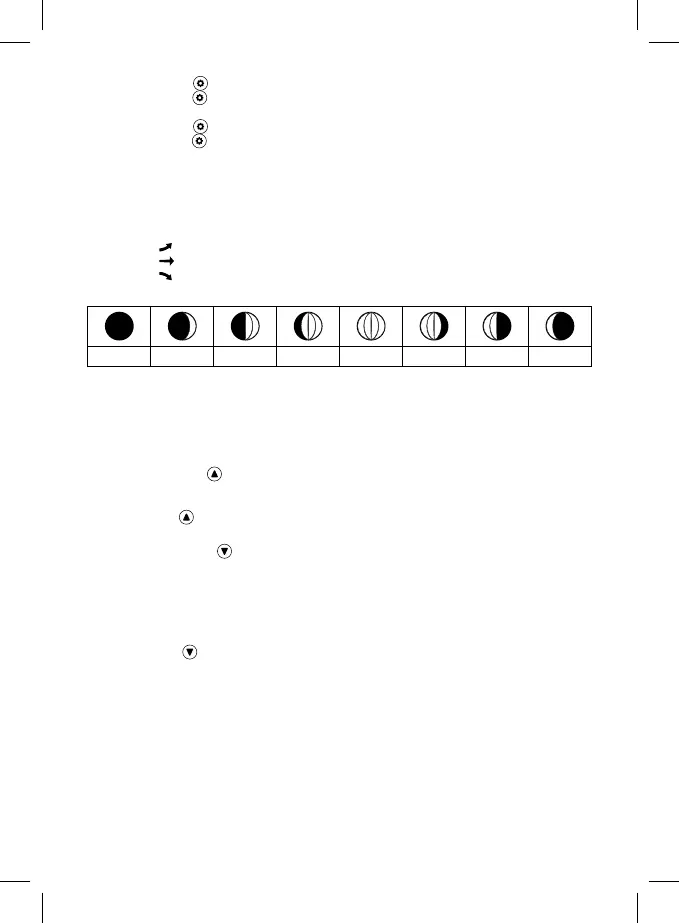
Temperature, Humidity and Pressure Trends
Rising
Constant
Falling
Moon Phases
1 2 3 4 5 6 7 8
1 – New moon
2 – Waxing crescent
3 – First quarter
4 – Waxing gibbous
5 – Full moon
6 – Waning gibbous
7 – Last quarter
8 – Waning crescent
Note: In the period between 18:00 and 06:00, the moon icon will be surrounded by stars.
Displaying Maximum and Minimum Readings of Temperature/Humidity and Wind
Repeatedly pressing the button will gradually show maximum and minimum measured temperature
and humidity values and maximum wind strength.
The memory of measured values is automatically erased every day at 00:00.
Or long-press the button to erase the memory automatically.
Displaying Measured Values from the Precipitation Sensor
Repeatedly pressing the button will gradually show measured precipitation values in various
time periods.
Accumulated
Today
Last hour
Yesterday
This week
Long-pressing the button erases the measured value.
Station Display Backlight
When powered via adapter:
Permanent backlighting is set automatically.
Repeatedly pressing the SNOOZE/LIGHT button will allow you to set 4 dierent levels of permanent
backlighting (o, maximum, medium, low).
When powered only by 3× 1.5 V AAA batteries:
Display backlighting is o. Pressing the SNOOZE/LIGHT button will turn the display backlight on for
5 seconds, then it turns o again. When the station is only powered by batteries, permanent back-
lighting of the display cannot be activated!
Note:
The inserted batteries serve as backup for the measured/set data.
If batteries are not inserted and you unplug the adapter, all data will be erased.


 To Next Page