3
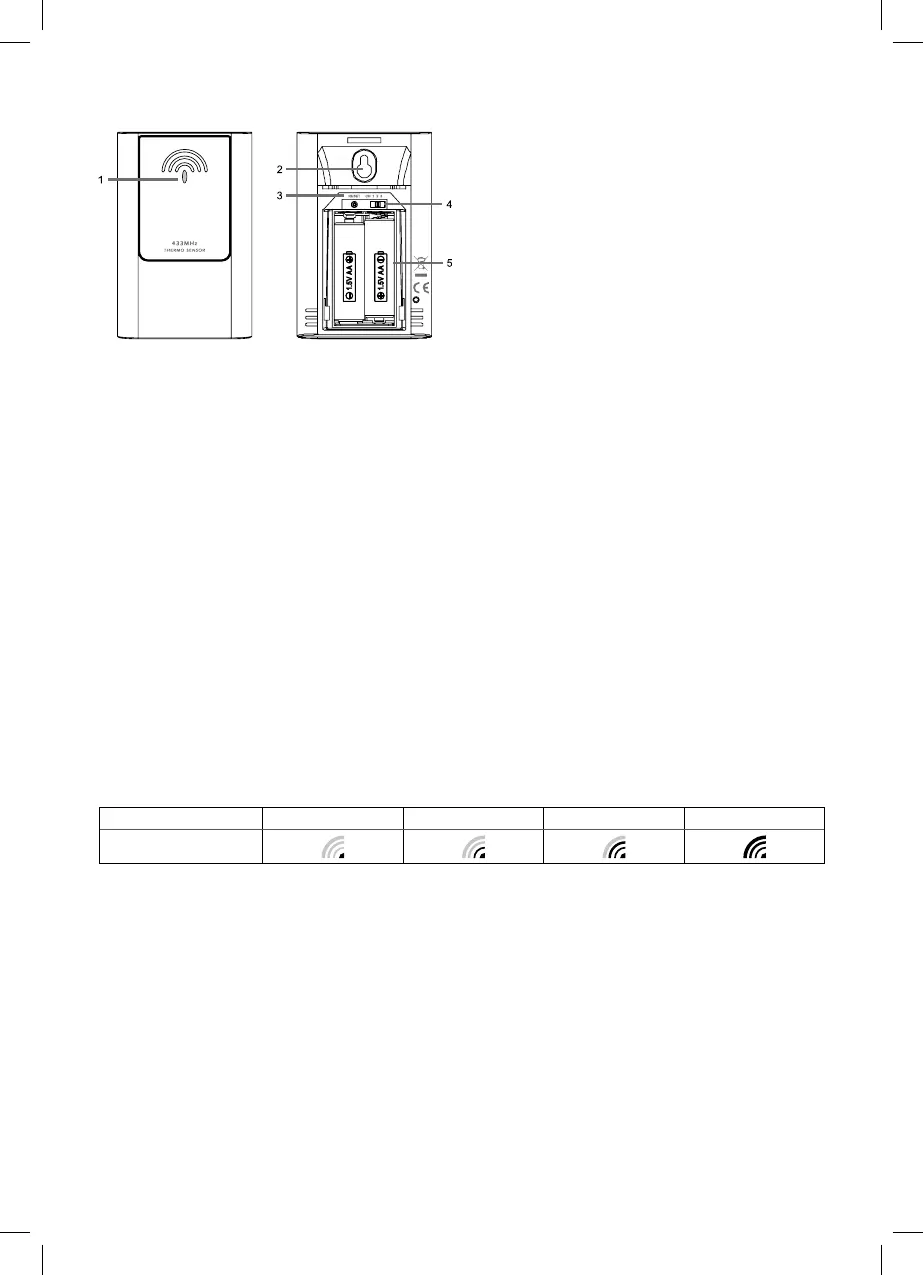
Sensor description
1 – sensor LED
2 – hole to hang the device on the wall
3 – RESET button
4 – sensor channel number switch
5 – battery compartment
Getting started
1. Insert the battery in the weather station (1× 3 V CR2032), connect the included 4.5 V DC adapter. The CR2032 battery is
only intended as a backup power source for storing the readings when the DC adapter is disconnected.
It is therefore necessary to use the DC adapter at all times!
2. Use the switch on the sensor to set the required sensor number and insert the batteries (2× 1.5 V AA). When inserting the
batteries make sure the polarity is correct to avoid damaging the weather station or sensor. Only use alkaline batteries of
the same type, do not use rechargeable batteries.
3. Place the two units next to each other. The weather station detects the remote sensor signal within 3 minutes. If the remote
sensor signal is not detected, press and hold the DOWN button to repeat the search.
4. If the outdoor temperature reading disappears from the display, press and hold the DOWN button on the weather station.
The weather station repeats the search for the sensor signal.
5. We recommend placing the sensor on the north side of the house. The range of the sensor may decrease substantially in
areas with large number of obstacles.
6. The sensor is resistant to dripping water, however, it should not be exposed to rain permanently.
7. Do not place the sensor on metal objects as this will reduce the transmission range.
8. If low battery icon is displayed, replace batteries in the sensor or weather station.
Switching over to another channel and connecting additional sensors
1. Repeatedly press the CHANNEL button at the back of the weather station to choose required channel of the sensor – 1, 2,
or 3. Then press and hold the DOWN button; the sensor number starts ashing.
2. Remove the cover from the battery compartment and insert batteries (2× 1.5 V AA).
3. Use the channel switch to set the required channel number – 1, 2, 3 and then insert batteries in the sensor. Replace the
battery cover. Data from the sensor will be loaded within 3 minutes.
4. If the sensor signal is not detected, remove the batteries and reinsert them.
Radio controlled clock (DCF77)
After registering with the wireless sensor, the weather station will automatically start searching for the DCF77 signal for 7minutes;
the following icon will ash depending on the DCF signal intensity.
no signal weak signal medium signal good signal
DCF signal reception icon
During the search, no other data on the display will be updated and the buttons will be disabled.
Signal detected – the icon stops ashing and displays the current time with the DCF icon.
Signal not detected – DCF icon is not displayed.
Press the RCC button shortly to repeat search for the DCF77 signal for 5 minutes, press and hold the RCC button to stop search
for the DCF77 signal. The DCF77 signal will be synchronised daily at the following times: 2:00, 8:00, 14:00, 20:00. In standard
conditions (at safe distance from sources of interference, such as TV sets, computer monitors), the reception of time signal
takes several minutes.
If the weather station does not detect the signal, follow these steps:
1. Move the weather station to another location and try to detect the DCF signal again.
2. Check the distance of the clock from the sources of interference (computer monitors or television sets). It should be at
least 1.5 to 2 m during the reception of the signal.
3. When receiving DCF signal, do not put the weather station to the proximity of metal doors, window frames and other metal
structures or objects (washing machines, dryers, refrigerators etc.).
4. In reinforced concrete structures (cellars, high-rise buildings etc.), the DCF signal reception is weaker, depending on the
conditions. In extreme cases, place the weather station close to a window toward the transmitter.
The reception of the DCF77 radio signal is aected by the following factors:
• thick walls and insulation, basements and cellars
• inadequate local geographical conditions (these are dicult to assess in advance)



 To Next Page