2
EVO19 – manual 105 × 148 mm
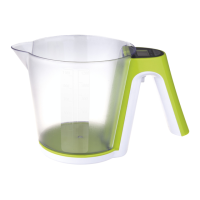
DIGITAL KITCHEN SCALE – EVO19
Before putting this product into the operation, read carefully this instruction manual.
Specication
Backlight LCD display: 54 × 23 mm
Maximum weight: up to 5 kg (2g – 5000g)
Tolerance: 1g
Measurement units: g/lb/oz
TARA function
Automatic and manual turning o
Warnings signal of overloading or low battery
Power: 3× 1,5 V AAA battery (not included in package)
Display
g/lb/oz – weight unit
Warnings on display
Low or no display backlight – Batteries are discharged. Change the batteries.
„Err“ – the scale is overloaded, maximum capacity is 5 kg. Remove the weighted material from the scale
to avoid the scale‘s damage.
Zero – reseting values on the display
Buttons
ON/OFF – turning on and turning o
TARER – activating the TARA function
UNIT – weight unit selection g/lb/oz
Measuring
1. Place the scale on at, hard and stable surface.
2. Before turning on the scale put a kitchen bowl on the weighing area (not included in the package),
if you want to use it.
3. Turn on the weighing mode by pressing the ON button, wait until the symbol zero starts ashing on
the left bottom side, then you can start to weight.
4. Set up the required measurement unit (g/lb/oz) by pressing repeatedly the UNIT button.
5. Put the material that you want to weight into the bowl or on the weighing area. The LCD display will
show you the weight of the material.
6. Turn o the scale by pressing the OFF button otherwise the scale turns o automatically after 2 minutes.
TARA Function (weigh out)
The TARA function works for measuring the substances or materials that are gradually added to the one
that is already on the scale
1. Put the rst portion of the weighted material on the scale and its weight will be shown on the
display.
2. Before another weighted material is added, press the TARE button. The current value on the display
will be reset. Now you can add another portion. This process can be repeated.
Changing the Batteries
1. Open the lid covering the slot for batteries located on the scale‘s bottom side.
2. Take out the old batteries.
3. Insert the new batteries. Observe the right polarity. Use the alkaline batteries only. Do not use the
rechargeable batteries.
4. Close the covering lid.
GB


 To Next Page