5
Basic Operation of the Device
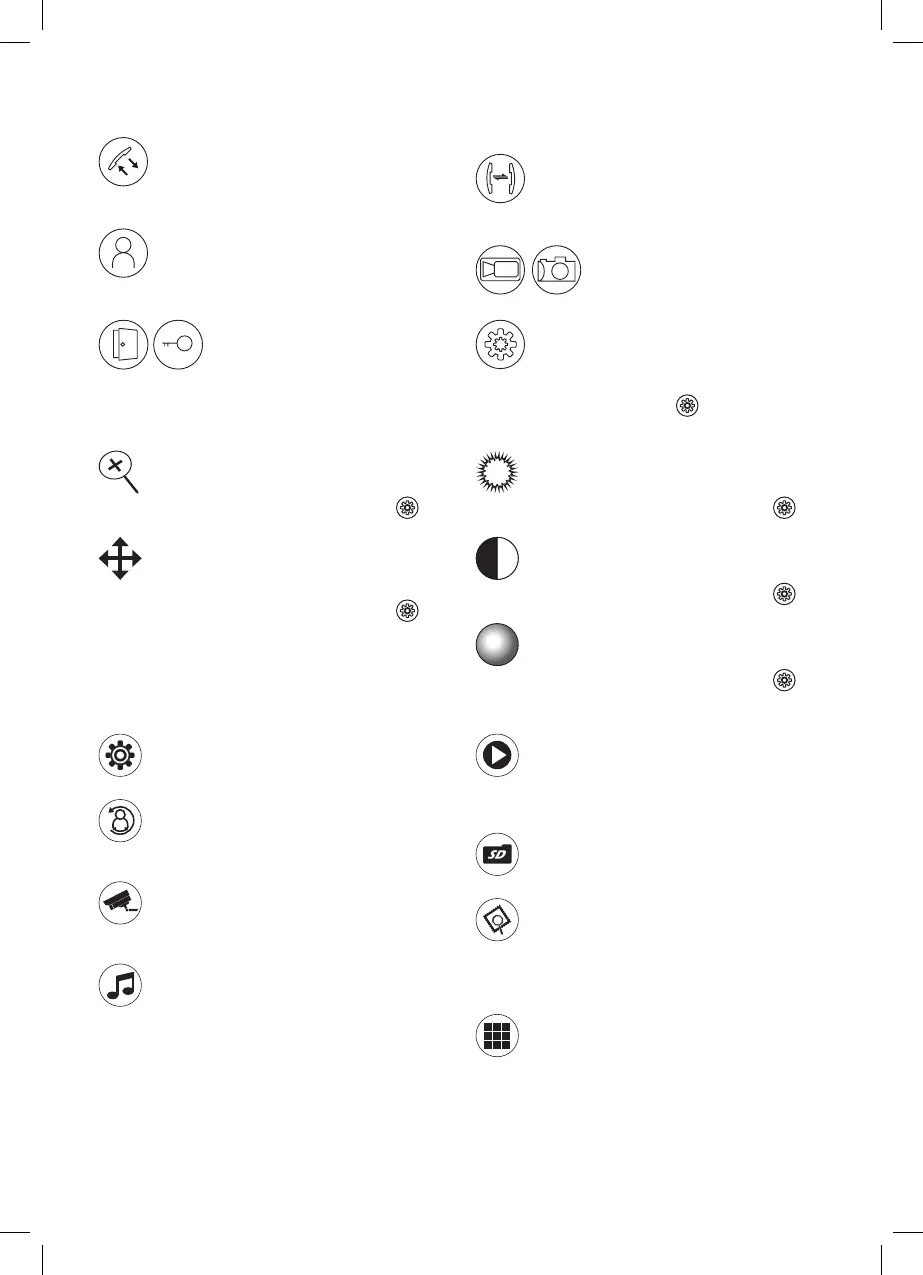
To accept a call, press this button on the monitor:
To immediately call up the image from the door camera
unit and CCTV camera, press this button:
Press the UNLOCK button to unlock the corresponding
door or to open the gate
For a private call between monitors, press the INTERCOM
button
You can manually activate video recording or take pictures
during a call
Enter the menu by pressing:
Speaker Volume Settings
Settings are changed by pressing
and adjusting the
value using arrows while a video image is active
Setting image zoom:
The setting can be changed by long-pressing the
icon
and adjusting the value using the arrows.
Setting view height while the zoom feature is
active:
The setting can be changed by long-pressing the
icon
and adjusting the value using the arrows.
Setting image brightness:
The setting can be changed by long-pressing the
icon
and adjusting the value using the arrows.
Setting image contrast:
The setting can be changed by long-pressing the
icon
and adjusting the value using the arrows.
Setting image colour temperature:
The setting can be changed by long-pressing the
icon
and adjusting the value using the arrows.
Device Menu
– System settings
Set time, date, language, reset to factory settings
– Door unit
Set automatic recording, duration for video, relay connection,
motion detection
– External CCTV cameras
Set alarms, duration for video, alarm sensors and motion
detection on secondary CCTV cameras
– Ringtone setting
Timing, duration and volume of the ringtone, selection of
ringtone types. You can also set your own ringtone from
a memory card. The ringtone les must be stored on the
memory card in the Ring folder.
– Play recordings
Play recordings and browse photos from door units and
CCTV cameras. A memory card must be inserted for this
feature to function!
– Memory card
Browse les stored on the memory card
– Digital picture frame
Setting for the LCD in standby mode. Allows displaying a
clock, or showing pictures from a memory card. The les
must be stored on the memory card in the DigitalFrame
folder.
– Mode setting
Selection of modes – at home, do not disturb, not at home
Settings for image signals
Maintenance of the Device
The device is low-maintenance. It is recommended, based on the condition of the device, to occasionally wipe the device
down with a moistened cloth.
Attention! Before cleaning, the device must be disconnected from power!


 To Next Page