2
GB
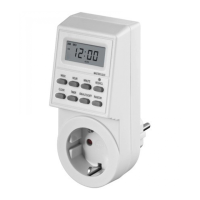
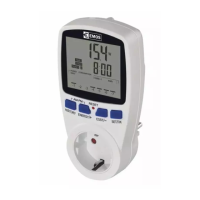
Digital outdoor timer socket
A. Functions
1. The programmable digital timer switch (herein-
after only “switch”) makes it possible to decide
in advance, when your indoor or outdoor
appliances are to switch on/o. It helps to save
energy and increase safety in your household.
2. The random switching on/o function lets the
appliances switch on/o in irregular times, so
it is suitable for some automatic functions in
your household, but also it lets you conceal
your absence from burglars.
3. LCD display shows the selected programme
setting and real time.
4. You can set up to 10 programmes to switch
on/o.
B. Specications
1. Power supply: 230 V~, 50 Hz, 16(2)A
2. Max. load: 3 680 W
3. IP protection: IP44
4. Operating temperature: -10 °C to +40 °C
5. Time setting interval: 1 minute
6. 16 combinations of days or blocks of days
7. Precision: ±1 minute per month
8. Switched phase
9. Backup battery: NiMH 1.2 V >100 hours
C. Installation
1. Plug the switch into a 230 V AC socket.
2. Let it recharge for 12 hours.
3. After recharging use a pointed object such
as pen or pencil to push the MASTER CLEAR
button to erase all stored information.
4. Now the switch is ready for use and for any
new setting.
D. Time display
Time can be displayed in two dierent systems.
1. 12 hour mode: digital numbers from 00:00 to
11:59 plus either the AM symbol (from mid-
night to noon) or PM (from noon to midnight).
2. 24 hour mode: digital numbers from 00:00 to
23:59 and the display does not show AM or PM.
3. To toggle the 12 hour mode to 24 format and
back, push the buttons CLOCK and TIMER at
the same time.
E. Setting the time and day of the
week
1. Setting the day of the week
1.1 Hold the CLOCK button and push the
WEEK button at the same time to set the
day of the week.
1.2 The order of the day (abbreviations) is
displayed this way:
MoTuWeThFrSaSu
Mo = Monday, Tu = Tuesday,
We=Wednesday, Th = Thursday, Fr=Fri-
day, Sa = Saturday, Su= Sunday
1.3 Push CLOCK and shortly also the WEEK
button to change the days of the week
slowly. If you hold both buttons, the
days of the week change fast. Release
the buttons as soon as the desired day
of the week appears.
2. Setting the time
2.1 To set time, hold the CLOCK button and
push the HOUR button.
2.2 If you hold CLOCK and briefly push
HOUR, the time will change slowly. If
you hold both buttons, time runs fast.
Release both buttons as soon as the
desired hour appears on the display.
2.3 To set minutes hold CLOCK and push
MINUTE. To set minutes, proceed the
same way as when setting hours as
described in point 2.2.
3. Setting the summer time
3.1 Hold the CLOCK button and push
ON/AUTO/OFF to activate summer time.
The display will automatically increase
the time by one hour and at the same
time an “S” symbol will appear.
3.2 By repeated pushing CLOCK and
ON/AUTO/OFF you can cancel the sum-
mer time. The time and the value will
lower by one hour and “S” will disappear
from the display.
Note:
In order to set the time and day of the week, the
LCD display must be in real time mode. If LCD is in
the programme setting mode, push CLOCK and the
display will go back to real time mode.
F. Setting the programmes
1. If LCD display shows real time (the display
reads “CLOCK”), push the TIMER button once
to activate the programme setting mode. On
the left side of the LCD display there appears
“1ON” and the “PROGRAMME” text will appear.



 To Next Page