8
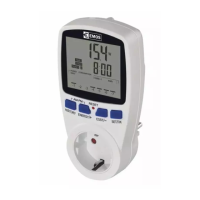
B) USE IN TIMER SWITCH SOCKET MODE
Activating Timer Switch Socket Mode
Long-press the TIME and MODE buttons at the same time to access
settings.
Repeatedly press the + and – buttons to select the mode marked
as „PrO“
.
Wait 30 seconds or press MODE to automatically save the setting
and return to the main screen.
Setting Day and Time
Press the TIME button; the day number will begin ashing.
Use the + and – buttons to set the current day and press TIME
to conrm.
The month number will start ashing. Use the + and – buttons to set
the current month and press TIME to conrm.
The year will start ashing. Use the + and – buttons to set the current
year and press TIME to conrm.
The hour will start ashing. Use the + and – buttons to set the current
hour and press TIME to conrm.
The minute will start ashing. Use the + and – buttons to set the
current minute and press TIME to conrm.
Wait 30 seconds or press MODE to automatically save the setting
and return to the main screen.
Table of Factory Preset Times
Activation
time (ON)
Deactivation
time (OFF)
Monday–Sunday
Monday–Friday
Mon/Tue/Wed/Thu/Fri
Saturday–Sunday
Sat/Sun
P1 6:00 8:00
P2 12:00 14:00
P3 17:00 22:00
Setting Programmes – Automatic Mode
If the factory settings do not suit your needs, you can adjust the
timing of the programmes.
You can set a maximum of 24 time programmes.
1. Press the PROG button; the day number will begin ashing.
1 to 7 = Monday to Sunday.
2. Use the + and – buttons to select days:
individual days in the week/workdays – 1, 2, 3, 4, 5/weekend – 6,
7/whole week – 1, 2, 3, 4, 5, 6, 7.
3. Conrm with the TIME button; the time value will start ashing
and P1 – ON (activation of the 1st programme) will appear on
the screen.
4. Use the + and – buttons to set the time (1 minute resolution)
when the 1st time programme should start and conrm with
the TIME button.
5. The time value will start ashing and P1 – OFF (deactivation of
the 1st programme) will appear on the screen.
6. Use the + and – buttons to set the time when the 1st time pro-
gramme should turn o; conrm by pressing TIME.


 To Next Page