
 Need help?
Do you have a question about the Energeeks EG-EW003MC and is the answer not in the manual?
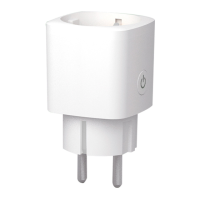
The Energeeks EG-EW003MC is a smart Wi-Fi plug with a consumption meter, designed to provide intelligent control over your electrical appliances and monitor their energy usage. This quick installation guide provides essential information for setting up and using the device.
The Energeeks EG-EW003MC smart plug allows you to remotely control connected appliances via a smartphone or tablet app. Its integrated consumption meter provides real-time data on energy usage, helping users monitor and manage their electricity consumption more efficiently. The plug is designed for easy integration into smart home ecosystems, offering convenience and energy-saving capabilities.
*   Download the "Energeeks 3.0" app from the Apple App Store or Google Play Store.
*   Upon first use, the app will prompt you to register as a user.
*   Enter your email address, create a password, and select your country of residence.
*   A confirmation code will be sent to your registered email. Enter this code in the app to complete the registration. If the code is not received, check your spam folder.
*   Ensure the indicator light on the smart plug is flashing blue quickly. If it's flashing blue slowly, press and hold the power switch on the plug for a few seconds until it flashes quickly.
*   Activate Bluetooth on your smartphone or tablet.
*   In the Energeeks 3.0 app, tap the "+" icon in the upper right corner. The app should automatically detect the smart plug.
*   Select "Smart Wifi Plug" from the detected devices.
*   The app will identify the Wi-Fi network your phone is connected to. This network must be 2.4GHz (5GHz networks are not supported).
*   Enter the Wi-Fi password and tap "Next." The plug will connect automatically.
*   Once successfully configured, the indicator light will turn solid red, and the device will be added to your "Device List."
*   You can now control the smart plug via the Energeeks 3.0 app.
*   If Bluetooth detection fails or is unavailable, manually select "Smart Wifi Plug" from the device list in the app.
*   As with Bluetooth installation, the app will recognize your phone's connected Wi-Fi network. Ensure this is a 2.4GHz network.
*   Confirm that the LED on the plug is flashing quickly.
*   Enter the Wi-Fi password and tap "Next." The plug will connect automatically.
*   After successful configuration, the indicator light will turn solid red, and the device will appear in your "Device List."
*   You can now control the smart plug using the Energeeks 3.0 app.
* The integrated consumption meter allows you to track the energy usage of appliances connected to the smart plug directly through the Energeeks 3.0 app. This feature helps in identifying energy-hungry devices and optimizing consumption.
*   **WEEE Compliance:** In accordance with European Directive 2012/19/UE on Waste Electrical and Electronic Equipment (WEEE) and its national transpositions, this product must not be disposed of with household waste. When the product or any of its accessories/components needs to be replaced, ensure proper disposal through the established local collection system for such products.
*   **Recycling:** Separating used products and packaging allows for material recycling and reuse. This process helps prevent environmental pollution and reduces the demand for raw materials.
*   **Duration:** The warranty period is 24 months for end-users not engaged in professional or commercial activities with the product. For professional or commercial use, the warranty period is 12 months.
*   **Coverage:** ENERGEEKS S.L. is obligated to repair or replace, free of charge, all components with verified manufacturing defects. The Technical Service will perform repairs or replacements as quickly as possible, consistent with internal service commitments.
*   **Exclusions:** The warranty does not cover:
    *   Consumables.
    *   Damages to persons, other living entities, or objects caused by improper use, incorrect installation, unauthorized modifications, lack of skill, or non-observance of instructions in the user manual.
*   **Expiration:** The warranty becomes void if:
    *   The warranty period (24/12 months from the purchase date) has expired.
    *   Instructions in the manual have not been followed.
    *   Improper or unsuitable use of the product is confirmed.
    *   The equipment has been used outside the parameters defined in the product specifications and order.
    *   The equipment's characteristics have been tampered with or altered by unauthorized persons.
 General
| Brand | Energeeks |
|---|---|
| Model | EG-EW003MC |
| Category | Accessories |
| Language | English |

 To Next Page