www.energetics.eu
4
COMPUTER INSTRUCTIONS
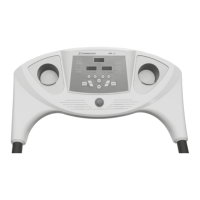
BUTTON FUNCTIONS
1. PROGRAM
While the treadmill is not in motion, this button is used to
select the individual programs (12 programs in total,
P1, P2 – P12).
2. MODE
While the treadmill is not in motion, this button is used to
select the individual target modes. Time counts down to
zero, distance counts down to zero, calories count down
to zero. After selecting the individual mode, please press
the speed up (+) or speed down button (–) to adjust the
data. After this, please press START to run the program.
The pre-set values will start running down to zero.
3. START
After the treadmill is turned on and the magnetic safety
key is attached to the console, press the START button to
start the treadmill.
SPEED WINDOW
TIME / DISTANCE WINDOW CALORIE / PULSE WINDOW
PROGRAM BUTTON
To select the individual
program
QUICK SPEED BUTTONS
3 / 6 / 9 / 12
MODE BUTTON
To select and set pre-values
STOP BUTTON
To stop the exercise
at any time
SPEED +/– BUTTON
To change the running speed
and set the individual values
START BUTTON
To start the exercise
4. STOP
Press this button to stop the treadmill at any time of the
exercise.
5. SPEED + / SPEED –
To adjust the speed level during the workout, press
speed up (+) or speed down (–). Each button press
increases or decreases the speed by 0.1 km/h. If you press
the button for more than 0.5 seconds, the speed will be
changed in a quicker way.
6. QUICK SPEED BUTTONS 3, 6, 9, 12
Press the button to adjust the speed quickly.




 To Next Page