
 Need help?
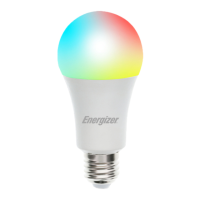
Do you have a question about the Energizer Connect EAC2-1002-RGB and is the answer not in the manual?
Lists items included: 1 Smart LED Bulb and 1 Quick Start Guide.
Devices require 2.4GHz Wi-Fi for initial setup; 5GHz is not supported.
Download the Energizer Connect app from the App Store or Google Play Store.
Open app, follow on-screen instructions to create or log into your account.
Install bulb, turn on power. Bulb should blink rapidly for EZ pairing.
Defines EZ Mode (rapid blinking) and AP Mode (slow blinking).
Click '+' and select 'Add Device' after logging in.
Select 'Lighting' from the available device categories within the app.
Confirm that the bulb is still rapidly blinking for pairing.
Enter your 2.4GHz Wi-Fi network name and password.
Your bulb is now connected to the network and ready for use.
Reset bulb by toggling power; explains EZ and AP pairing modes.
Connect Energizer Connect skill to Alexa app for voice command functionality.
Connect Energizer Connect skill to Google Home app for voice command functionality.
Covers FCC/IC compliance, RF exposure, safety warnings, and model numbers.
Details Jem Connected IOT's one-year limited warranty, coverage, and exclusions.
 General
| Brand | Energizer |
|---|---|
| Model | Connect EAC2-1002-RGB |
| Category | Lighting Equipment |
| Language | English |

 To Next Page