CONNECT THE DEVICE
STEP 1
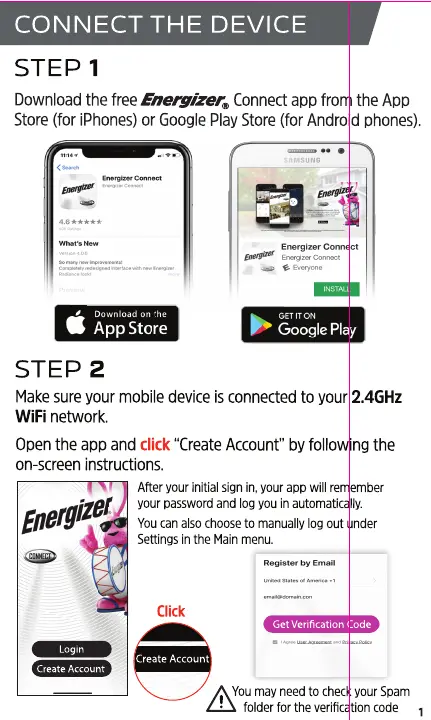
Downloadthe freeEnemizer@ Connectappfrom the App
Store (for iPhones) or Google Play Store (for Android phones).
Download on the
App Store
STEP 2
IT ON
Google Play
Makesure your mobile device isconnected to your 2.4GHz
WiFi network.
Open the app and click "CreateAccount" by following the
on-screen instructions.
After your initial sign in, your app will remember
Energizer
your password and log you in automatically.
You can also choose to manually log out under
Settings in the Main menu.
Register by
Click
Get Verification Code
Login
Create Account
Create Account
A Youmay need to checkyour Spam
folderforthe verificationcode 1


 To Next Page