EasyManua.ls Logo

Enernova ETA - Recharging Guide; Solar and Adapter Charging

Enernova ETA
28 pages
Print Icon
To Next Page IconTo Next Page
To Previous Page IconTo Previous Page
Loading...
4.
Recharging
The
product
has
a
charging
protection
function,
once
the
productis
fully
charged,
it
will
automatically
stop
charging.
It
is
recommended
to
disconnect
the
charging
connection
in
time
after
the
product
shows
that
it
is
fully
charged.
4.1
Solar
Charging
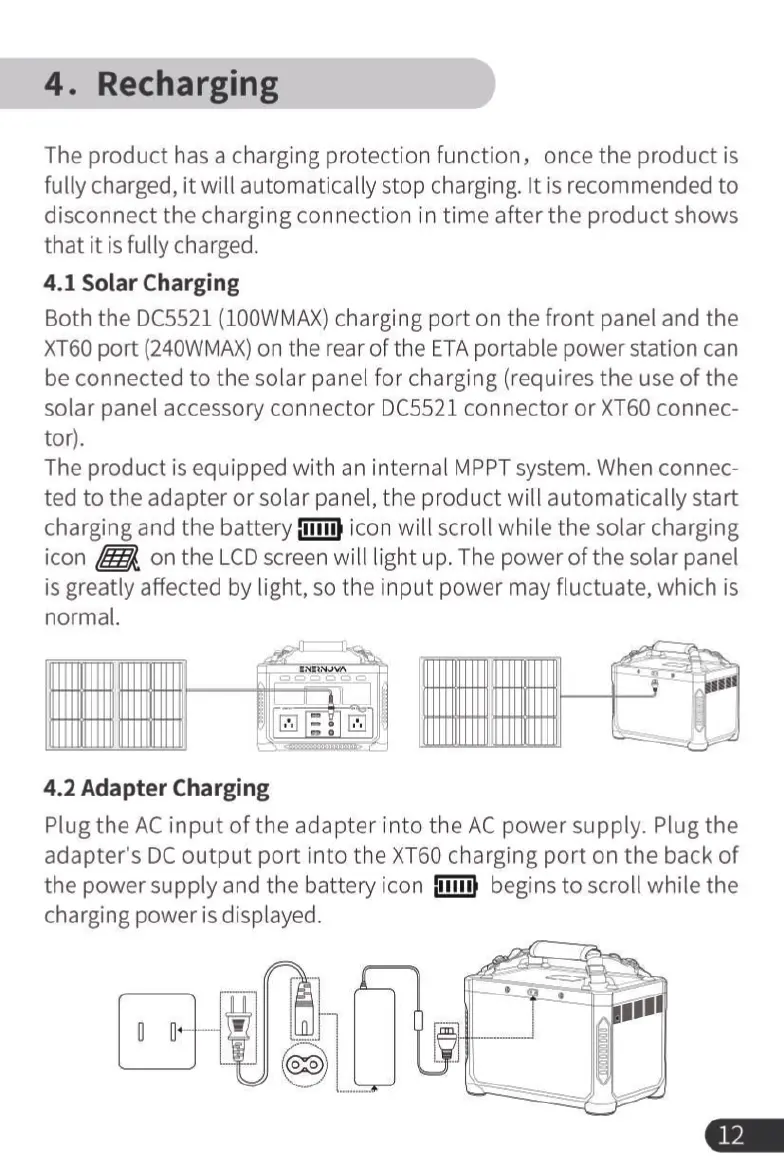
Both
the
DC5521
(100WMAX)
charging
port
on
the
front
panel
and
the
XT60
port
(240WMAX)
on
the
rear
of
the
ETA
portable
power
station
can
be
connected
to
the
solar
panel
for
charging
(requires
the
use
of
the
solar
panel
accessory
connector
DC5521
connector
or
XT60
connec-
tor).
The
product
is
equipped
with
an
internal
MPPT
system.
When
connec-
ted
to
the
adapter
or
solar
panel,
the
product
will
automatically
start
charging
and
the
battery
fllim
icon
will
scroll
while
the
solar
charging
icon
R
on
the
LCD
screen
will
light
up.
The
power
of
the
solar
panel
is
greatly
affected
by
light,
so
the
input
power
may
fluctuate,
which
is
normal.
‘l
4.2
Adapter
Charging
Plug
the
AC input
of
the
adapter
into
the
AC
power
supply.
Plug
the
adapter's
DC
output
port
into
the
XT60
charging
port
on
the
back
of
the
power
supply
and
the
battery
icon
il
begins
to
scroll
while
the
charging
power
is
displayed.
"4“
Th
T,
(e
|
HR
Y
|
—=
&
s-um“

Related product manuals