This document describes the ENKHO TECH Party Speaker with DJ Controller, a portable entertainment electronics device designed for playing audio via USB, Bluetooth®, or AUX IN, and can also function as a karaoke system or amplifier.
Function Description
The party speaker allows for simultaneous playback of two audio signals, crossfading between them, and adding various sound effects. It supports connecting external playback devices with built-in amplifiers (such as CD or MP3 players) via LINE IN, USB memory devices, and Bluetooth®-enabled audio output devices. A microphone can also be connected for announcements or karaoke. The device features an integrated party light on the front.
Important Technical Specifications
- Dimensions (W x H x D): 490 x 250 x 260 mm
- Weight: 7 kg
- Power Supply: AC 100–240 V ~ 50/60 Hz
- Power Consumption: 50 W
- Output Power: 2 x 20W RMS
- Integrated Battery: Lead battery, 7.4 V, approx. 4400 mAh, 32.56 Wh
- Operating Temperature: 0°C to +35°C, 30% to 90% relative humidity
- Storage Temperature: 0°C to +45°C, 30% to 90% relative humidity
- AUX Inputs: 2 x 3.5 mm jack
- Microphone Input: 6.3 mm jack
- Headset Output: 3.5 mm jack
- USB Port: USB 2.0, up to 32 GB (USB extension cables not supported)
- Supported File Systems (USB): FAT16, FAT32
- Supported File Format (USB): MP3 (external hard disks not supported)
- USB Output Voltage: 5 V 500 mA
- Bluetooth® Version: 4.2
- Bluetooth® Profiles: A2DP, AVRCP
- Bluetooth® Range: Up to 10 m (depending on ambient conditions)
- Bluetooth® Frequency Range: 2.4 GHz (2402–2480 MHz)
- Max. Bluetooth® Transmitting Power: -2.63 dBm
Usage Features
The device is divided into two identical channels (CH1 and CH2), each with its own input sources (LINE, USB, Bluetooth) and controls.
Getting Started
- Placement: Place the speaker on a sturdy, level, vibration-free surface. Maintain a minimum distance of 5 cm from walls at the rear and 1 cm on either side for adequate ventilation. Avoid placing liquids or open flames on or near the device.
- Power: Connect the supplied mains cable to an earthed 100–240 V ~ 50/60 Hz outlet. The internal rechargeable battery charges automatically when connected to power. The battery charge level is indicated by four LEDs (Low, 1, 2, 3).
- Switching On/Off: Use the On/Off switch. The device starts in the last selected operating mode. Unplugging the mains cable completely switches off the device and ensures full battery charge if connected.
Connections
- LINE IN Mode: Connect external audio devices (CD/MP3 players) to LINE1 or LINE2 3.5 mm jack inputs. Select AUX as the input source on the display.
- USB Mode: Insert a USB memory device into the USB port. Select USB as the input source. Audio playback starts automatically.
- Bluetooth® Mode: Activate Bluetooth on your external audio device. Press the PAIRING button on the desired channel (CH1 or CH2) to initiate pairing. The device will appear as "MD44420CH1" or "MD44420CH2". If prompted, enter "0000" as the password. The speaker attempts to automatically connect to the last paired device.
- Microphone: Plug a 6.3 mm jack microphone into the MIC input. Adjust volume using the MIC VOLUME control.
- Headphones: Plug headphones into the HEADPHONE jack to preview music loops. Set volume to the lowest setting before playback and gradually increase to a comfortable level to prevent hearing damage.
Operating the Device
- Music Playback: Connect two audio sources. Select the desired input source (Bluetooth, AUX, or USB) for each channel using the SOURCE button. Start playback using the ▶/II button. Adjust overall volume with MASTER VOLUME, microphone volume with MIC VOL, and "Sample cue" volume with CUE VOL.
- Changing Channels: Use the Crossfader to play both channels simultaneously (middle position), only CH1 (left), or only CH2 (right).
- Scratching: Available only with USB playback. Press the SCRATCH button to activate the effect, then turn the Slipmat clockwise or anti-clockwise.
- Pitch: Adjust the playback speed of tracks (USB playback only).
- Effects: Each channel has 8 sound effects, with two effects per button. Press EFFECT PAD1-4 for standard effects, or FILTER + EFFECT PAD1-4 for additional effects.
- CUE: Set a cue point in a song (USB playback only) by pressing the ▶/II button at the desired point, then CUE. Pressing CUE again returns to the stored point and pauses playback.
- CUE1, CUE2, CUE3: Set up to three additional cue points per song by pressing the respective CUE1, CUE2, or CUE3 buttons.
- Track Selection: Use the ◀◀ button to go to the start of the current track or the previous track. Use the ▶▶ button to skip to the next track.
- Party Light: Activate or deactivate the front LED party light using the LED MODE button. The LED light is integrated and not user-replaceable.
Maintenance Features
- Cleaning: Always disconnect from mains power before cleaning. Use a dry, soft cloth. Avoid chemical solvents or cleaning products. Ensure no liquid enters the speaker.
- Storage: If not in use for a prolonged period, unplug the device and store it in a cool, dry place, protected from dust and extreme temperature variations.
- General: Read the user manual and safety instructions carefully. Keep the device and accessories out of reach of children. Children aged 8 and older, or individuals with reduced physical, sensory, or mental capabilities, may use the device with proper supervision and understanding of risks.
- Choking/Suffocation: Keep packaging materials away from children.
- Electric Shock: Do not place liquid-filled containers on or near the device. Protect the device from dampness, water drops, or spray. Avoid exposing it to dust, heat, or direct sunlight. Do not place objects on cables. Never attempt to open or repair the device yourself.
- Fire: Ensure adequate ventilation (min. 5 cm at the rear, 1 cm on sides). Do not cover the device. Keep open flames away. Do not use in potentially explosive atmospheres or areas with particle-laden air.
- Damage: Place on a stable, level surface. Maintain at least one meter distance from high-frequency or magnetic interference sources. Avoid extreme humidity, temperatures, direct sunlight, or naked flames.
- Troubleshooting: In case of malfunction (e.g., no power, no sound, MP3 files not playing), refer to the troubleshooting section in the manual or contact the Service Centre.
MEDION AG declares that this device complies with the fundamental requirements and other relevant provisions of:
- Radio Equipment Directive 2014/53/EU
- Ecodesign Directive 2009/125/EC
- RoHS Directive 2011/65/EU
The complete EU Declaration of Conformity can be downloaded from www.medion.com/conformity.
- Bluetooth®: Registered trademark of Bluetooth SIG, Inc., used under license by MEDION.
- USB™: Registered trademark of USB Implementers Forum, Inc., used under license by MEDION.
- Other trademarks belong to their respective owners.
Disposal
- Packaging: Dispose of packaging materials in an environmentally friendly manner through recycling.
- Device: Do not dispose of old devices with household waste. Dispose of correctly at the end of its service life at an electrical scrap collection point or recycling center, in accordance with Directive 2012/19/EU.
- Rechargeable Batteries: Do not dispose of used rechargeable batteries with household rubbish. Dispose of them correctly at designated collection points provided by retailers or local authorities. The crossed-out wheelie bin symbol indicates that batteries must not be disposed of with household rubbish.
Warranty
The appliance is guaranteed for three years from the date of delivery, as shown by the receipt/invoice. Replacement is guaranteed for defects existing before purchase. The warranty does not cover parts found faulty due to negligence or careless use, improper use, or professional use. The seller disclaims liability for damages caused by failure to abide by the instructions in this manual.

 Need help?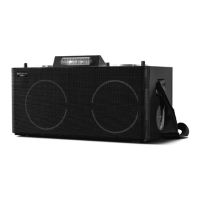

 To Next Page
 General