Acve faults are listed on this page with a red
background color. Immediately below the list of acve
faults, the fault log list begins. It opens by pressing the
Down buon on the main page.
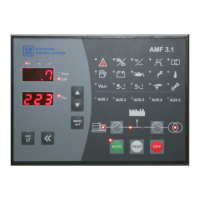
START BUTTON: If the device is set to manual mode, the Start
Button is used to start the generator. Additionally, when the
generator is operational in these modes, pressing the Start
Button activates the generator load.
STOP BUTTON: When the Stop Button is pressed, if the
generator load is active, the generator switches to cooling
mode. If the generator load is not active, it transitions directly
to the stop state. Pressing this button puts the device in
Shutdown Mode.
AUTO BUTTON: The Auto Button is used for mode transitions
in the device when short-pressed on Monitoring Pages. It
facilitates switching between Auto Mode and Manual Mode.
Additionally, when short-pressed on Menu Pages, it functions
as the Enter Button.
EXIT BUTTON: Alarm Silence Button: When pressed briefly,
this button silences the specific alarm shown on the active
alarm page in case of any error occurrence. If not on the
active alarm page, when on Monitoring Pages, a brief press
clears all non-critical errors. Moreover, on Menu Pages, a brief
press acts as the Back Button.
take.
Take value.


 To Next Page
 Need help?
 General