Page 2
Page 3
Page 4
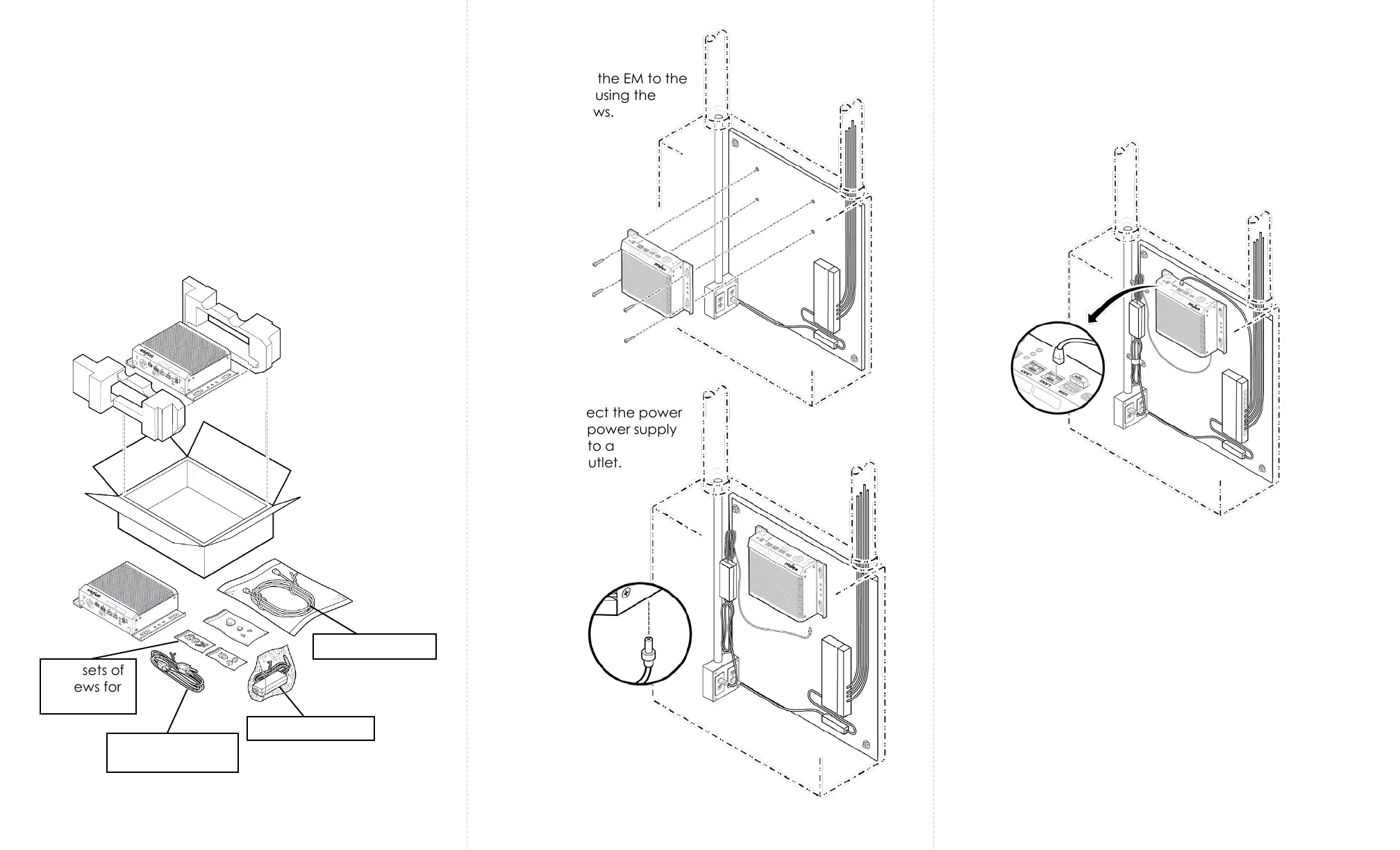
The procedure below shows how to install the Energy Manager.
The Energy Manager (EM) can be installed on a backer board,
which can be inside or outside of an enclosure.
Step 1: Unbox the Energy Manager (EM).
Caution
Installation and maintenance must be performed by a
qualified electrician in accordance with local, state, and
national electrical codes (NEC) and requirements.
Step 2: Attach the EM to the
backer board using the
mounting screws.
Step 3: Connect the power
cable to the power supply
and plug it into a
receptacle outlet.
Step 4: Use an Ethernet cable to connect LAN2 port on the
EM to a standard port on the PoE switch.
Step 5: Tie the extra-length of the cables using tie wraps
and/or hold downs.
Power supply
Power cable for
power supply
Two sets of
screws for
mounting
Ethernet cable


 To Next Page
 Loading...