EasyManua.ls Logo

enphase Communications Kit 2 - User Manual

enphase Communications Kit 2
7 pages
Print Icon
To Next Page IconTo Next Page
Loading...
QUICK INSTALL GUIDE
(Model: COMMS-KIT-02)
Installing the Enphase Communications Kit 2
The Communications Kit 2 (SKU: COMMS-KIT-02) enables wired communication between IQ Gateway, IQ Battery 5P, and IQ System Controller 3/3G.
NOTE: The Communications Kit 2 must be installed when an IQ Battery 5P is being used with the IQ Gateway (standalone or integrated into an IQ
Combiner 4/4C/3/3C/3-ES/3C-ES) instead of an IQ Combiner 5/5C. The IQ Combiner 5/5C integrates the functionality of the Communications
Kit 2 and therefore does not require a standalone Communications Kit 2.
Read and follow all warnings and instructions in this guide. If you need help understanding any of the concepts, terminology, or hazards outlined in these
instructions, refer installation to a qualied electrician or installer. These instructions are not meant to be a complete explanation of a renewable energy
system. All installations must comply with local codes and standards.
INSTALLATION
The installation section is divided into three sections.
1 ) Preparation
2 ) Product installation and wiring
3 ) Control (CTRL) wiring between system components and Commu-
nications Kit 2
Preparation
The Communications Kit 2 enclosure should have access to a ground
bar.
Identify your system design from the system wiring section below. The
control wiring installation varies based on the system design. You can
identify the Communications Kit wiring based on how the system will
be wired.
Identify a vertical location where the enclosure can be mounted. Keep
in mind the dimensions of the enclosure when nding a location.
It is recommended to power down the system before you begin to en-
sure safety while operating near electrical equipment and power wires.
Ensure you have the following tools for the installation:
Drill bit (required to drill holes for the conduit).
Screwdrivers, pliers, and a torque wrench.
DANGER! Risk of electric shock. All sources to equipment
being serviced must be disconnected external to the device.
In particular, the storage system may energize conductors, so
storage circuits must ALWAYS be isolated via a circuit breaker
or disconnected before working on any portion of the system.
Figure 1: Communications Kit 2 enclosure view
© 2023 Enphase Energy. All rights reserved. Enphase, the e and CC logos, IQ, and certain other marks listed at
https://enphase.com/trademark-usage-guidelines are trademarks of Enphase Energy, Inc. in the US and other coun-
tries. Data subject to change. Rev 02/2023-07-10
1
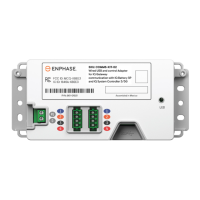
Figure 2: Control adapter
NOTE: For installation on sites containing the Envoy S Metered,
a 3-pin Wago that can t into ports supporting 14 AWG wires
must be purchased separately.
CONTENTS
The Communications Kit 2 enables the IQ Gateway to communicate with
the IQ Battery 5P and/or IQ System Controller 3/3G over the control
cable.
This kit contains:
NEMA 3R enclosure with two DIN-rails mounted.
Control adapter mounted on lower din rail.
IQ Battery CT (leads must be wired to IQ Combiner terminals, as
shown in Section 6 of the IQ Combiner 4/4C QIG. CT must be in-
stalled on the aggregate IQ Battery Line 2 wire landing in IQ System
Controller 3 for multi-mode systems, IQ Combiner, or panel for
grid-interactive systems).
One - USB Type-C to Type-A cable (40 cm/15 ¾
inch).
Accessories bag including:
Zip ties for wire management.
Jumper (for shorting the IQ Gateway L2 and L3 power termi-
nals. Provided with this product for ease of system installation).
Two control headers pre-installed on the kit (one extra header
provided as a spare).
The USB cable connects the Communications Kit 2 adapter to the IQ
Gateway. This also powers the Communications Kit adapter by drawing
power from the IQ Gateway.
The Control cable is wired to the detachable headers attached to the
adapter.

Question and Answer IconNeed help?

Do you have a question about the enphase Communications Kit 2 and is the answer not in the manual?

Overview

The Enphase Communications Kit 2 (SKU: COMMS-KIT-02) is a crucial component designed to facilitate wired communication between an IQ Gateway, IQ Battery 5P, and IQ System Controller 3/3G within an Enphase Energy System. This kit is specifically required when an IQ Battery 5P is integrated with an IQ Gateway (either standalone or as part of an IQ Combiner 4/4C/3/3C/3-ES/3C-ES), unless an IQ Combiner 5/5C is used, as the latter already incorporates the Communications Kit 2's functionality.

Function Description:

The primary function of the Communications Kit 2 is to establish a reliable wired communication link, enabling the IQ Gateway to monitor and manage the IQ Battery 5P and IQ System Controller 3/3G. This ensures seamless data exchange for optimal system performance, energy management, and diagnostics. The kit comes housed in a NEMA 3R enclosure, providing protection against environmental elements, and includes a control adapter mounted on a lower DIN rail. Communication is achieved via a USB Type-C to Type-A cable (40 cm/15.75 inches) that connects the adapter to the IQ Gateway, also supplying power to the adapter from the Gateway. Control wiring is managed through detachable headers attached to the adapter.

Important Technical Specifications:

  • Model: COMMS-KIT-02
  • Enclosure: NEMA 3R, suitable for outdoor installation.
  • Communication Interface: Wired USB for connection to IQ Gateway.
  • Control Cable Compatibility: Enphase control cables (SKU: CTRL-SC3-NA-01) are recommended for optimal performance and are certified under UL-1277, UL-3003, and UL-83. Third-party cables are not guaranteed for performance.
  • Control Cable Torque Details:
    • Power cables (18 AWG): 0.2 N m (1.77 lb-in.)
    • Ground cables (18 AWG): 0.2 N m (1.77 lb-in.)
    • Terminal block cables (6 to 24 AWG): 0.5 N m (4.42 lb-in.)
  • USB Cable Length: 40 cm (15.75 inches).
  • IQ Gateway Software Requirement: Version 8.1 or higher for compatibility with other Enphase Energy System components.
  • Total Control Wiring Length: Should not exceed 250 feet to ensure system specifications are met.
  • LED Indicators:
    • Red: ERROR (Control or BUS error)
    • Blinking green: Communications Kit firmware update
    • Green: Communications Kit is operational
    • Blue: No USB communication
  • FCC Compliance: Class B digital device, Part 15 of FCC Rules.
  • Industry Canada Compliance: ICES-003.

Usage Features:

  • System Integration: Essential for systems incorporating IQ Battery 5P with IQ Gateway (excluding IQ Combiner 5/5C).
  • Flexible Installation: Can be installed in the same enclosure as the IQ Gateway or in a separate enclosure, depending on system design.
  • Control Wiring Configurations: Supports various wiring sequences for connecting to IQ System Controller 3/3G and IQ Battery 5P, including non-terminating and terminating node configurations.
  • Drain Wire Management: The drain wire of the control cable should only be terminated on one end of the control wiring between system components, preferably at the component where the control wiring for that section originates.
  • CT Installation: Requires installation of an IQ Battery CT on the line 2 power wire for IQ Battery 5P branches, with the CT arrow pointing towards the load.
  • Jumper Requirement: A shorting jumper is needed for the L2 and L3 power terminals of the IQ Gateway (or B and C ports on Envoy S Metered) to prevent interference with battery CT readings.
  • Conduit Routing: Control cables and the USB cable can share the same conduit when using Enphase CTRL cable (CTRL-SC3-NA-01). If the Communications Kit 2 is in a separate enclosure from the IQ Gateway/IQ Combiner or Envoy S Metered, power cables for the gateway and the USB cable should be routed through different conduits.
  • Commissioning: Requires the Enphase Installer App (version 8.1 or higher) to connect to the IQ Gateway, update software, and verify device connectivity.

Maintenance Features:

  • No User-Serviceable Parts: The Communications Kit 2 is not designed for user repair. In case of equipment failure, contact Enphase customer support for assistance or replacement.
  • Safety Guidelines: Emphasizes strict adherence to safety instructions, including disconnecting all power sources before servicing, ensuring correct wiring, and avoiding pinched or damaged wires.
  • Firmware Updates: The blinking green LED indicates a firmware update is in progress, highlighting the kit's ability to receive software enhancements.
  • Diagnostic LEDs: Provides clear LED indicators for quick status checks, aiding in troubleshooting and system monitoring.
  • Approved Attachments: Only approved attachments or accessories should be used to prevent damage or injury.

enphase Communications Kit 2 Specifications

General IconGeneral
Brandenphase
ModelCommunications Kit 2
CategoryControl Unit
LanguageEnglish