

EasyManua.ls Logo

Enso pearl - User Manual

Enso pearl
20 pages
Print Icon
To Next Page IconTo Next Page
Loading...
Welcome!
EC-200-P Instructions-v1.2.indd 1EC-200-P Instructions-v1.2.indd 1 21/5/2020 3:04 PM21/5/2020 3:04 PM
Question and Answer IconNeed help?

Do you have a question about the Enso pearl and is the answer not in the manual?

Summary

Setting the Clock

Setting the Alarm

Timer Functions Overview

Timing Function Options

Explains countdown and count-up timer functions.

Interval Timing Explanation

Setting an Interval Timer

Repeat Timing Function

Timer Mode Configuration

Timer Mode Configurations

Details how timer modes like Interval and Stopwatch are configured.

Stopwatch Mode Operation

Explains how to start the timer in Stopwatch mode.

Audio Alert Settings

Volume Adjustment

Instructions for adjusting audio alert volume levels.

Battery Replacement

Overview

The Enso Pearl is a unique timing device designed to provide a serene and distraction-free experience for managing time. It combines the functionality of a clock, alarm, and multiple timers with a focus on abstract time visualization and soothing audio alerts.

Function Description:

The Enso Pearl serves as a multi-functional time management tool with the following core capabilities:
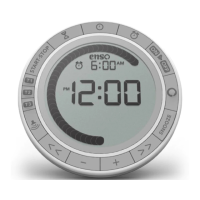
  • Clock: Displays the current time in either 12-hour or 24-hour format.
  • Alarm: A single alarm function that can be set, toggled on/off, and snoozed. The alarm utilizes soothing chimes from Tibetan & Japanese singing bowls and bells.
  • Timers (T1, T2, T3): The device features three independent timers, each highly configurable for different timing needs:
    • Interval Timing: Allows for a sequence of two or more separate sub-timers (Intervals). Each Interval is set for a specific duration, and the device counts down through them sequentially. Each timer can hold up to 99 Intervals.
    • Repeat Timing: Enables repetitive timing of a single duration, up to 99 repetitions.
    • Stopwatch Function: A count-up timer that starts from zero.
  • Enso Ring: A distinctive visual element that slowly "brushes" around the clock display, abstractly showing the relative amount of elapsed time. This feature aims to free the user's mind from the distraction of a numerical countdown.
  • Audio Alerts: Provides gentle chimes from Tibetan & Japanese singing bowls and bells to indicate the completion of a timer or alarm. The volume and tone of these alerts are adjustable.
  • Backlight: A temporary backlight for visibility in low-light conditions.
  • Numerical Display Hiding: Allows the user to hide the numerical display during a timer, leaving only the Enso Ring for abstract time visualization.

Important Technical Specifications:

  • Power Source: Requires 2-AAA batteries.
  • Interval Timer Capacity: Each interval timer can store up to 99 individual intervals.
  • Repeat Timer Capacity: Can be set for up to 99 repetitions.
  • FCC Compliance: Complies with Part 15 of the FCC rules, ensuring it does not cause harmful interference and accepts received interference.
  • Industry Canada Compliance: Class B digital apparatus compliant with Canadian ICES-003 (NMB-003 du Canada).
  • European Community Compliance: Complies with European Directive 89/336/EEC.

Usage Features:

  • Setting the Clock:
    1. Press the Clock button.
    2. Use the '+' and '-' buttons to increment/decrement time. Holding these buttons enables fast scrolling.
    3. Use the '<<' or '>>' buttons to toggle between 12/24-hour format and reset seconds to 0.
    4. Press the Clock button again to finish setting.
  • Setting the Alarm:
    1. Press the Alarm button.
    2. Use the '+' and '-' buttons to adjust the alarm time (with fast scrolling available).
    3. Press the 'ON OFF' button to toggle the alarm on or off.
    4. When the alarm sounds, press 'ON OFF' to turn it off or 'SNOOZE' to silence it for 9 minutes.
  • Timer Introduction: The Enso Pearl has three separate timers (T1, T2, T3). Each can be configured for Countdown (Interval or Repeat) or Count-up (Stopwatch) functions, and display time in Hr:Min or Min:Sec format.
    • Default Timer Settings:
      • T1: Interval (Int) Hr:Min
      • T2: Interval (Int) Min:Sec
      • T3: Repeat (Repeat icon) Min:Sec
  • Setting an Interval Timer:
    1. Press the Timer (hourglass) button.
    2. Use '+' and '-' to adjust the duration of the current interval (with fast scrolling).
    3. Press '>>' to edit the next interval.
    4. To adjust the time of a new interval, press the Repeat button (2).
    5. To add more intervals, press the Repeat button (3) then (2).
    6. Press '<<' for the previous interval.
    7. Press 'START-STOP' to start the timer.
  • Repeat Timing:
    1. Press the T3 button to use the Repeat Timer. The repeat icon will be visible.
    2. Use '+' and '-' to adjust the duration of the single timer (with fast scrolling).
    3. Use '>>' to increase the number of repetitions and '<<' to decrease.
    4. Press 'START-STOP' to start the timer.
  • Changing the Timer Function:
    1. Press T1, T2, or T3.
    2. Press and hold the Timer (hourglass) button to cycle through the following configurations for the selected timer: Hr Min Int, Min Sec Int, Hr Min Repeat, Min Sec Repeat.
  • Stopwatch Function: Press 'START-STOP' on a blank (0) timer to begin counting up in Stopwatch mode.
  • Setting the Audio Alert:
    1. Press the Speaker button.
    2. Use '+' and '-' to adjust the volume. Volume level 0 mutes the audio alert.
    3. Use '<<' or '>>' to change the tone.
    • Alert Behavior: During a timer, the selected tone plays once at the end of each Interval or Repetition, and twice at the end of the full timer. The alarm tone plays continuously when triggered.
  • Backlight: Press the Enso button to turn on the backlight for 5 seconds. The backlight cannot always be on due to power limitations.
  • Hiding the Numerical Display During a Timer: When a timer is running, hold down the Enso button for 1 second to hide the numerical display, leaving only the Enso Ring.
  • Resetting a Timer: Press and hold T1, T2, or T3 to completely reset the respective timer.

Maintenance Features:

  • Battery Replacement: When the low battery icon appears on the screen, the 2-AAA batteries must be replaced.
  • Troubleshooting Low Battery: Low battery power can cause malfunctions such as the clock display freezing, unresponsive buttons, random resetting, or degradation in audio quality. These issues can typically be resolved by replacing the batteries with a fresh set.

Enso pearl Specifications

General IconGeneral
BrandEnso
Modelpearl
CategoryTimer
LanguageEnglish