COPYRIGHT 2009 ENTONE, INC. ALL RIGHTS RESERVED
.
Amulet Quick Reference (P/N 95-80xxxx-06) 2
6. Using the Remote Control
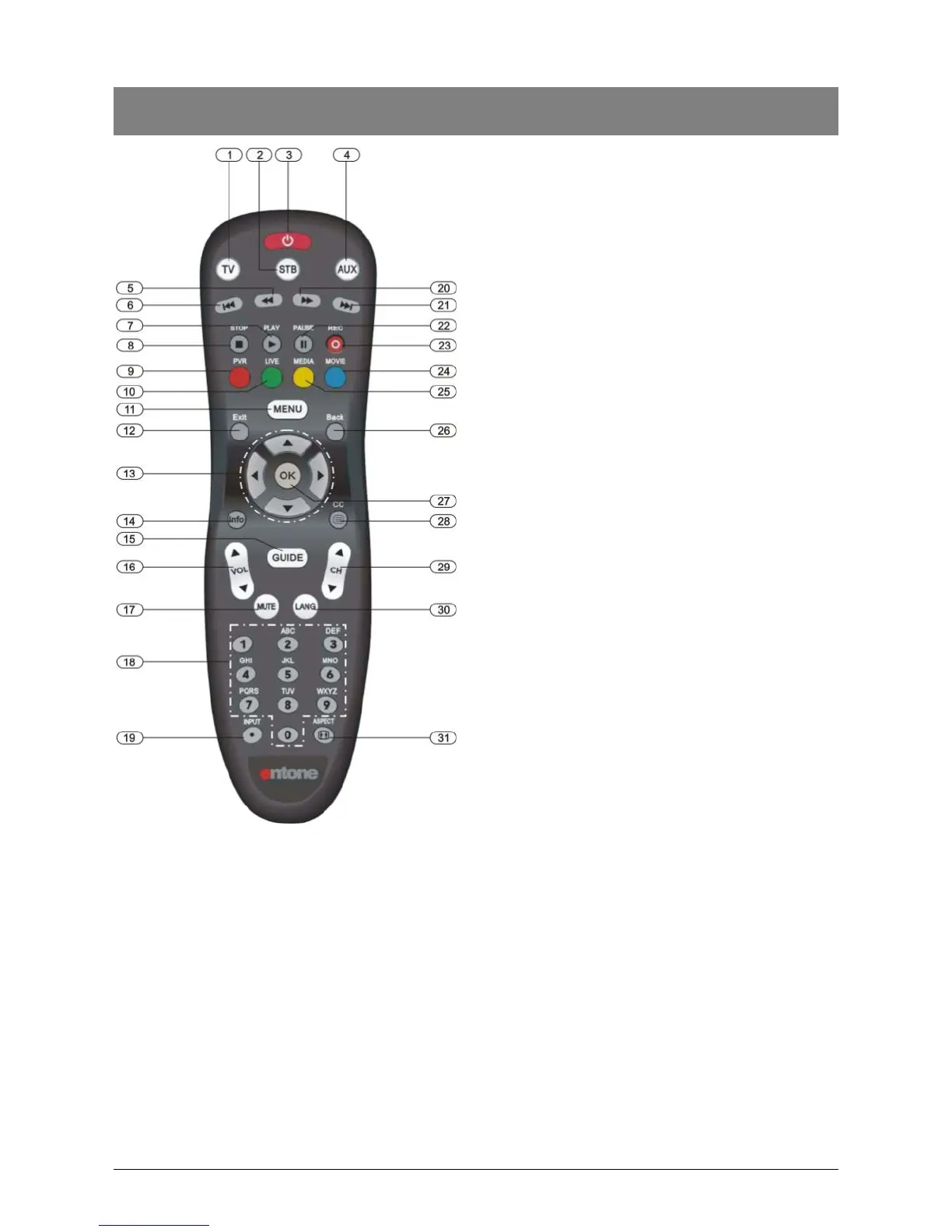
The diagram and list provide a brief description of
your remote control features. Entone provides this
as a general guide to remote control usage.
Functions may vary between different service
providers.
Please refer to your service provider’s manual for
specific information on remote usage and feature.
1. TV – Selects to control TV
2. STB – Puts remote control in STB mode.
Presses for more than 5s will trigger remote
control registration mode.
3. POWER – Switches the power on/off for the
currently selected device. Switches STB to
power on/standby mode.
4. AUX – Selects to control AUX device.
5. FAST REVERSE – Starts fast reverse for
VOD / PVR / live channel.
6. PREVIOUS CHAPTER – Toggles closed
captioning on or off.
7. PLAY – Play button for VOD / PVR / live
channel.
8. STOP – Stop button for VOD / PVR / live
channel.
9. RED / PVR – Shows the PVR Menu (if
available)
10. GREEN / LIVE – Shows the live channel
11. MENU – Shows the on-screen menu
12. EXIT – Exits the current menu item.
13. ARROW KEYS – Navigates right, left,
up, down in the on-screen guide.
14. INFO – Shows on-screen information
about the current TV / VOD / PVR
program.
15. GUIDE – Shows the electronic program
guide
16. VOL + / - – Increases or decreases
volume of the currently selected device.
17. MUTE – Turns the volume of the
currently selected device off.
18. NUMBER KEYS – Allows direct access
to specific channels and menu items.
19. INPUT – Changes the current A/V input
of the selected device.
20. FAST FORWARD – Starts fast forward
for VOD / PVR / live channel
21. NEXT CHAPTER – Goes to next movie
chapter for VOD.
22. PAUSE – Pause button for VOD / PVR /
live channel
23. RECORD – Records live channel
24. BLUE / MOVIE – Shows the VOD Menu
25. YELLLOW / MEDIA – Shows the Web
Menu
26. BACK – Changes channel to the most
recently viewed channel
27. OK – Executes the currently selected
menu option.
28. CC – Toggles closed captioning on or off
29. CH UP/DOWN – Changes channel up or
down.
30. LANG – Toggle different language in TV
audio
31. ASPECT – Changes aspect ratio of the
TV



 To Next Page