13
7. Menu Language: Select the menu display language. (English / Espanol /
Francais)
8. Aspect Ratio: Select the display aspect ratio. (Normal/Zoom/Wide/Cinema)
9. Favorite Channel Mode: When favorite channel mode on user can edit
favorite channel table in favorite channel set option.
VIDEO MENU
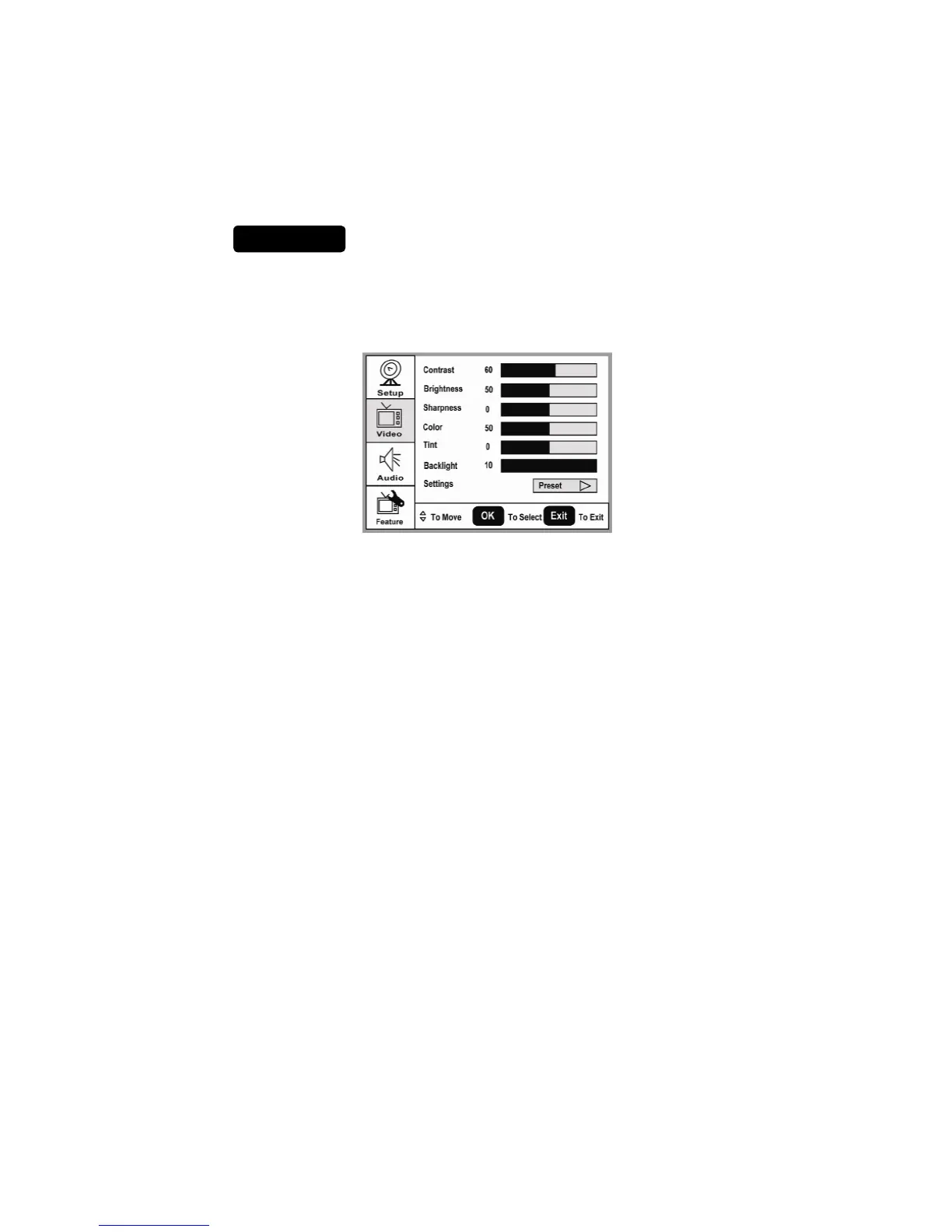
The Video menu in most source modes shows as below. It provides several video
adjustment items for user fine tuning the video display. Only in VGA source
modes, the Video menu simply provides Contrast, Brightness, Back light and
Settings (Preset) items.
1. Contrast: Video contrast adjustment, the tuning range is 0 ~ 100.
2. Brightness: Video brightness adjustment, the tuning range is 0 ~ 100.
3. Sharpness: Video sharpness adjustment, the tuning range is -50 ~ 50.
4. Color: Video color chroma adjustment, the tuning range is 0 ~ 100.
5. Tint: Video tint adjustment, the tuning range is R50 ~ G50.
6. BackLight: Backlight strength adjustment, the tuning range is 0 ~ 10.
7. Settings: Restore the default video settings.


 To Next Page
 Loading...