© EnvisionTEC Page 3 of 4
TS-OPI-PCA-4000-V20210311-FN-EN.pdf
The Custom program allows the user to adjust -
1 The UV power from 1% up to 100%.
2 The exposure time from 1 second to 100 hours
3 The temperature from 20° C to 60° C / 68° F to 140° F
Storing a Custom program
To store a new Custom program -
1 Select Custom from the Main menu
2 From the Custom Program list, choose the number of the program
to edit from Prg 1 - Prg 8
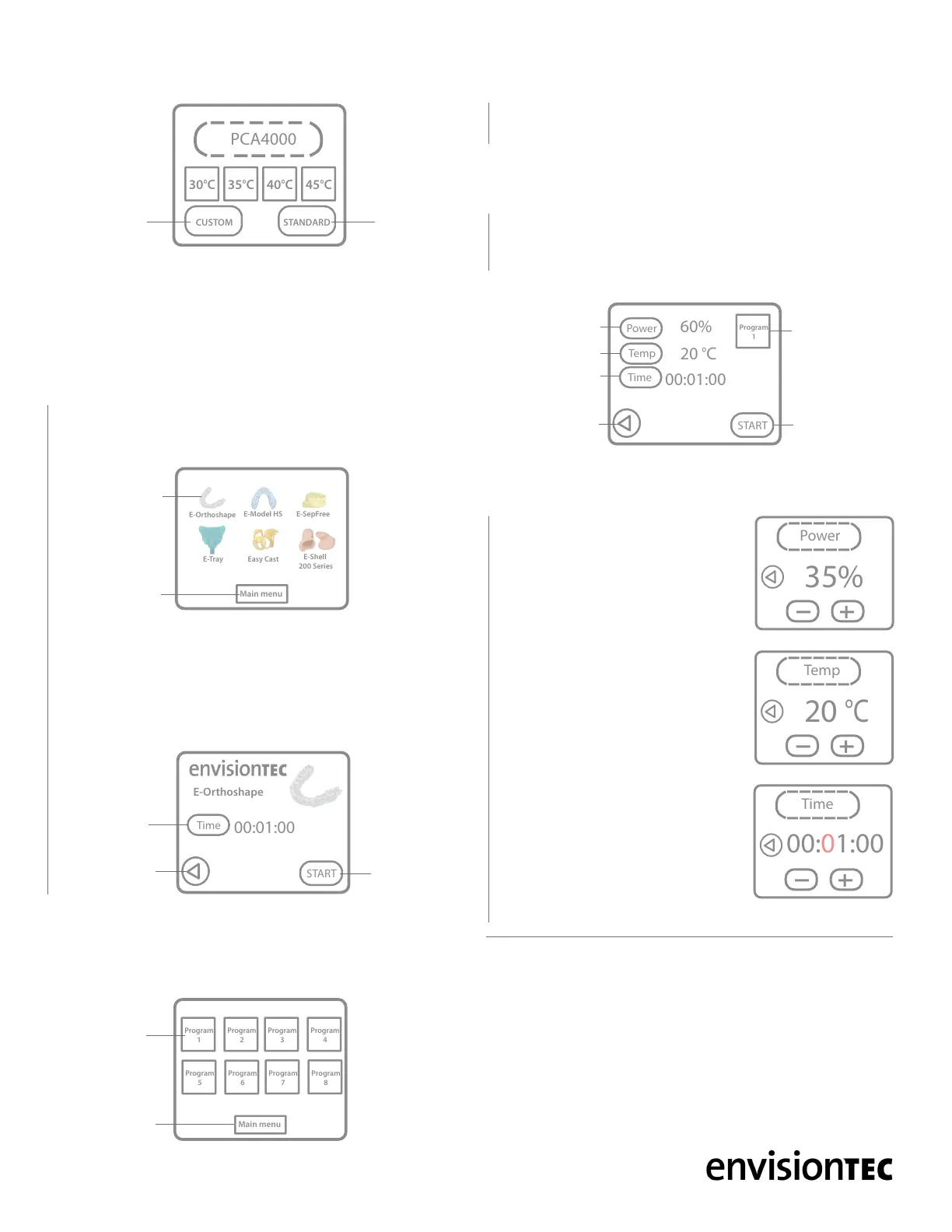
3 The custom program screen will open, ex. Program 1 Fig. 10.
For each custom program, the Power, Temperature, and Time can
be adjusted individually -
4 From the Custom program menu,
select Power
5 Adjust the power from 1 - 100% using
the plus and minus symbols
6 Select the Back button at the center
left of the menu to return to the Custom
program menu
7 Select Temp
8 Adjust the temperature from 20° to 60°
C / 68° to 140° F
9 Select Back
10 Select Time
11 Adjust the time from 1 second to 100
hours
12 Select Back. Verify your Power,
Temp, and Time are correct
13 Place the clean model(s) on the post
curing tray in the curing chamber and
close the lid
14 When ready to begin the curing cycle, select Start
The PCA 4000 system has two post curing program options - Custom
and Standard. The placement of the UV emitters allows for 360°
curing of the models without having to rotate the curing platform.
Using a Standard program
The Standard programs are pre-programmed post-curing settings for
specic EnvisionTEC materials. Each material listed in the Standard
program menu has specic time, temperature, and power settings.
1 Select the STANDARD icon from the Main menu, Fig. 6, to
access the Standard program menu, Fig. 7.
2 Select the desired material from the Standard program menu, ex.
E-Orthoshape Fig. 8
3 Place the clean model(s) on the post curing tray in the curing
chamber and close the lid
4 When ready to begin the curing cycle, select the Start button at
the bottom right of the menu
Custom programs
The PCA 4000 can store eight personalized programs. Select the
CUSTOM icon from the Main menu, Fig. 6, to access the Custom
program menu, Fig. 9.
Main menu
Program
1
Program
2
Program
3
Program
4
Program
5
Program
6
Program
7
Program
8
CUSTOM PROGRAM MENUFig. 9
Main
menu
Custom
program 1
Main menu
E-Orthoshape
E-Model HS E-SepFree
E-Tray Easy Cast
E-Shell
200 Series
STANDARD PROGRAM MENUFig. 7
Main
menu
E-Orthoshape
program
Time
START
00:01:00
E-Orthoshape
E-ORTHOSHAPE STANDARD PROGRAMFig. 8
Return to Standard
program menu
Standard
program time
Start
button
Time
START
00:01:00
Program
1
Temp
Power
60%
20
°
C
CUSTOM PROGRAM 1Fig. 10
Return to Custom
program menu
Custom
program 1
Start curing
cycle
Power settings
Temp settings
Time settings
MAIN MENUFig. 6
Standard
program
Custom
program
PCA4000
30
°
C 35
°
C 40
°
C 45
°
C
STANDARDCUSTOM


 To Next Page
 Loading...