16
INSTALLATION GUIDE
(Parts of case hidden for clarity)
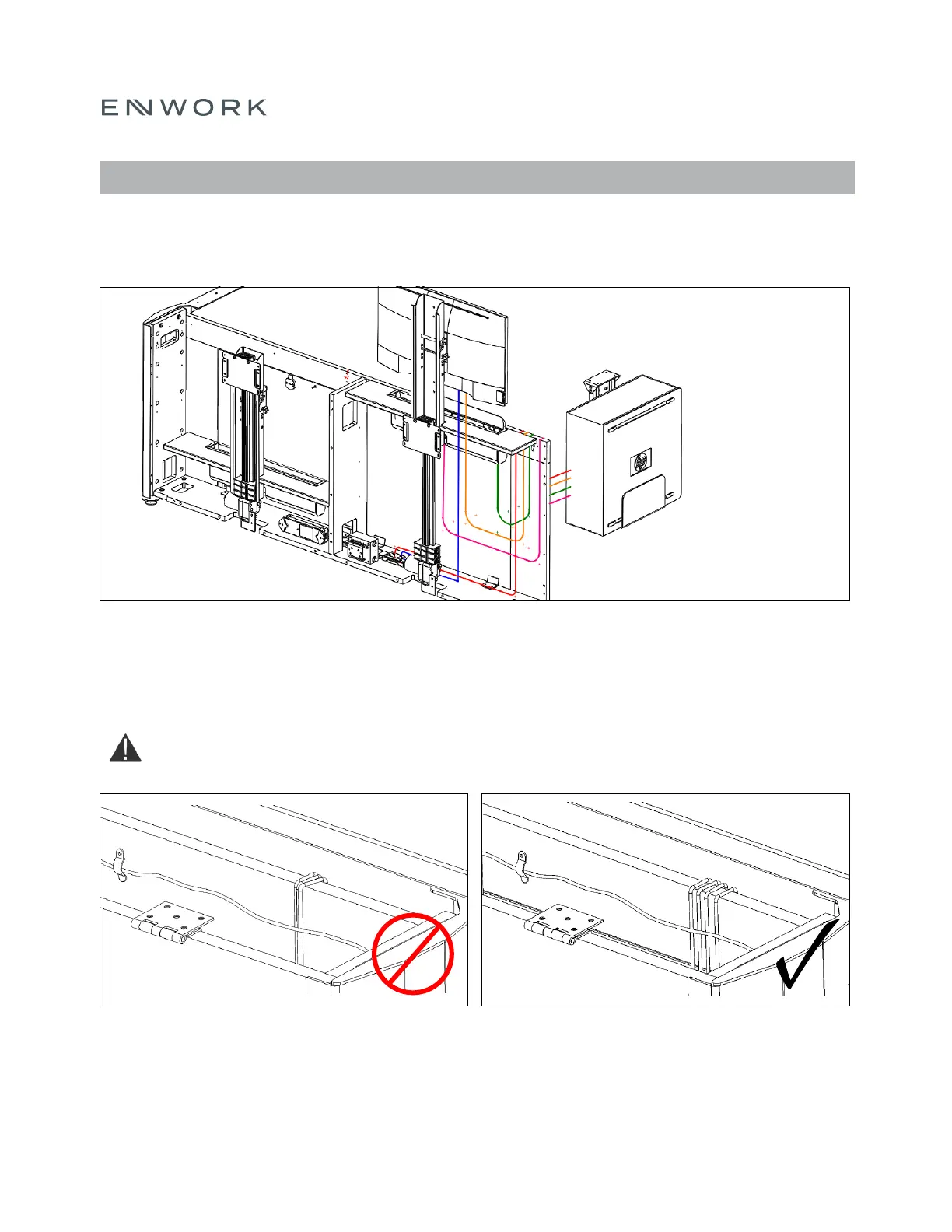
Refer to Figure 6.12 for advised wire routing on an external CPU setup.
ALL cords must run behind the Shelf and/or over the Front Panel of the case. The cords plugging into the
4Trac from the shelf should move freely and should not be tethered, tied, or clipped to anything else in the case.
(Lids hidden for clarity)
The cords over the Front Panel should not be grouped on top of each other as shown in Figure 6.13.
Note: Route these cords behind the handset cord as shown in Figure 6.13
FIGURE 6.12
FIGURE 6.13
6) ASSEMBLY: WIRE ROUTING
– = CPU
– = Keyboard
– = Mouse
– = Monitor VGA
– = Monitor


 To Next Page