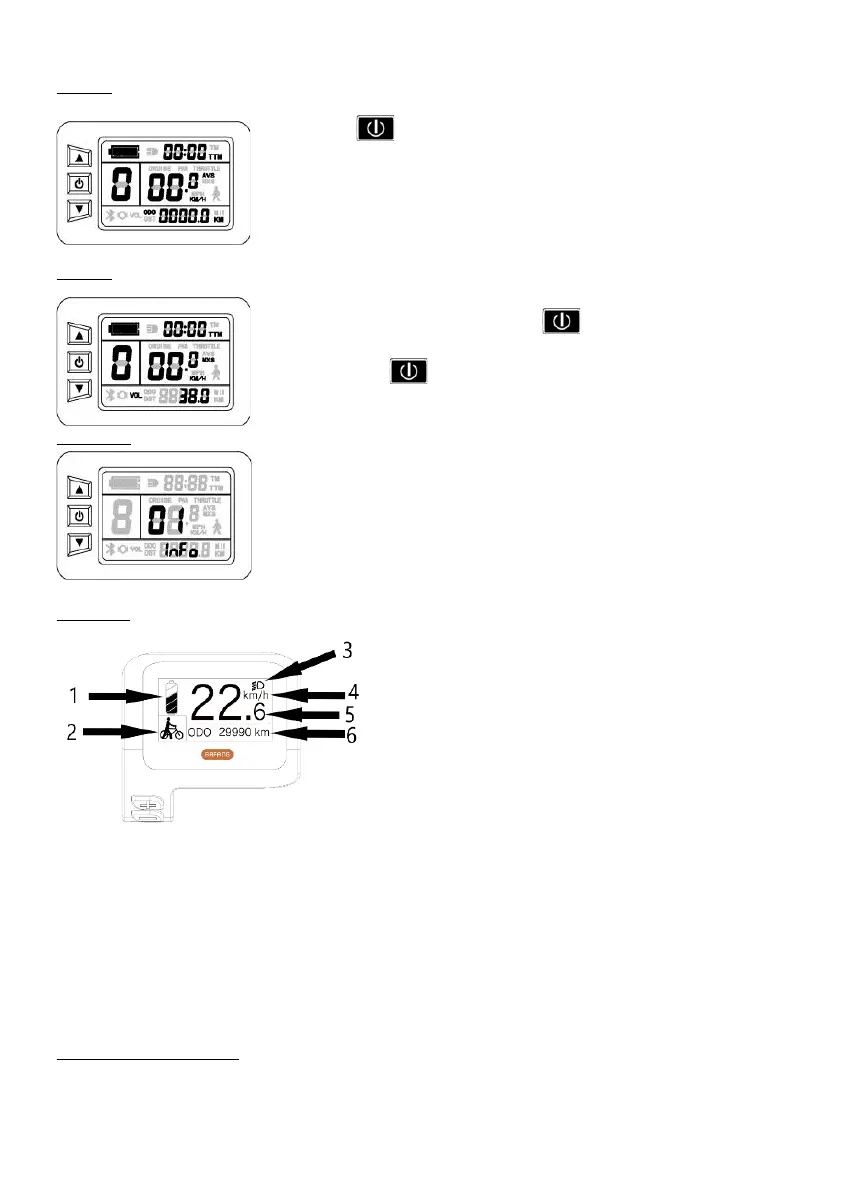
Screen 2
Briefly press to access the second screen, on which you will find the average
speed as well as the total distance.
Screen 3
From the display two press once more on you will access the third screen,
where the maximum speed and battery voltage will be indicated.
Press ink once on to return to the home screen.
Error codes
03_ info motor anomaly.
04_info anomaly in the pedalling sensor
06_info short circuit of the motor or controller.
LCD Bafang
LCD display version for models City X et Confort X
1 Real-time battery charging
2 Level of assistance
3 Indicator light display when lights are on
4 Speed unit
5 Digital display
6 Trip: Daily kilometres (TRIP) - Total kilometres (ODO) - Maximum speed (MAX) - Average speed (average distance
remaining RANGE) - Energy consumption (CAL) - Travel time (TIME)
Switching the system on/off
Press and hold the power button for 2 seconds to turn on the system. Press the power button again for 2 seconds to
turn off the system.
Page8


 To Next Page