13
D
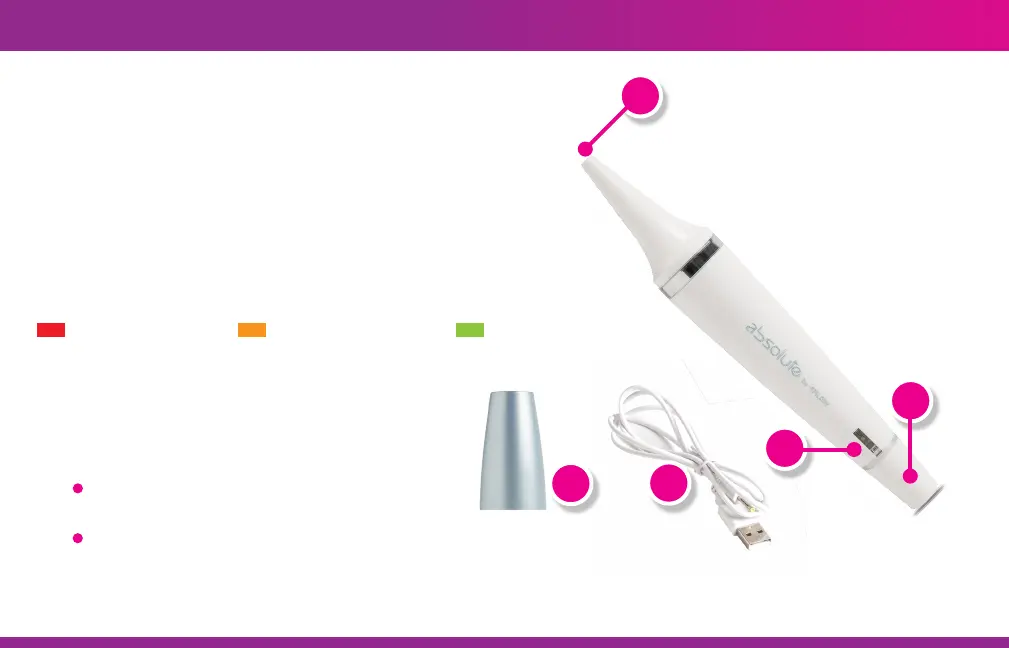
GETTING TO KNOW YOUR EPILASER ABSOLUTE
(A) Treatment Window: The end of the laser that
must make contact with the skin and the area you
wish to laser. When the laser is on you will see a
white light shine from this end.
(B) Power Switch: Rotate 1/4 turn to turn the laser
device on.
(C) Indicator Light: A light at the bottom of the laser
that lets you know the status of the laser.
(D) Cap: Covers the laser when not in use.
(E) Charger Cable: This cable has 2 ends:
USB end - connects to your USB-compatible
charger (e.g. phone charger, computer)
Pin plug end - connects to the laser
Blinking red = Charging Orange = Charge complete Green = Laser turned on
A
B
C
D
E


 To Next Page