EasyManua.ls Logo

Epomaker Shadow-X - Keyboard Functionality and Controls; Windows Shortcuts; macOS Shortcuts; Function Key Combinations

Epomaker Shadow-X
5 pages
Print Icon
To Next Page IconTo Next Page
To Previous Page IconTo Previous Page
Loading...
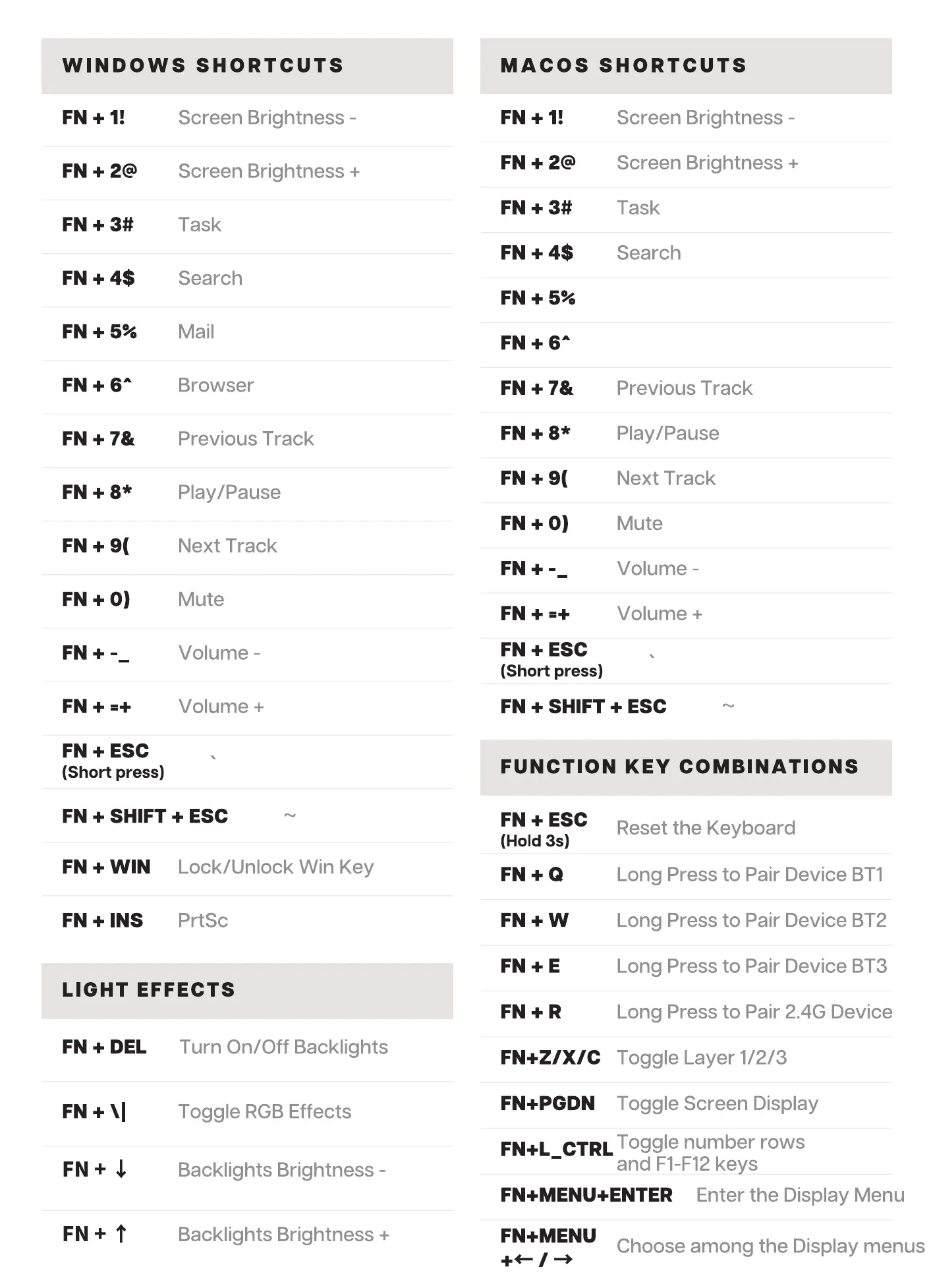
WINDOWS SHORTCUTS
Screen Brightness -
Screen Brightness +
Task
Search
Mail
Browser
Previous Track
Play/Pause
Next Track
Mute
Volume -
Volume +
FN + ESC
(Short press)
FN + SHIFT + ESC
MACOS SHORTCUTS
Screen Brightness -
Screen Brightness +
Task
Search
Previous Track
Play/Pause
Next Track
Mute
Volume -
Volume +
FN + ESC
(Short press)
FN + SHIFT + ESC
FUNCTION KEY COMBINATIONS
FN + WIN
FN + INS
Lock/Unlock Win Key
prtSc
LIGHT EFFECTS
Turn On/Off Backlights
FN + DEL
FN + ESC
(Hold 3s)
FN+E
FN+R
FN+ZIX/C
FN+PGDN
Reset the Keyboard
Long Press to Pair Device BTI
Long Press to Pair Device BT2
Long Press to Pair Device BT3
Long Press to Pair 2.4G Device
Toggle Layer 1/2/3
Toggle Screen Display
FN+t
Toggle RGB Effects
Backlights Brightness -
Backlights Brightness +
Toggle number rows
FN+L_CTRL
and Fl-F12 keys
Enter the Display Menu
FN+MENU+ENTER
FN+MENU
Choose among the Display menus

Related product manuals