QUICK S T A R T GUIDE
EN
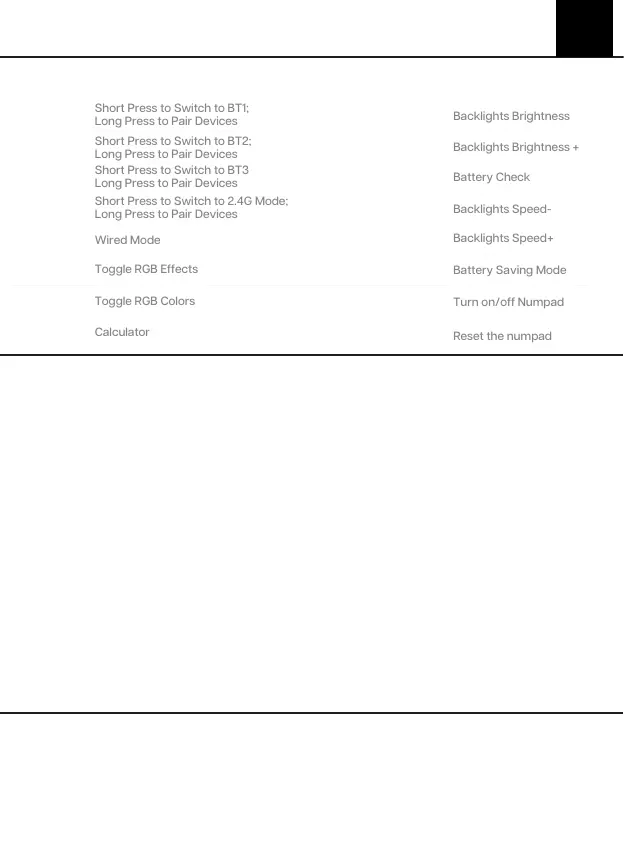
FN + 1
FN + 2
PAIRING BLUETOOTH
PAIRING WIRELESS 2.4GHz
BASIC FUNCTION
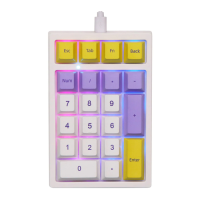
1. Hold Fn+1/2/3 for 3-5 seconds till the indicators flashes fast, the numpad is ready to pair.
1. Hold Fn+4 for for 3-5 seconds till the light flashes fast, the keyboard is ready to pair.
Toggle the switch to the wired mode, press Fn+5 till the T key lights up, and the keyboard enters
to the wired mode successfully.
The Tab light is the battery indicator. When the numpad is at low battery, it flashes red; when the
numpad is charging, the Tab key remains red light; when the numpad is fully charged, the indicator
light is off.
2. Insert the 2.4G dongle to your device, the 4 key stops flashing green and the connection is done.
2. Turn on your Bluetooth device and find“TH21 BT5.0” or “TH21 BT3.0”, then connect. When the
keyboard is connected to the Bluetooth device, the light on the 1/2/3 key stops flashing and the
connection is done.
3. Press Fn+1/2/3 to toggle between the Bluetooth devices 1/2/3.
Short Press to Switch to BT1;
Long Press to Pair Devices
Short Press to Switch to BT2;
Long Press to Pair Devices
FN + 3
Short Press to Switch to BT3
Long Press to Pair Devices
FN + 4
Short Press to Switch to 2.4G Mode;
Long Press to Pair Devices
FN + 5
FN + 6
FN + 7
FN + 8
FN + -
FN + +
FN + .
FN + ÷
FN + ×
FN + Back
Fn+ Enter
(Long press 3s in
wireless mode)
Fn+ Esc
(Long press 3s)
TECHNICAL ASS ISTANCE
TIPS ON CHARGING
WIRED MODE
For technical assistance, please email to support@epomaker.com with your purchase order number
and a detailed description of your issue.
We normally respond to enquiries within 24 hours. If you purchased your keyboard from a distributor or
not from any official store of Epomaker, please contact them directly for any additional help.


 To Next Page