EN
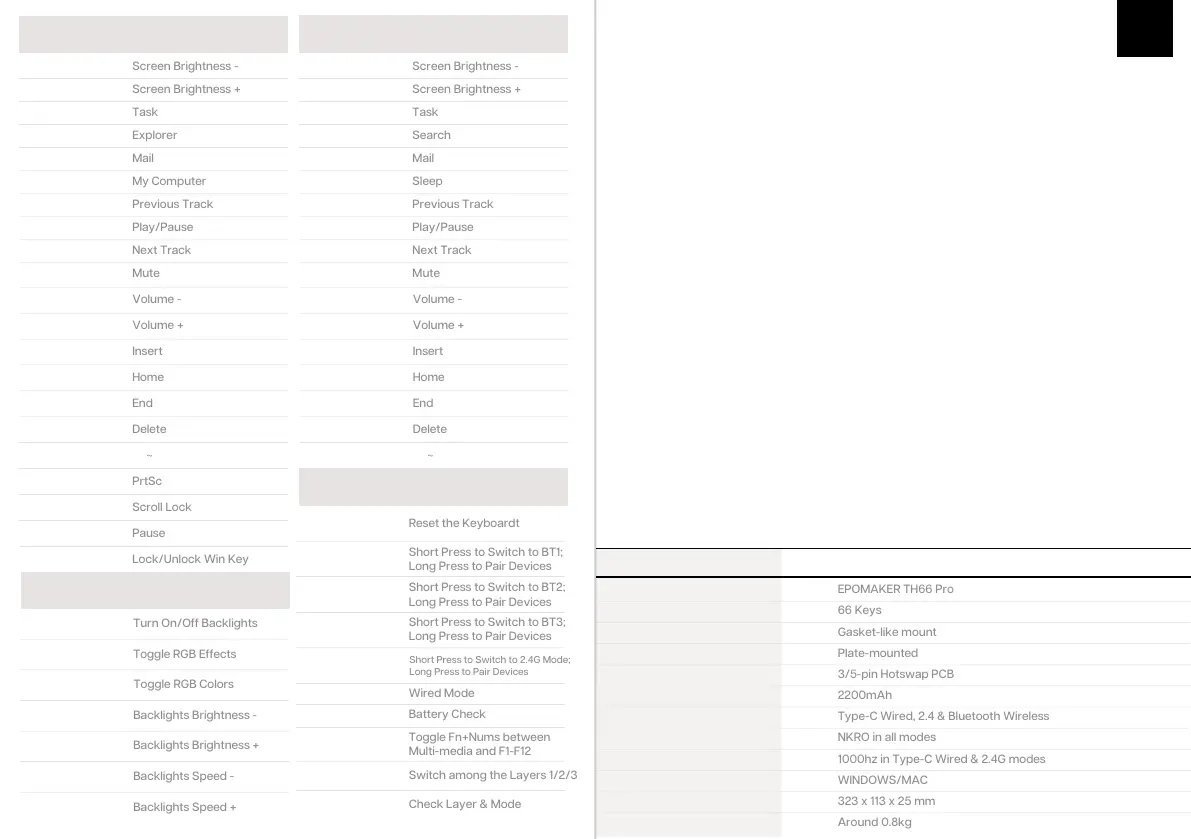
WIN D O W S S H O RTC U T S
FN + 1
Fn + 2
Fn + 3
Fn + 4
Fn + 5
Fn + 6
Fn + 7
Fn + 8
Fn + 9
Fn + 0
FN + 1
Fn + 2
Fn + 3
Fn + 4
Fn + 5
Fn + 6
Fn + 7
Fn + 8
Fn + 9
Fn + 0
Fn + -
Fn + =
Fn + J
Fn + K
Fn + L
Fn + PgDn
Fn + Shift + Esc
Fn + -
Fn + =
Fn + J
Fn + K
Fn + L
Fn + PgDn
Fn + Shift + Esc
Fn + U
Fn + I
Fn + O
Fn + Win
FN+Esc
(Hold 3s)
Fn + Q
Short Press to Switch to BT1;
Long Press to Pair Devices
Short Press to Switch to BT2;
Long Press to Pair Devices
Short Press to Switch to BT3;
Long Press to Pair Devices
Fn + W
Fn + E
Fn + R
Short Press to Switch to 2.4G Mode;
Long Press to Pair Devices
Fn + T
FN+ B
Fn+L_Ctrl
Toggle Fn+Nums between
Multi-media and F1-F12
Fn+Z/X/C
Switch among the Layers 1/2/3
Fn+Spacebar
(Hold)
Fn + Backspace
Fn + \|
Fn + P
Fn + ↓
Fn + ↑
Fn + ←
Fn + →
MACOS SHORTCUTS
FUNCTION KEY COMBINATIONS
LIGHT EFFECTS
Toggle the switch in the back to make sure that the keyboard is under
the wireless mode:
PAIRING BLUETOOTH
1. Hold Fn+Q/W/E for 3-5 seconds till the indicators flashes fast in blue, the keyboard is ready
to pair.
2. Turn on your Bluetooth device and find “TH66 BT5.0” or “TH66 BT3.0”, then connect. When
the keyboard is connected to the Bluetooth device, the light on the Q/W/E key stops flashing
and the connection is done.
3. Press Fn+Q/W/E to toggle between the Bluetooth devices 1/2/3.
WIRED MODE
Toggle the switch to the wired mode, press Fn+T till the T key lights up in
white, and the keyboard enters to the wired mode successfully.
TOGGLE THE NUMBER ROW BETWEEN MULTIMEDIA MODE AND F1F12 KEYS
Press Fn+L_Ctrl, the combinations from Fn+1 to Fn+= will toggle between Multi-media functions
and F1-F12 keys; for example, when Fn+1= Brightness -, it means that the number row is under
the Multi-media Mode; if you need to type F1-F12 keys, press Fn+L_Ctrl, the number row will be
changed to F keys mode, and Fn+1 will be F1 under this mode.
CHECK LAYER AND MODE
Hold Fn+Spacebar, the indicators of Z/X/C and Q/W/E/R/T light up to show at which layer and
which mode the keyboard is; for example, if the keys of X and E light up when holding
Fn+Spacebar, it means that the keyboard is in layer 2 and under the wireless mode and
connected to BT3 device.
PAIRING WIRELESS 2.4GHZ
1. Hold Fn+R for for 3-5 seconds till the light flashes fast in green, the keyboard is ready to pair.
2. Insert the 2.4G dongle to your device, the R key stops flashing green and the connection is
done.
Toggle the switch in the back to make sure that the keyboard is under
the wireless mode:
S P E C S
MODEL:
KEYS AMOUNT:
STRUCTURE:
STABILIZER TYPE:
PCB TYPE:
BATTERY CAPACITY:
CONNECTIVITY:
ANTI-GHOST KEY:
POLLING RATE:
COMPATIBILITY:
DIMENSION:
WEIGHT:
Type-CWired, 2.4&BluetoothWireless
1000hz inType-C Wired & 2.4G modes



 To Next Page
 Loading...