EN
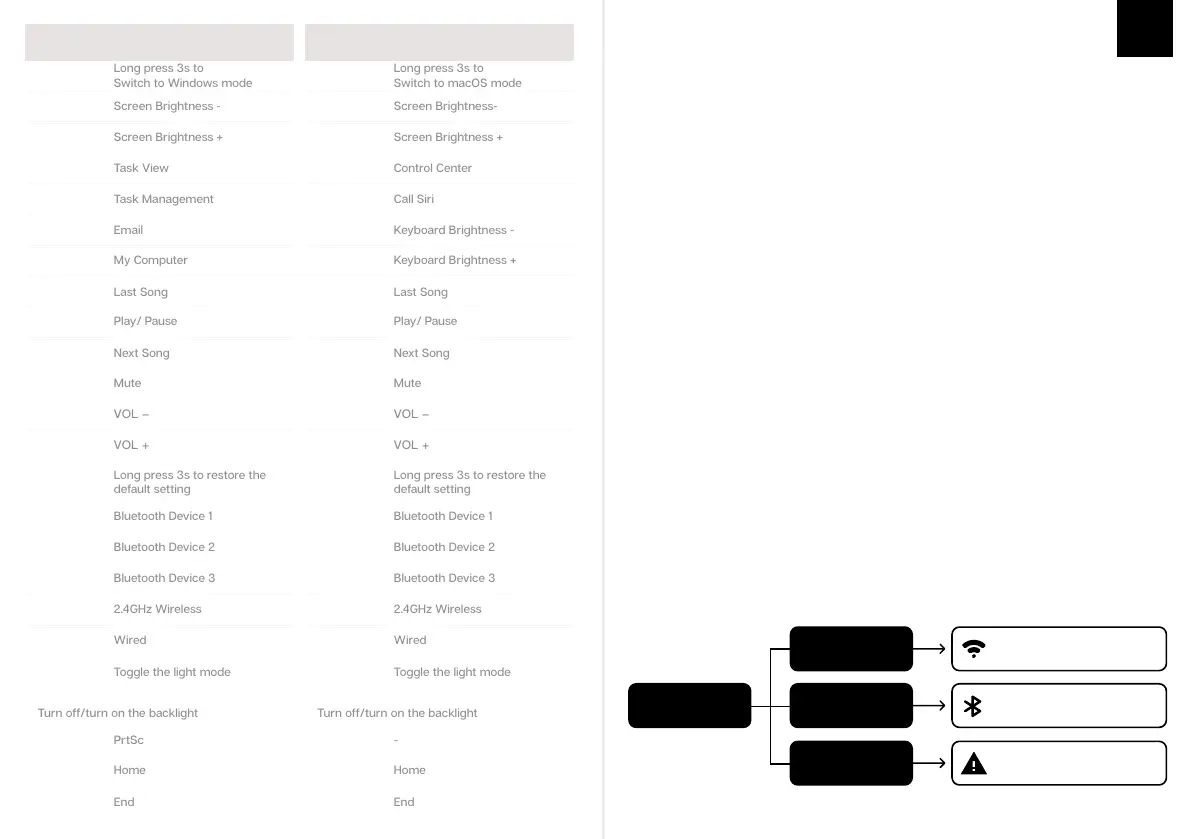
WINDOWS SHORTCUTS
FN + F8
FN + F7
FN + F9
FN + F10
FN + F11
FN + F12
FN + 1
FN + 2
FN + 3
FN + 4
FN + 5
FN + F1
FN + F2
FN + F3
FN + F4
FN + F5
FN + ESC
Long press 3s to restore the
default setting
FN + F6
FN + A
Long press 3s to
Switch to Windows mode
FN + \
FN + BACKSPACE
Turn off/turn on the backlight
FN + U
FN + K
FN + L
Operating system should be windows 8 or above to support the Bluetooth function. The device
should support Bluetooth 5.0 or a higher version to use Bluetooth 5.0.
BLUETOOTH & WIRELESS 2.4GHZ SPECIFICATIONS
KEYBOARD WAKE UP/
If your keyboard is sleeping press any key to wake it up, it will remember the last device connected.
Turn on the
keyboard
Green Light ON
Blue Light ON
Lights OFF
Wireless 2.4GHz connected
Bluetooth connected to the
last paired device.
No device paired. Try pairing
your device again.
Long press the FN+1/2/3 for 3 seconds, the keyboard will start pairing and the light will flash. If
there’s no connection, the keyboard will enter into sleep mode.
PAIRING BLUETOOTH
Long Press for 3 seconds to pair Bluetooth device
FN + 123
Firstly, turn on the keyboard via the switch at the back.
Press Fn+4$ to the 2.4Ghz mode, then hold Fn+4$ for 3s till the indicator flashes at a fast speed,
insert the receiver into your device.
When the indicator stay for 2s and then off, the keyboard is connected successfully.
PAIRING WIRELESS 2.4GHz
Switch to Wireless Mode
FN + 4
Pressing Fn+ \| at the same time allows you to switch the RGB effect of
your TH80 Keyboard.
CHANGE RGB EFFECTS
MACOS SHORTCUTS
F8
F7
F9
F10
F11
F12
FN + 1
FN + 2
FN + 3
FN + 4
FN + 5
F1
F2
F3
F4
F5
FN + ESC
Long press 3s to restore the
default setting
F6
FN + S
FN + \
FN + U
FN + K
FN + L
Short Press to switch to last paired device
FN + 123
KEYBOARD SHORTCUTS
If you switch devices and/or systems, please make sure to press FN+A/S to switch the keyboard
layout according to the system you used, or some shortcuts/multimedia keys may not work
properly.
FN + BACKSPACE
Turn off/turn on the backlight
Long press 3s to
Switch to macOS mode



 To Next Page