Troubleshooting Screen Messages :
Please do not make treatment decisions based on an error message. If you have any concerns, please
contact Customer Service Toll-Free: 1-866-203-2761(Eastern Time, Mon-Fri 9:00 AM - 9:00 PM)
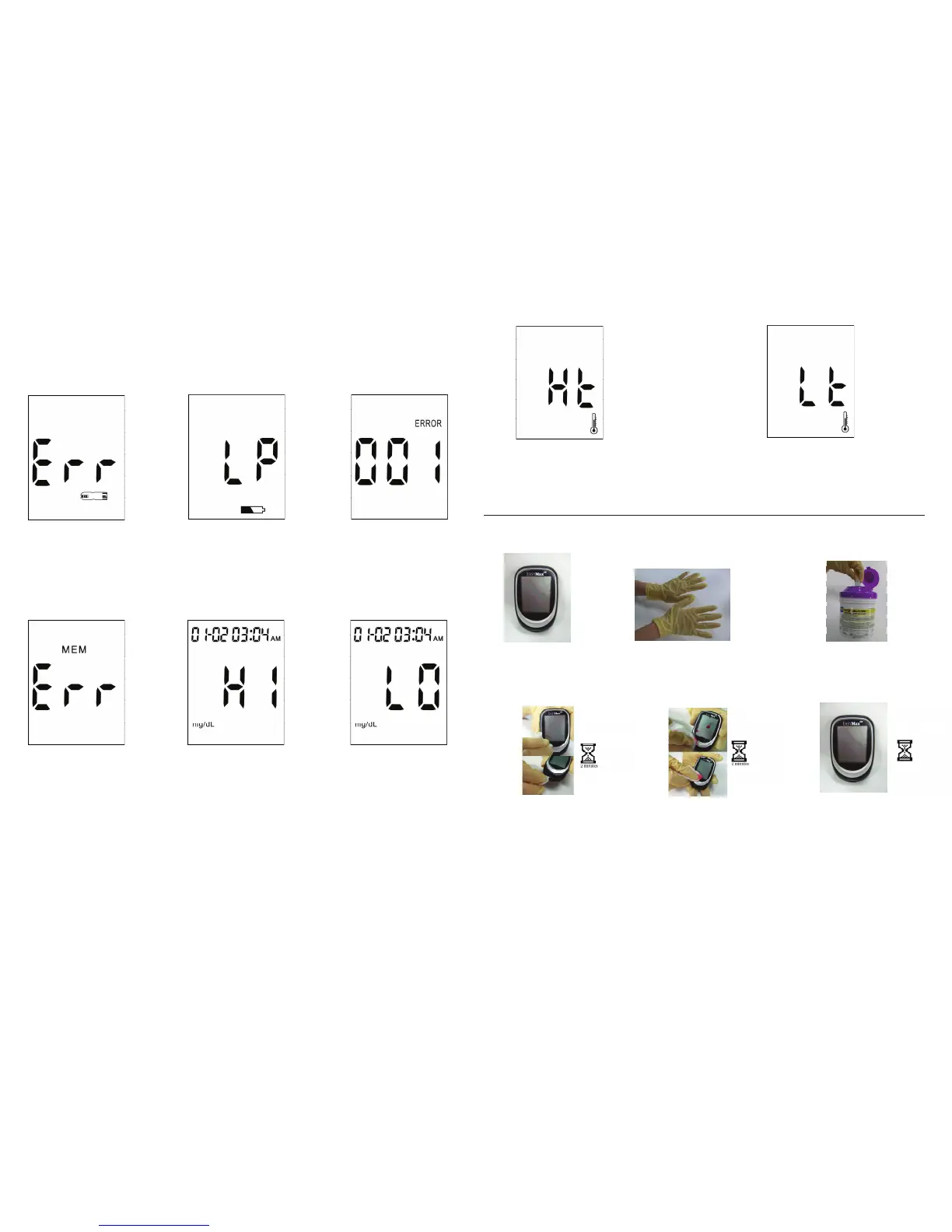
Humidied/Used strips
Action: Replace with a
new strip.
Low Power
Action: Replace with
new batteries.
System Fault
Action: Replace the
batteriesrst.If001
ERROR appears again,
please call Customer
Service toll-free
1-866-203-2761.
System Fault
Action: Replace the
batteriesrst.IfErr
appears again, please
call Customer Service
toll-free 1-866-203-2761.
Test result is higher
than 600 mg/dL.
Action: Test again. If the
result is still the same,
try a control solution
test and if the control
solution test falls within
the correct range, then
please take immediate
medical action.
The test result is
lower than 20 mg/dL.
Action: Test again. If the
result is still the same,
try a control solution
test and if the control
solution test falls within
the correct range, then
please take immediate
medical action.
Page 3
The "Ht" and thermometer icon appears.
Temperature is too high, outside the required
range of 50°F - 104°F (10°C - 40°C). This alerts
user that an incorrect result may occur if the
test continues.
Action: Relocate the meter to a location with
temperaturebetween50°F-104°F(10°C-40°C).
The "Lt" and thermometer icon appears.
Temperature is too low, outside the required
range of 50°F - 104°F (10°C - 40°C). This alerts
users that an incorrect result may occur if the
test continues.
Action: Relocate the meter to a location with
temperaturebetween50°F~104°F(10°C-40°C).
Page 4
Caring for your Blood Glucose Meter in a LTC Setting
1. Make sure
the meter is
off.
2. Put on a pair of
protective gloves
before you start the
cleaning procedure
3. Sanitizetheglucose
meter with any EPA
approved disinfectant
product that meets the
1:10 bleach solution.
4. Wipethesurfaceofthe
glucose meter including the
test strip port and USB port
after each use. Be careful to
make sure no liquid goes into
eitherport.Wipethemeter
thoroughly; the treated surface
must remain visibly wet for a
full 2 minutes to attain
complete disinfection.
5. Ifyoundanyblood
stains on the device,
make sure you clean it
with caution.
6. Air dry the meter to
sanitizecompletely
before next use.
In order to prevent the growth of microorganism, make sure you cover al the steps below.


 To Next Page
 Loading...