20
Replacing Ink Cartridges
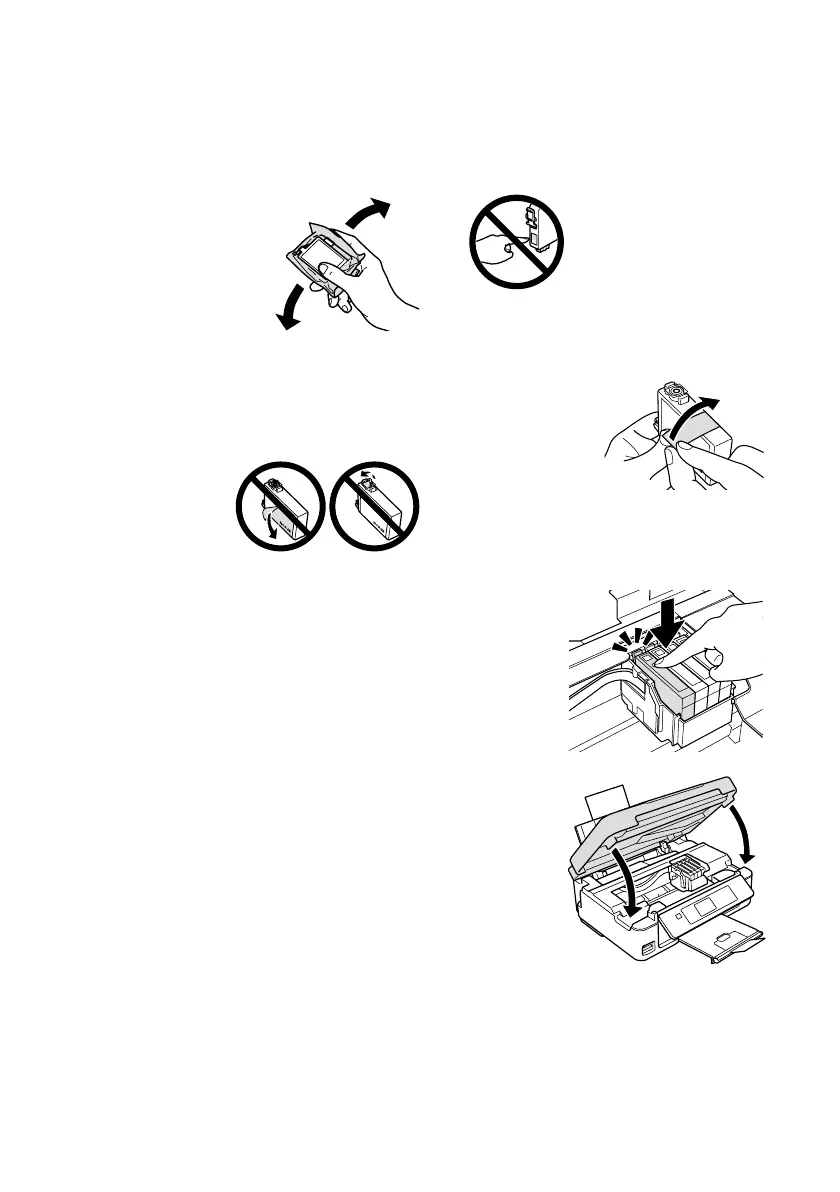
5. Before you open the new cartridge package, shake it gently four or five times. Then
remove the cartridge from the package.
Caution: Do not touch the green chip on the front of the cartridge. This can
damage the ink cartridge.
6. Remove the yellow tape from the bottom of the ink cartridge.
Caution: Do not remove any other labels or seals, or ink
may leak.
7. Insert the new ink cartridge into the holder and push it
down until it clicks into place.
8. Lower the scanner.
9. Press
OK
to begin charging the ink. This takes about
2 minutes. When you see a completion message on the
LCD screen, ink charging is finished.
Caution: Never turn off the your Epson printer while
ink is charging or you’ll waste ink. If you see an ink
replacement message on the LCD screen, press OK
and press down all the cartridges securely. Then press
OK again.
Note: If you replaced a cartridge while copying a document or photo, cancel
printing and make sure your original is still placed correctly on the document table.
Then copy your original again.
If you remove a low or expended ink cartridge, you cannot reinstall and use the
cartridge.










 To Next Page