EasyManua.ls Logo

Epson UB-E02 - User Manual

Epson UB-E02
8 pages
Print Icon
To Next Page IconTo Next Page
Loading...
1
UB-E02 User’s Manual
Copyright © SEIKO EPSON CORPORATION 2004
Printed in China 2004.01
Introduction
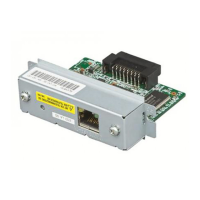
The UB-E02, designed for EPSON
®
TM printers, is a 10BASE-T/100BASE-TX
Ethernet interface board.
This manual provides instructions, including a simple setup for operators of
POS systems in which the UB-E02 is installed so that the operators can use the
UB-E02 safely and correctly.
Key to Symbols
The symbols in this manual are identified by their level of importance, as
defined below. Read the following carefully before handling the product.
CAUTION:
Cautions must be observed to avoid minor injury to yourself, damage to
your equipment, or loss of data.
Note:
Notes have important information and useful tips on the operation of your equipment.
Caution Label
The following caution label is visible near the display module connector.
The label has the following meaning:
“The display module connector and the drawer kick-out connector use the
same type of the Ethernet connector; therefore, be sure not to connect the
Ethernet connector cable or the telephone line to the display module connector
or the drawer kick-out connector.”
Features and Functions
Protocols: TCP, UDP, ICMP, IP, LP/LPR (for APD), TCP socket port (for
OPOS)
Communication standard: 10Base-T/100Base-TX, Full duplex/half
duplex
OPOS, JavaPOS, APD support
405223600

Other manuals for Epson UB-E02

Question and Answer IconNeed help?

Do you have a question about the Epson UB-E02 and is the answer not in the manual?

Summary

Introduction to UB-E02

Manual Symbol Guide

Explains important symbols like CAUTION and Note used within the manual.

Caution Label Meaning

Details the caution label near the display module connector and its warning about connector usage.

UB-E02 Features and Functions

Lists supported protocols (TCP, UDP, ICMP) and communication standards (10Base-T/100Base-TX).

UB-E02 Hardware Identification

Printer DIP Switch Settings

Explains required DIP switch settings on the TM printer for parallel interface and reset signal.

Connecting Ethernet and Power Cables

Step-by-step instructions for connecting cables, including a critical CAUTION about improper connections.

UB-E02 Network Setup Guide

Preparation: Printing Status Sheet

Instructions for printing a status sheet to obtain network configuration parameters like IP address.

Connection and Verification

Details host PC configuration, connection verification via ping, and IP address management.

Resetting to Factory Defaults

Procedure to restore the UB-E02 to its original factory default settings.

Setup Methods and OS

Recommends host OS and outlines setup via web browser or TMNetWinConfig utility.

Regulatory Compliance and Safety

EMC Standards and Warnings

Lists applied EMC standards and warns about cable use, modifications, and potential interference.

Compliance Marks and Statements

Details conformity to European directives (CE) and FCC/Canadian regulations.

Outdoor LAN Cable Safety Warning

Warns against direct connection of outdoor LAN cables due to lightning surge risks.

Epson UB-E02 Specifications

General IconGeneral
Connectivity TechnologyWired
Data Link ProtocolEthernet
Interface TypeEthernet
Interface10/100Base-T/TX
ProtocolTCP/IP
CompatibilityEpson TM printers
Data Transfer Rate100 Mbps

Related product manuals