C
ONFIGURATION
1-17
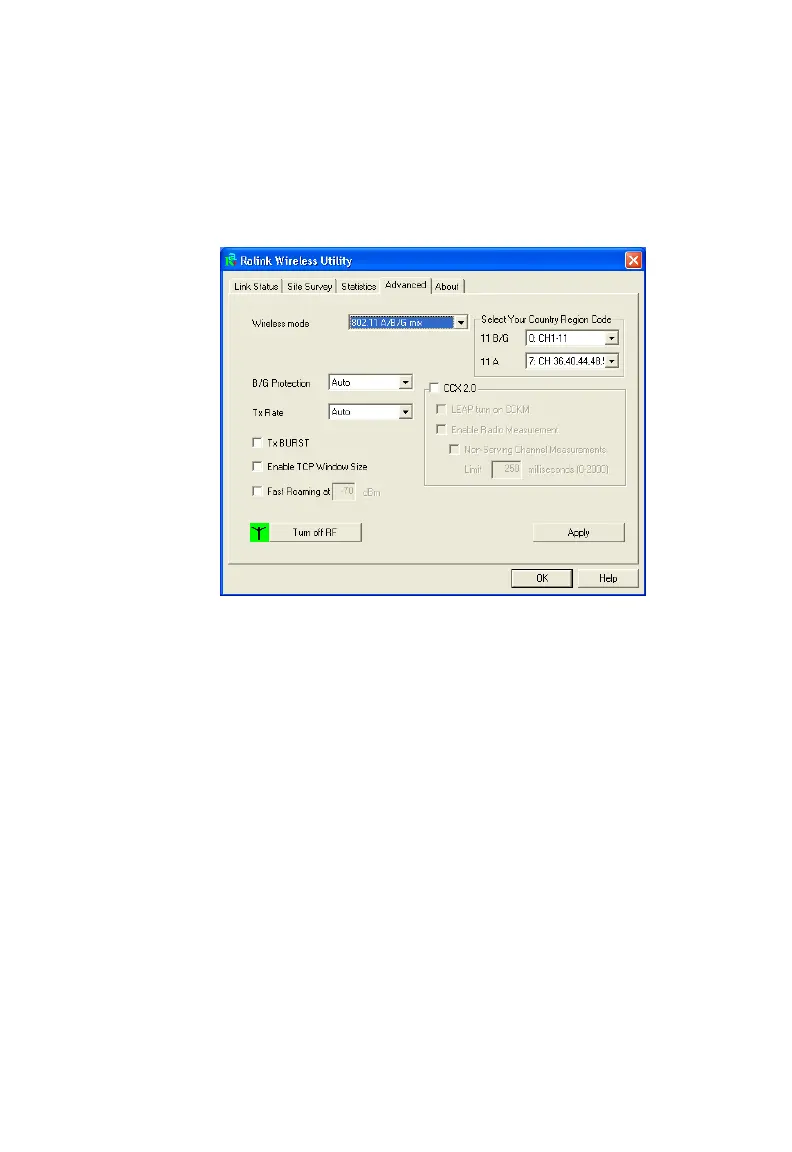
Advanced
The Advanced screen displays all the advanced network connection
information.
Wireless mode - The RALINK Wireless Network Card supports 802.11a,
802.11b and 802.11g mode. (Default: 802.11 A/B/G mix)
Select Your Country Region Code - Choose the Country Region Code
for 802.11b/g and 802.11a.
B/G Protection - Co-existing 802.11b and 802.11g networks can lead to
network conflicts. The final 802.11g standard includes a protection
mechanism to ensure mixed 802.11b and 802.11g operation. To get
optimum performance it can be helpful to enable this feature which allows
b/g to co-exist at the expense of performance. (Default: Auto)
CCX 2.0 - The Cisco Compatible Extensions (CCX) specification is for
makers of 802.11 wireless LAN chips for ensuring compliance with Cisco’s
proprietary wireless LAN protocols. (Default: Disabled)



 To Next Page