FR
ES
PT
IT
EL
PL
UA
RO
EN
30
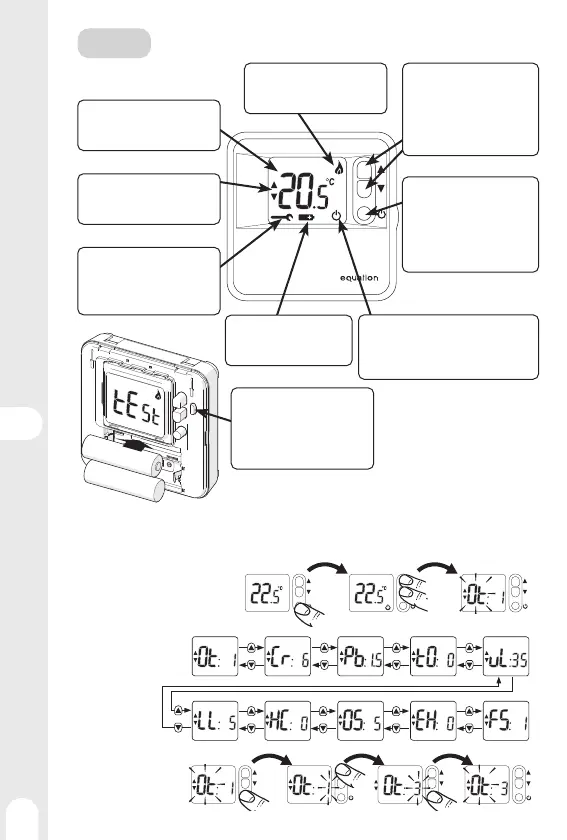
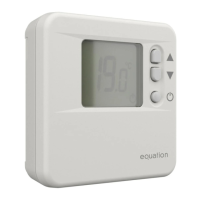
Functions and Displays
Temperature display
Displays the room temperature
or the set temperature (fl ashes)
Heating indicator
Lights up when the thermostat
starts the boiler.
Set temperature
Displayed while viewing or adjus-
ting the set temperature.
Defect indicator
Flashes to indicate a thermostat
fault.
Contact a qualifi ed technician.
Low Batteries
Flashes to indicate that the
batteries need to be replaced.
O / Frost protection
Displayed when the thermostat is in
Frost protection mode, i.e. with a setpoint
temperature of 5 ° C.
Adjustment buttons
Press once to display the
set temperature (desired
temperature). Press several
times to adjust the setpoint
temperature.
On / O (Frost protection)
Press for 2 seconds to switch to
Frost protection mode, i.e. with a
setpoint temperature of 5 ° C.
Press again for 2 seconds to
return to normal mode.
USE
Installer Mode
The thermostat is factory set to control a gas boiler. Installer Mode allows you to modify these factory
settings respecting the above values.
Access to installer mode:
Reading
parameters:
Setting
parameters:
3 s
2 s
+ -
- +
Test button
Press to force the boiler to start
in order to check the correct
connection.
Press again to exit test mode.


 To Next Page