0.5H
1 H
2 H
4 H
45
EN
USE
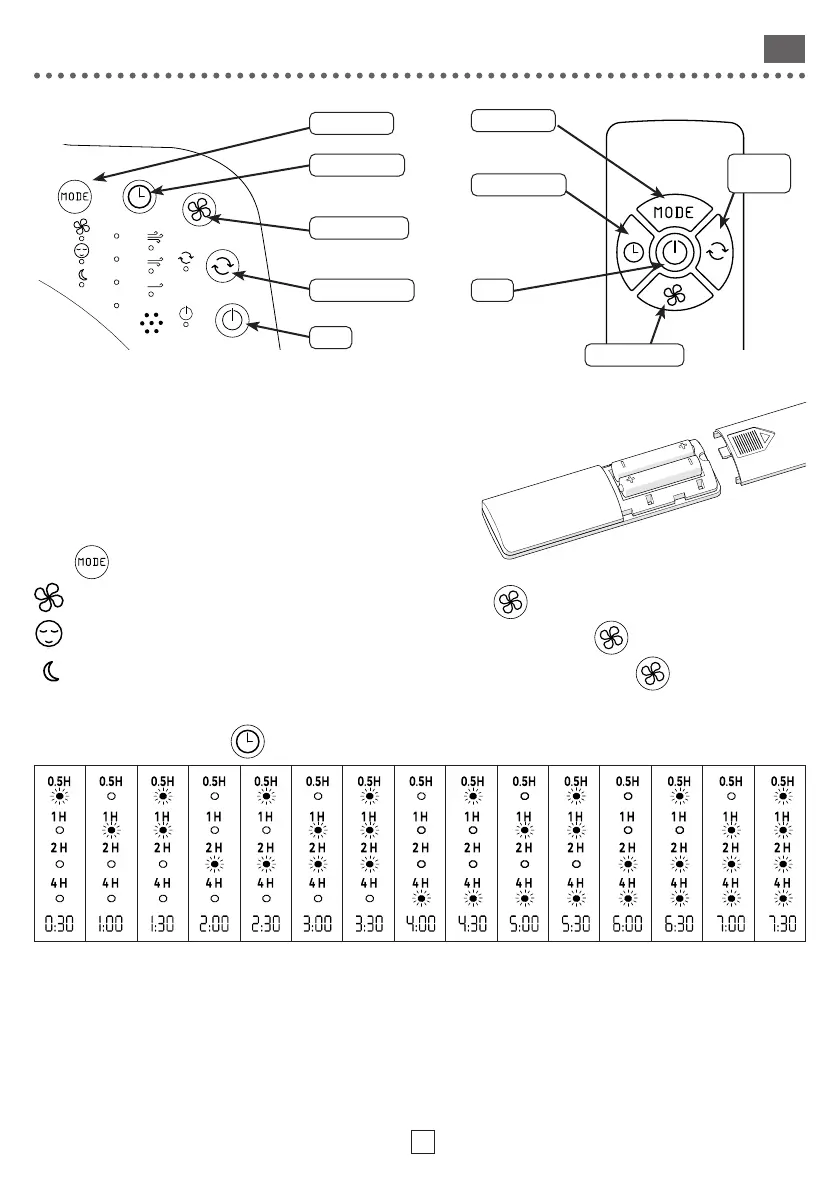
Inserting batteries
• Open the cover in the direction of the arrow.
• Insert 2 AAA (LR03) 1,5V batteries in the compartment (batteries not included).
• Make sure you observe the right polarity (“+” and “-”).
• Place the cover of the battery compartment back.
Mode selection
Press
several times to choose the mode:
Normal: the fan speed is constant, it can be adjusted using the
button
Natural: speed varies to simulate natural airflow, it can be adjusted using the
button
Sleep: the speed gradually decreases to promote sleep, it can be adjusted using the
button
Using the timer
When the device is on, press
several times to set the time until the device switches o automatically.
CLEANING
• Use a soft, dry cloth.
• For persistent stains, use a cloth dampened with soapy water and wipe immediately with a dry cloth.
Speed Adjustment
Speed Adjustment
Setting the Timer
Setting the Timer
Mode selection
Mode selection
Activate Oscillation
Activate
Oscillation
On/O
On/O




 To Next Page