Specifications
Bluetooth version
Bluetooth profiles
Audio codecs
Wireless range
(from paired device)
Battery capacity
Driver size
Sensitivity
Frequency
Impedance @ 1kHz
MEMS omnidirectional
microphone input sensitivity
Water proof
4.1
A2DP 1.2, AVRCP 1.4, HFP 1.6, HSP 1.2
aptX/AAC/SBC
10 meters (30 feet)
Earphone (50mAh)
Charging case (Li-Ion rechargeable,
300mAh)
Ø 5.8mm Micro Driver
100dB/mW
20Hz-20KHz
16ohm
-42dB (+/- 2dB)
Nano coating technology
EN
Pairing Apollo 7 with a
Bluetooth-enabled device for the
first time
Insert either earbud in your ear, then press and hold
its button until you hear "Power On", followed
by
"Pairing", then release the button and connect to your
paired device, tap “Apollo 7-L" or “Apollo 7-R”
in the
Bluetooth device list and you will hear
"Phone Connected". Next, insert the second earbud
and
press/hold its button until you hear "Power On".
Release the button, and you will hear
“Headset Connected“. This means the two earbuds
are in sync.
*You can enjoy the music by pairing earbud
individually, but we suggest pairing both with the
same device so you can answer calls or activate
Siri/Google voice assistance.
Single-touch multifunction
Power on/off, volume up/down, pairing, play/pause,
play next/previous track, call accept/reject, and Siri
are accessible with one button. Please read and
follow these guidelines to ensure the best and safest
experience with your Apollo 7
Apollo 7 True Wireless
Headset

 Need help?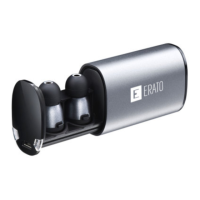

 To Next Page
 General