20 of 23
888-97-341-G-01 rev. G • 10/19
4
x
x/"
5
x
6
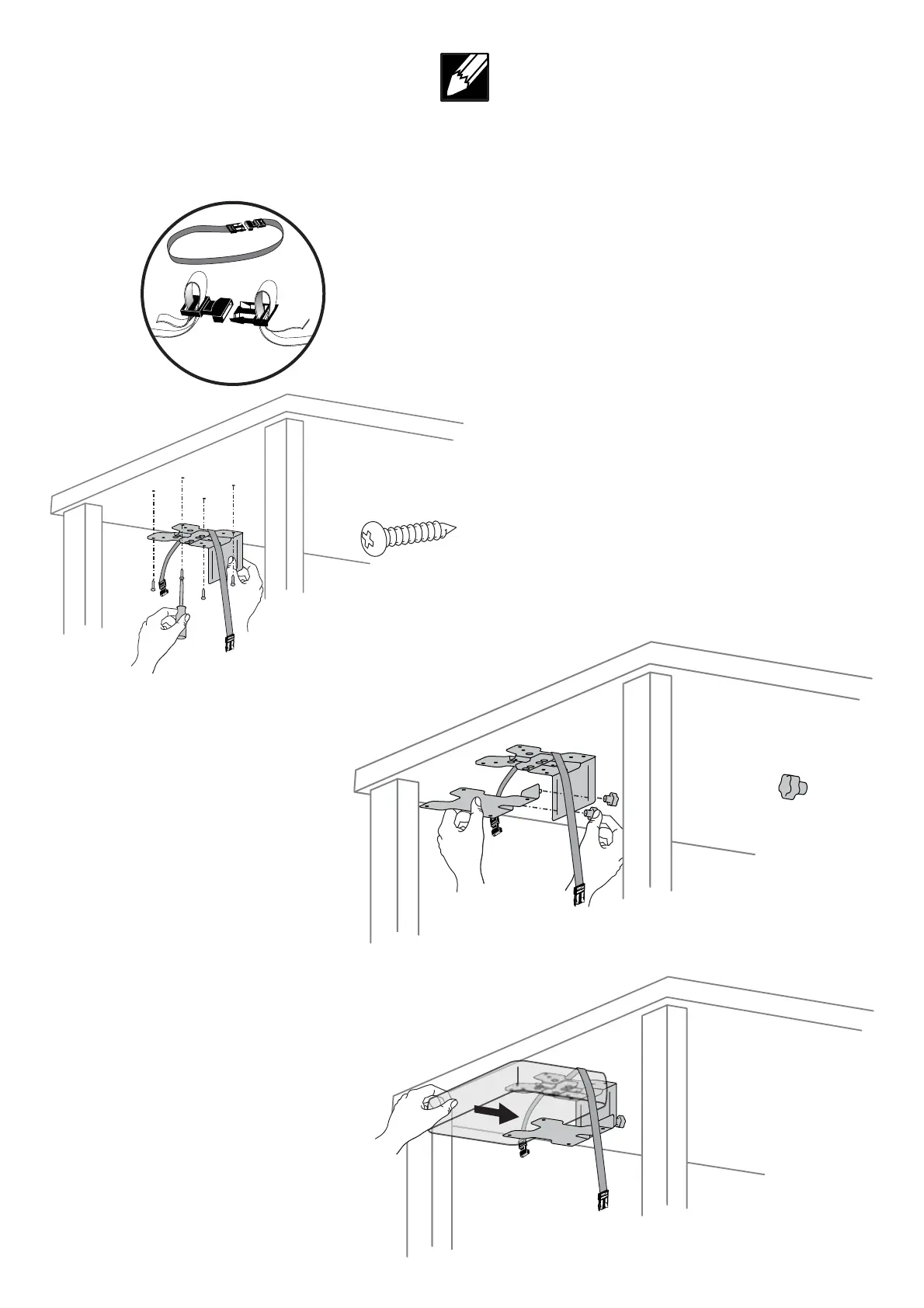
図のようにブラケットを取り付けます。
注: ストラップとバックルの使用はオプションです。
ストラップとバックルを使用する場合は、図のように
ストラップを机とバックルの間に挟むように取り付け
てください。
ブラケットを取り付けます。
シン クライアントを取り付けます。
DiedargestellteHaltepla ebefestigen
HINWEISRiemenundSchnallekönnenaufWunsch
verwendetwerdenBeiGebrauchdesRiemensundder
SchnallesicherstellendassderRiemensichbeider
MontagewiegezeigtzwischenderTischpla eundder
Haltepla ebefi ndet
Knop alteranbringen
MiniPCeinsetzen
Fixezlesupportillustré
REMARQUEL'utilisationdelasangleavecboucle
estfacultativeSivoussouhaitezutiliserlasangleavec
boucleassurezvousquelasanglepasseentrelebureau
etlesupportlorsdelafi xationtelqu'indiqué
Fixezlessupports
Fixezleclientléger
Coloquelaabrazaderamostrada
NOTAElusodelacorreaylahebillaesopcionalSidesea
incluirlacorreaylahebillaasegúresedequelacorrease
encuentreentreelescritorioylaabrazaderadurantela
colocacióncomosemuestra
Coloquelasabrazaderas
Coloqueelclienteligero
A achbracketshown
NOTEUsingthestrapandbuckleisoptionalIfyouwould
liketoincludethestrapandbucklemakesurethestrap
isbetweenthedeskandthebracketwhena achingas
shown
A achbrackets
A achMiniPC






 To Next Page