9 of 23
888-97-341-G-01 rev. G • 10/19
4
100x100mm
75x75mm
x
x
x
Mxmm
Mxmm
Mxmm
75x75mm 埋め込み型
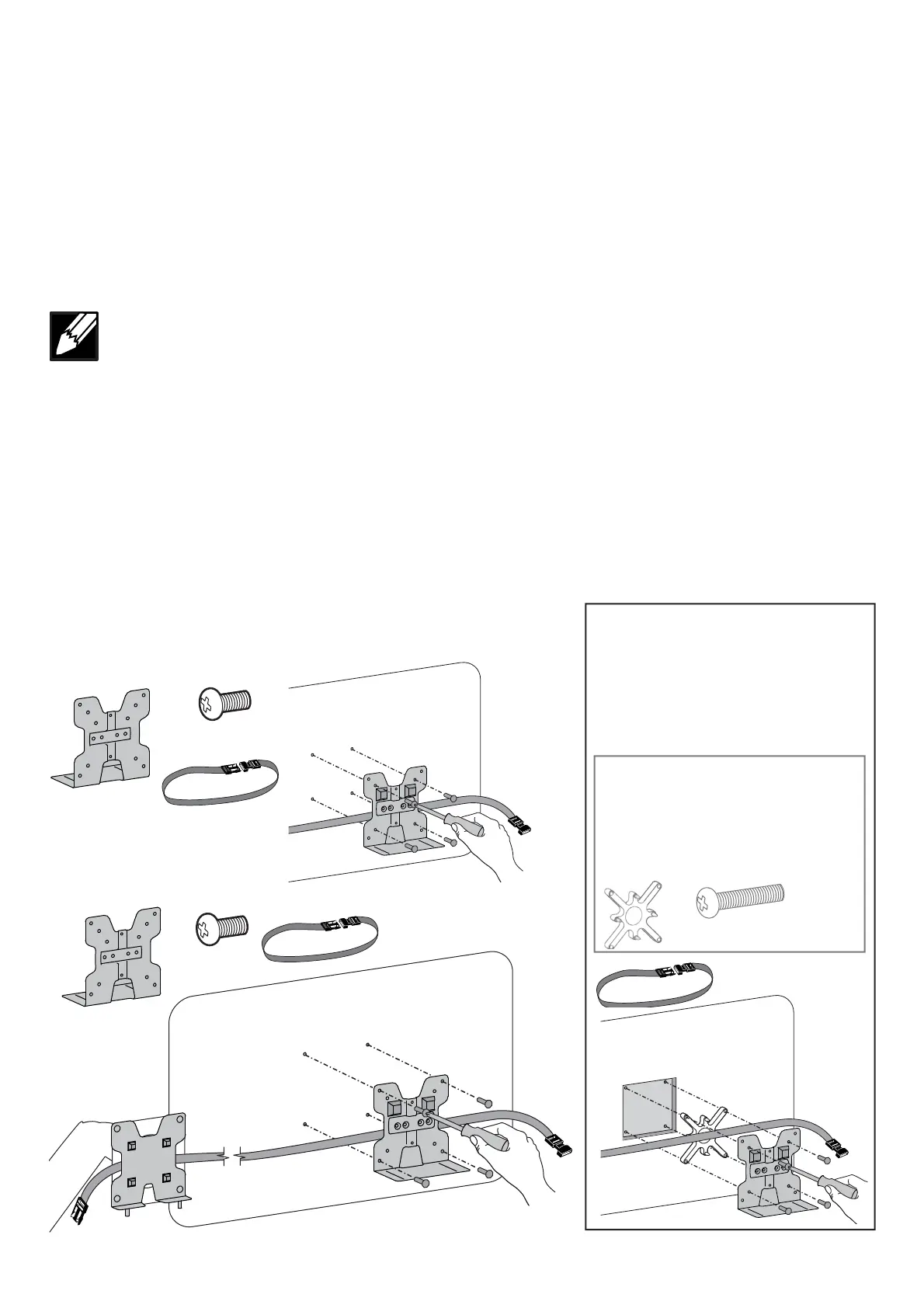
ブラケットをモニターに取り付けます。
注: ストラップとバックルの使用はオプションです。ストラップとバックルを使用する場合は、図のように
ストラップをブラケットとモニターの間に挟むように取り付けてください。
キットは別途ご注文ください。
75mm x 75mm Aussparung
DieHaltepla eamMonitorbefestigen
HINWEISRiemenundSchnallekönnenaufWunschverwendetwerdenBeiGebrauchdesRiemensundderSchnalle
sicherstellendassderRiemensichbeiderMontagewiegezeigtzwischenderHaltepla eunddemMonitorbefi ndet
Satzmussseparatbestelltwerden
75 x 75 mm encastré
Fixezlesupportaumoniteur
REMARQUEL'utilisationdelasangleavecboucleestfacultativeSivoussouhaitezutiliserlasangleavec
boucleassurezvousquelasanglepasseentrelesupportetlemoniteurlorsdelafi xationtelqu'indiqué
Kitvenduséparément
75 x 75 mm empotrado
Unalaabrazaderaalmonitor
NOTAElusodelacorreaylahebillaesopcionalSideseaincluirlacorreaylahebillaasegúresedequela
correaseencuentreentrelaabrazaderayelmonitordurantelacolocacióncomosemuestra
Elkitseencargaporseparado
A achbrackettomonitor
75x75mm Recessed
NOTEUsingthestrapandbuckleisoptionalIfyouwouldliketoincludethestrapandbucklemakesurethe
strapisbetweenthebracketandthemonitorwhena achingasshownThisinstallationsteprequirespeople
KitOrderedSeparately






 To Next Page