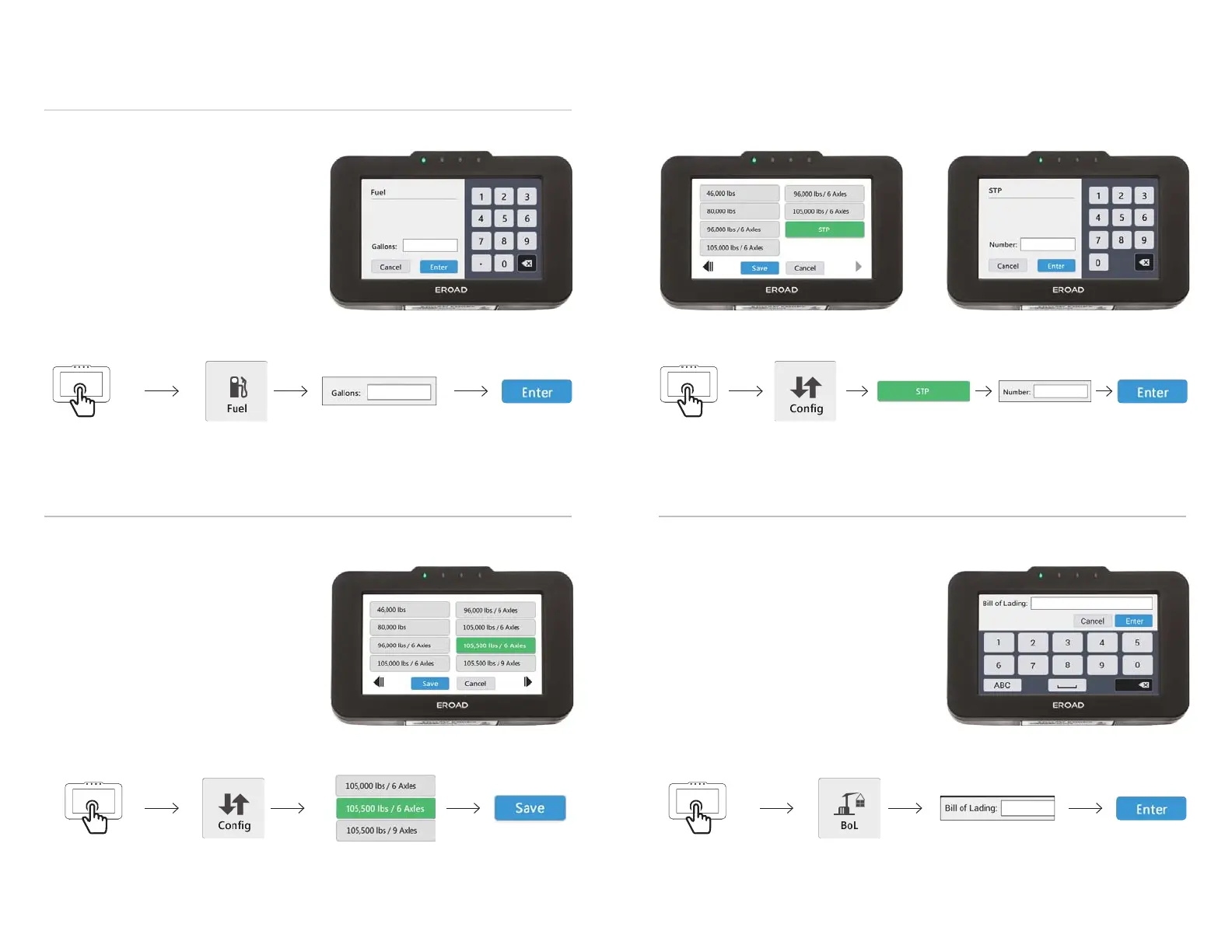
HOW TO ENTER A
FUEL TRANSACTION
HOW TO SET YOUR
CONFIGURATION
1. Tap screen
to turn it on
2. Tap Fuel on
the Home screen
3. Enter the
number of gallons
4. Confi rm
with Enter
REMEMBER: Confi rm each entry with Enter
or Save! Otherwise it will not be recorded.
When refueling your vehicle
Before continuing your journey
When starting your journey
When changing your confi guration
When unloading an STP haul
Before continuing your journey
EROAD
1. Tap screen
to turn it on
2. Tap Confi g on
the Home screen
3. Select your
new confi guration
4. Confi rm
with Save
EROAD
HOW TO ENTER AN OVERWEIGHT PERMIT (STP)
HOW TO ENTER A
BILL OF LADING (BOL)
2. Tap Confi g on
the Home screen
5. Confi rm
with Enter
When loading a shipment
Before continuing your journey
1. Tap screen
to turn it on
2. Tap BOL on
the Home screen
3. Enter
Bill of Lading
4. Confi rm
with Enter
EROAD
When loading an STP haul
Before continuing your journey
1. Tap screen
to turn it on
3. Select STP
from the list
4. Enter STP
number
EROAD


 To Previous Page