Setting the R2LC ID and feature code
Setting the engine ID Number:
The R2LC Receiver comes with its engine ID set to ENG ‘1’. To change the engine ID,
follow this procedure.
1. Make sure the Command Base is connected to the track
2. Set the engine PROGRAM / RUN switch to “PROGRAM”
3. Place the engine on the track and apply power
4. On the CAB-1, press [ENG] then the number (1 - 99) for the engine desired
5. Press [SET] (the engine ID is saved until you need to change it again)
6. Press [AUX1] [n], where n = the engine feature code (this must be done!)
7. Remove power from the track and place the switch back into the ‘RUN’ Position
Feature Code information:
The R2LC receiver module can be programmed to operate different features for different
engines. Use only codes “4” through “8” for proper operation.
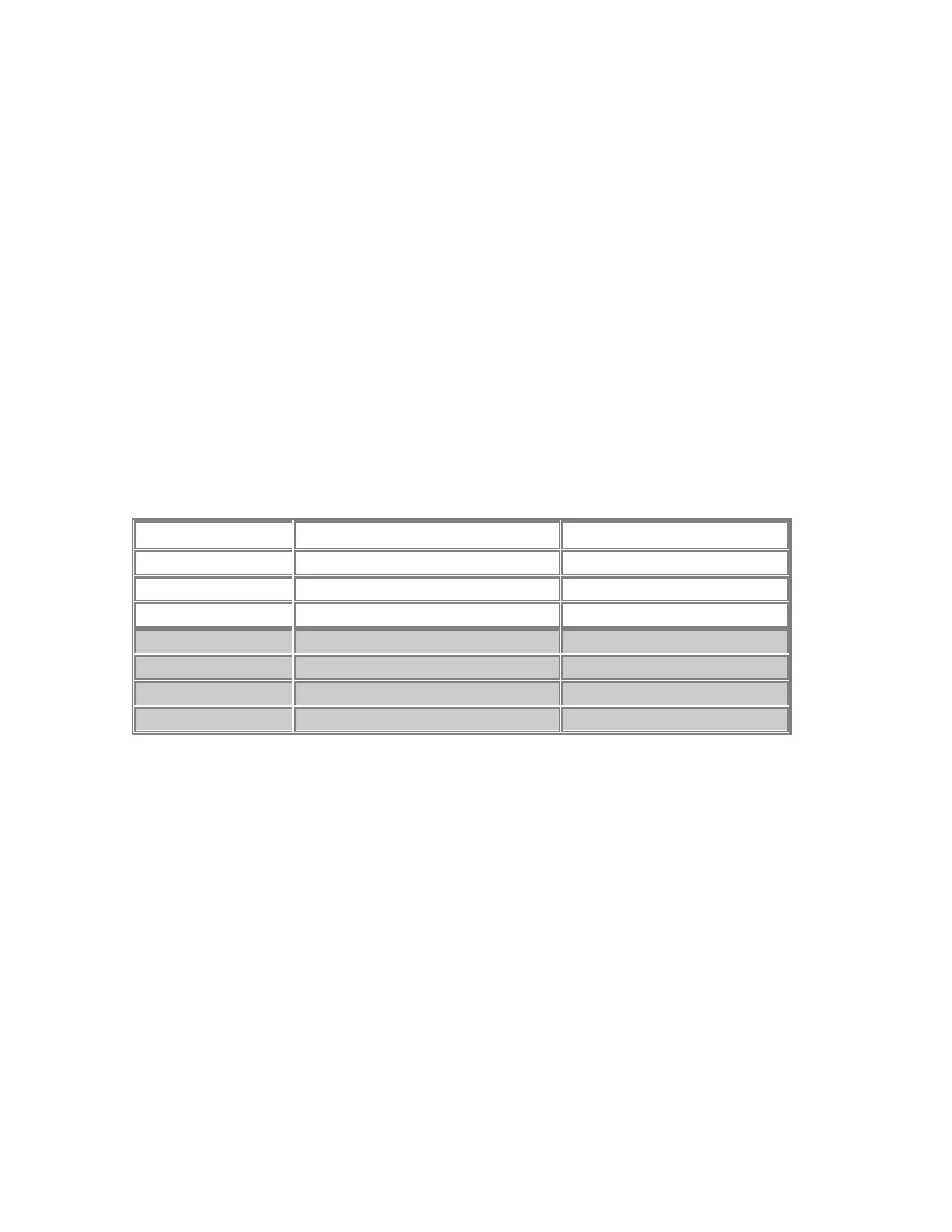
Code Engine Type Feature Terminal
0 Steam w/ Signal sounds Smoke Unit
1 Diesel w/ Signal sounds Strobe Light
2 Diesel w/ Signal sounds Cab / Marker Light
4 Steam w/ Rail sounds Smoke Unit
5 Diesel w/ Rail sounds Strobe Light
6 Diesel w/ Rail sounds Cab / Marker Light
8 Diesel w/ Rail sounds Smoke Unit
Why is it necessary to set the Feature Code?
The Cruise Commander Lite uses the serial data from the R2LC receiver to detect the
throttle settings. This serial data signal is dependent on the feature code. If this is not
properly set, the loco will not respond to throttle commands and may even enter into
conventional mode and rocket down the rails! Additionally, features like the smoke unit will
not operate until the feature code is set. It is always a good idea to know your loco feature
codes for proper operation of smoke/strobe/cab/marker lighting effects. This is true of your
entire TMCC loco stable.
When running in Conventional mode:
Cycling of engine direction can be overridden by placing the programming switch in the
’PROGRAM’ position. This will lock the engine direction to the last operating direction.
You must replace the switch back to the ‘RUN’ position if you wish to run the engine in
Command mode.
11


 To Next Page