18
DETAILED OPERATION
Step 1: Preparation before drying
• Clothes should be washed before use within the dryer.
• Always ensure the same types of clothes are dried together.
• Try to sort your clothes to be dried into load that take a similar time to dry (for example heavier items separate from
light items).
• Make sure any decorations or buttons on your clothing items are safe for high temperatures and well protected.
• It is recommended to turn your clothes inside-out.
• Please ensure that the power cord is in perfect condition before use. Should there be any damage to the power cord
or plug, please immediately isolate the dryer from power and contact our After Sales Service Team.
Step 2: Check the lter
• Make sure that the lter is always clean and in the correct position.
• The lter must be cleaned regularly, after each use.
Step 3: Loading the dryer
• For faster drying results, load the dryer to ½ -> 2/3 capacity of the drum. This will allow the clothes and air to
circulate evenly.
• When drying a small load of clothes or even expensive clothes, it’s best to add some towels that won’t lose bres, as
this will help the wet clothes to dry more evenly.
• To avoid creases or static charges on your clothes, it’s important to ensure you don’t over-dry your items.
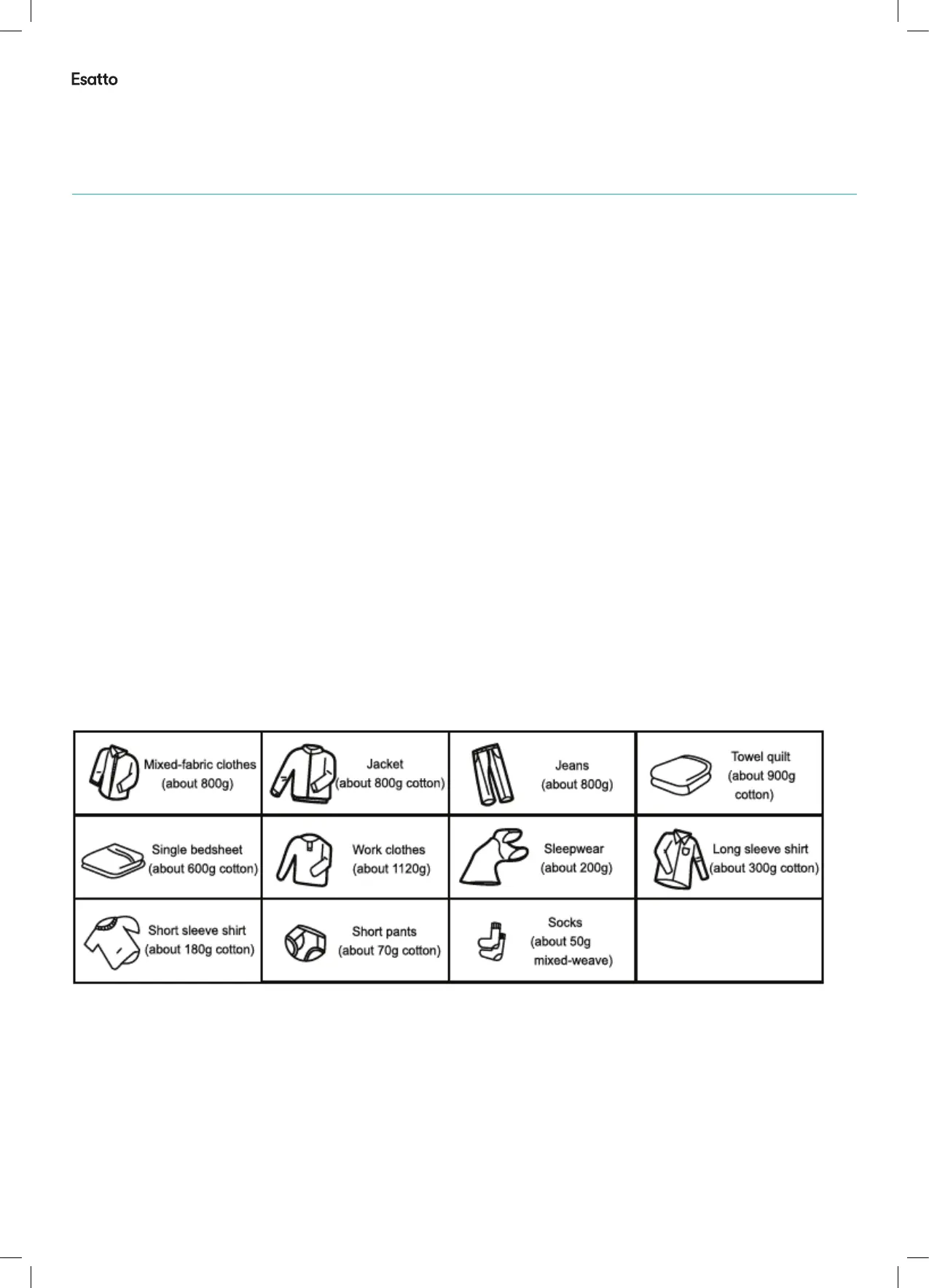
Tip! Refer to the Reference weights of clothing articles (when dry) in the table below, to assist with avoiding overloading
your dryer.
Figure 9- Reference weights for various clothing articles when they are dry
Step 4: Close the dryer door
• The door will click when fully closed.
Step 5: Select your settings
• Set your desired dryer Program, relevant to your load type, along with your preferred Dryness level.
• The various drying programs and the Dryness level options for each program, are outlined in the table on the
following page.
Opertion Instructions (Continued)


 To Next Page