Need help?
Do you have a question about the Escali Pico and is the answer not in the manual?
Steps for operating the scale to measure the weight of an item.
Instructions for subtracting container weight to get the net item weight.
Procedure to reset the tare function by removing platform items.
Guide for using the scale to count a quantity of items based on sample weight.
Enables weighing oversized items by freezing the display after weight is stable.
Guidelines for maintaining the scale, including environment and cleaning.
Explanation of common display warnings like overload or low battery.
Details on the scale's capacity, graduation, dimensions, and power source.
Information regarding the scale's guarantee against defects in materials and workmanship.
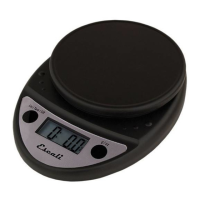
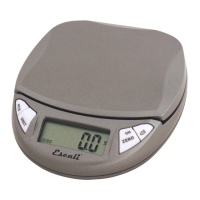
The Escali Pico High Precision Digital Scale, Model # PR500S, is a versatile instrument designed for accurate weighing and counting of various items. This product manual outlines its functions, usage features, and proper maintenance to ensure optimal performance.
The primary function of the Escali Pico High Precision Digital Scale is to measure the weight of items with high precision. It offers multiple units of measurement, including grams (g), pounds (lb), ounces (oz), and a combination of pounds and ounces (lb+oz), providing flexibility for different weighing needs. Beyond simple weighing, the scale incorporates a "Tare" feature, which is particularly useful for measuring the net weight of items within a container by subtracting the container's weight. This ensures that only the contents are weighed, providing accurate results for ingredients or components.
Another advanced function is the "Counting Feature," which allows the scale to count a large quantity of identical items based on the weight of a sample quantity. This is highly beneficial for inventory management, portion control, or any task requiring precise item counts without manual counting. The scale also includes a "Hold Feature" designed to accommodate oversized items that might obstruct the display. This feature ensures that the weight reading is captured and displayed even after the item is removed, making it convenient for larger objects.
Operating the Escali Pico High Precision Digital Scale is straightforward. To begin weighing, the user simply presses the ON/ZERO key. The display will briefly show all segments before resetting to zero, indicating it's ready for use. The UNIT key allows the user to cycle through the available units of measurement (g, lb, oz, or lb+oz) to select the desired one. Once the unit is selected, items can be placed slowly on the platform, and their weight will be displayed. To turn off the scale, the ON/ZERO key is pressed again.
The "Tare" feature is activated by placing an empty container on the platform and then pressing the ON/ZERO key. This action removes the container's weight from the display, setting it back to zero. Subsequent addition of items to the container will then show only the weight of those items. This process can be repeated for multiple items added sequentially, allowing for cumulative net weighing. To clear the "Tare" setting, all items must be removed from the platform, and the ON/ZERO key should be pressed.
For the "Counting Feature," the scale is first turned on and allowed to stabilize at zero. A sample quantity of 10, 20, or 50 pieces of the item to be counted is then placed on the platform. The PCS key is pressed to activate the counting mode. To set or change the sample quantity, the PCS key is pressed and held for 3 seconds until the sample quantity flashes, then pressed again immediately to cycle through options. After a 3-second wait, pressing the PCS key confirms the sample quantity, and "CAL" will briefly appear. Once calibrated, the total quantity of items can be placed on the platform, and the display will show the count. To exit counting mode and return to weighing, items are removed, and the UNIT key is pressed.
The "Hold Feature" is particularly useful when weighing large items that might obscure the display. After placing such an item on the scale, a beep sound indicates that the weight has stabilized. The item can then be removed, and the weight will remain on the display for 5 seconds, allowing the user to read it comfortably.
Proper use and care are essential for maintaining the precision and longevity of the Escali Pico High Precision Digital Scale. It is recommended to use and store the scale at room temperature and always on a flat, level, and stable surface to ensure accurate readings. As a precision instrument, the scale should not be subjected to shaking, excessive vibration, or other rough treatment, as this can affect its accuracy and internal components.
The scale's display can be sensitive to electromagnetic disturbances from devices like radios, microwaves, or cell phones. If such disturbances occur and affect the display, the source of the disturbance should be removed, and the scale should be restarted. Disassembling or tampering with the scale will void its warranty, so it is crucial to avoid unauthorized repairs or modifications.
Cleaning the scale is simple: it can be wiped with dish soap and a damp cloth. However, it is important to remember that the scale is not waterproof and should not be submerged in liquid. Following these maintenance guidelines will help ensure the scale continues to function accurately and reliably over time. The manual also provides warning messages for common issues such as "0-Ld" for overload, "Out2" for a damaged load cell or recalibration need, and "Lo" for low battery, guiding users to address these issues promptly.
 General
| Capacity (grams) | 5000 g |
|---|---|
| Precision (grams) | 1 g |
| Display | LCD |
| Power Source | Battery |
| Auto-Off | Yes |
| Tare Function | Yes |
| Type | Kitchen Scale |
| Capacity | 11 lb |
| Units | Grams, Ounces |
| Battery | 2 x AAA (included) |

 To Next Page